A small home workspace needs an all-in-one that fits the way you print and scan, not just the outline of a closed box. Start with three questions: do you scan stacks, do you need automatic two-sided printing, and would you rather replace cartridges or refill bottles?
The Brother MFC-J4355DW, Canon PIXMA TR7820, and Epson EcoTank ET-2800 offer different answers to that routine. These picks come from manufacturer documentation and exact Amazon listings; we have not run independent print-quality, speed, or ownership-cost tests.
Choose the workflow before choosing the machine
For several loose documents at a time, an automatic document feeder can be an important feature to compare. A flatbed remains a separate way to place a supported original, so decide which type of scanning you actually repeat.
Automatic two-sided printing is also separate from automatic two-sided scanning. Do not infer that a model scans both faces in one pass merely because its listing describes duplex printing or an automatic document feeder.
For this shortlist, compare Brother and Canon first when a feeder and automatic duplex printing matter, then consider the Epson if a flatbed and manual page-flipping suit your simpler routine. Check every choice against your own supported paper and software requirements.

| Model | Original handling | Printing workflow |
|---|---|---|
| Brother MFC-J4355DW | Flatbed plus 20-page single-sided ADF | Cartridges;150-sheet tray; automatic duplex |
| Canon PIXMA TR7820 | Flatbed plus 35-sheet ADF | Two ink cartridges; automatic duplex |
| Epson EcoTank ET-2800 | Flatbed scanner | Refillable bottles;100-sheet input; manual duplex workflow |
Brother MFC-J4355DW: compare for recurring paperwork

The MFC-J4355DW is the first comparison here if your ordinary jobs combine document stacks and two-sided printouts. Brother specifies a 150-sheet paper tray,20-page single-sided automatic document feeder, automatic duplex printing, and a one-sheet manual feed slot.
The word single-sided matters when you prepare a folder of originals with writing on both faces. Check the documented scanning process rather than assuming the automatic feeder removes every manual step from that job.
Brother’s INKvestment system for this model uses front-loading ink cartridges with an internal tank arrangement. Choose it with that replacement routine in mind rather than expecting to pour ink bottles into exposed reservoirs.
Brother documents wireless and USB connectivity, but you should still confirm the current support route for your own devices. An application feature listed for mobile use is not a promise that every computer uses the same workflow.
The inspected Amazon variant was Current Model: MFCJ4355DW, New, Printer, in white. Recheck that exact selection because the same listing also presents the previous MFC-J4335DW, renewed options, and supply bundles.
Check Brother MFC-J4355DW on AmazonCanon PIXMA TR7820: compare for the 35-sheet feeder

The TR7820 gives you another cartridge-based option with automatic duplex printing and a feeder. Canon specifies up to 35 plain Letter pages in the ADF, which makes it a useful comparison when your ordinary stack exceeds the Brother’s 20-page feeder capacity.
Those capacities describe supported loading under the manufacturer’s conditions, not proof that either feeder handles every original equally well. Check the document requirements before using damaged, delicate, or irreplaceable material.
Canon lists two replaceable ink cartridges and a 2.7-inch touchscreen for this model. Compare the exact replacement supplies and documented yields with your likely mix of color and black-only jobs rather than assuming fewer cartridges always means lower spending.
Check the working location with room to open the scanner cover and load the feeder, in addition to the paper input and output. A machine that fits a shelf when closed can still be awkward to use there every week.
The inspected Amazon selection was the white PIXMA TR7820 with With Auto Document Feeder selected. The neighboring No Auto Document Feeder option should not be treated as the same configuration when comparing offers.
Check Canon PIXMA TR7820 on AmazonEpson EcoTank ET-2800: compare for bottle refills and flatbed jobs
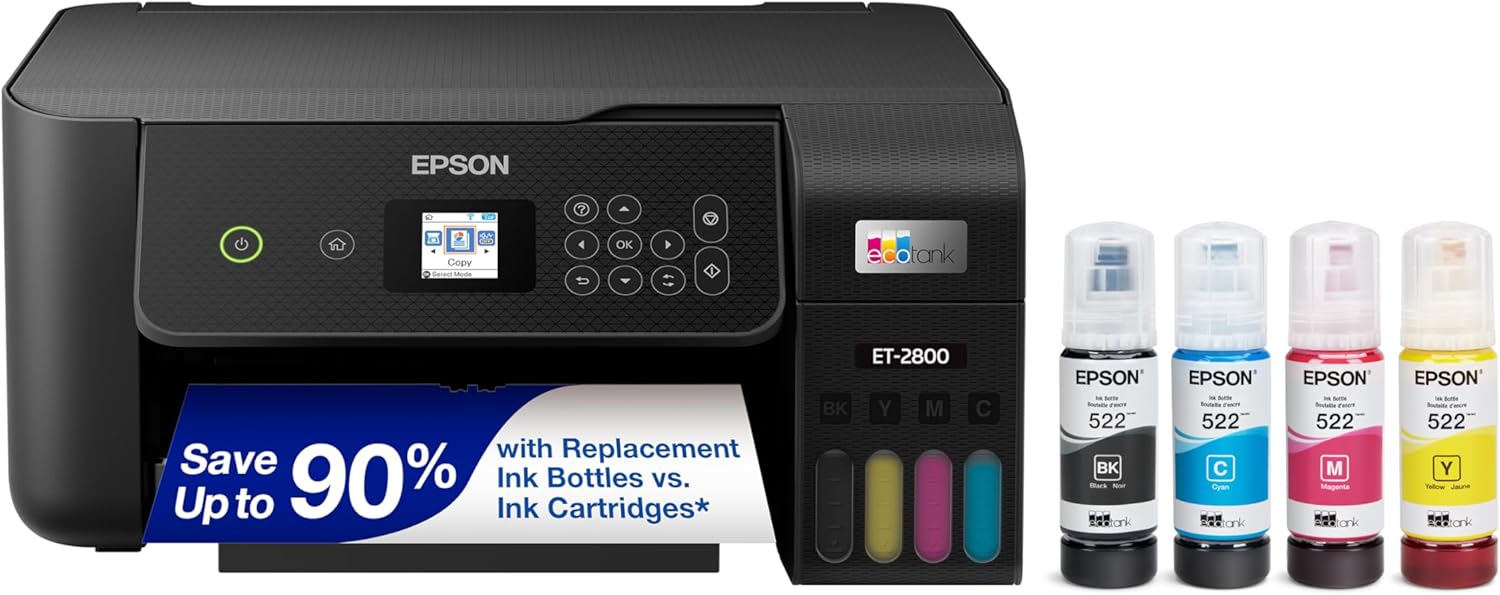
The ET-2800 is worth comparing if you want refillable ink bottles and mainly place individual originals on a flatbed. Epson documents its cartridge-free tank system, color flatbed scanner, and 100-sheet plain-paper input capacity.
This is the simpler handling option in the shortlist: it does not give you the ADF workflow described for the Brother and Canon. Think about your actual scanning pile before accepting that trade-off because of the ink system alone.
Epson’s two-sided-printing support instructions describe a manual workflow that prompts you to flip the paper. If automatic duplex printing is a frequent requirement, choose from models that document that capability instead of expecting a setting to add it later.
Use the exact compatible ink and maintenance guidance, and compare ownership costs with your own workload. A manufacturer’s included-ink period or savings claim does not establish how long your particular mix of pages will last.
The inspected Amazon selection was ET-2800, Black, with model name EcoTank ET-2800-B. Recheck that choice because the page also offers another model and a white color variant.
Check Epson ET-2800 on AmazonRehearse the scan and print routine on your desk
Sketch the printer with its cover, feeder support, and output areas in use, using the exact manual for any required clearances. Place a sheet where an original will enter and another where a finished page will land.

Try the reach required to lift a lid, collect originals, and remove a finished stack without moving your main computer. Include access for supply replacement so the setup remains practical after the first week.
Choose the Brother for its documented 20-page single-sided feeder routine, compare the Canon when its 35-sheet feeder fits your work better, or consider the Epson when flatbed scans and manual duplex are enough. Keep price, supplies, and current device support in that final decision rather than treating any one feature as a universal winner.
Count originals separately from printed pages
Look at the documents you scanned during a normal month and separate single sheets from stacks of loose pages. The number of originals you handle is often a more useful guide to feeder needs than the number of pages you print.
A fictional household scanning one receipt at a time may be comfortable placing each original on the glass. Another household digitizing a packet of twenty ordinary pages every week should compare the supported feeder workflow before choosing mainly around the ink system.
Also separate the documents that can go through a feeder from items that need another approach. Follow the model’s original-handling instructions for fragile material, unusual sizes, attached notes, or anything you cannot risk feeding incorrectly.
Keep automatic two-sided printing and scanning in different columns on your comparison sheet. If you frequently need both faces of an original, verify the exact scanning procedure and supported software instead of carrying a duplex claim from the printing column into scanning.
Plan the workspace and supply routine together
Place paper and a representative folder beside the intended printer location before buying, leaving your ordinary computer setup in place. Think through where incoming originals wait, where completed scans go, and where the finished print stack lands.
Leave practical access to the documented loading points and supply compartments rather than considering only the printer’s footprint. Check the exact manual for required clearances because this comparison does not prescribe a universal distance around all three machines.
Build an ownership worksheet with separate entries for the machine, compatible supplies, paper, and any maintenance items specified for the model. Record the current prices and declared yields with their conditions, then add your own expected mix of color and black-only documents.
For a deliberately invented example, a household printing ten pages each week would plan around roughly 520 pages over 52 weeks. That arithmetic describes an assumed workload, not an ink-yield promise or a prediction of how often any of these printers will need supplies.
Finally, check the return terms and selected condition for the exact offer you intend to buy. Keeping the model, software requirements, supply system, and handling routine together makes the final choice easier to explain and easier to maintain after setup.