If you send a handful of packages each week, the best label printer is the one that fits your existing routine. A fast print engine does not help much if getting a label from your phone to the machine becomes the slowest part of packing.
This research-based shortlist compares three specific models using manufacturer documentation and the linked US Amazon listings. You will find conditional recommendations here, rather than hands-on speed scores or claims that these printers were tested in our office.
Choose your connection before your printer
Start by following one label from purchase to parcel: where you buy it, where the PDF opens, and which device will send it to print. That path tells you more than a headline printing-speed number.
If you already pack beside a laptop, USB may be perfectly convenient. If you finish orders on a phone, check the required app and file-import process before assuming that every wireless printer behaves like AirPrint.
| Printer | A useful fit | Main trade-off |
|---|---|---|
| Rollo USB X1038 | One laptop at a fixed packing spot | USB model; not a phone-first wireless choice |
| Phomemo 241BT | Phone/tablet labels through Labelife | Mobile workflow depends on the companion app |
| Brother QL-1110NWB | A shared or networked label station | More connection choices to configure; check DK stock |
Do you need a dedicated label printer yet?
Picture your next Saturday packing session, not an imaginary warehouse full of orders. If you have two parcels and a working document printer, continuing with a suitable label sheet may be the practical choice.
A dedicated machine starts to make more sense when peeling a ready-sized label removes an annoying repeated step. Count your actual cutting, positioning, and setup work before assigning a dollar value to time savings.
These are direct-thermal printers, so you are choosing compatible label stock rather than buying ink for this job. You still need to account for labels, equipment, any holder or adapter, and the space the complete setup occupies.

Rollo USB X1038

The X1038 is worth a look when you print from a Mac or Windows computer and can leave a USB cable connected. Rollo’s product documentation distinguishes this wired model from its separate wireless printer, so do not buy it expecting direct phone printing.
For an occasional seller, that limitation can be a useful simplification. If your postage PDF already opens on the same laptop, you can keep one repeatable route from file to label without adding another mobile app to the process.
The manufacturer documents 203 dpi printing and support for shipping-label stock. Treat those as specifications, not proof that its output will scan better than another printer’s in your particular setup.
Think beyond the small printer body when measuring your desk. Labels feed from behind and emerge at the front, so keep room for the supply and an unobstructed exit instead of pushing the machine against a wall.
Choose it if your laptop is already part of packing; pass if you need a self-contained phone workflow. Check the current driver for your exact operating-system version and the connector or adapter your computer needs before ordering.
Check Price on AmazonPhomemo 241BT

The 241BT takes a different approach: Phomemo directs iPhone and Android users through its Labelife app for Bluetooth printing. Its instructions specifically say to connect through the app rather than pairing directly in the phone’s ordinary Bluetooth settings.
That makes it a candidate when you handle orders on a phone and are comfortable importing labels into an app. Before buying, trace the export steps in your shipping service and check that you can obtain the intended label file.
The manufacturer also describes USB printing from a computer, giving you a second route when a mobile task becomes awkward. Do not assume Bluetooth support means every computer or application can send a print job through the same path.
The linked listing is the pink 241BT with 20 starter labels, rather than a different-color bundle or a larger kit. Count that small starter supply as setup material, and price the compatible stock you would actually reorder.
Choose it if Labelife fits your mobile routine; pass if you want an app-free wireless experience. Check the current app requirements and your operating-system version, and avoid treating the listing’s speed claims as an independent reliability result.
Check Price on AmazonBrother QL-1110NWB
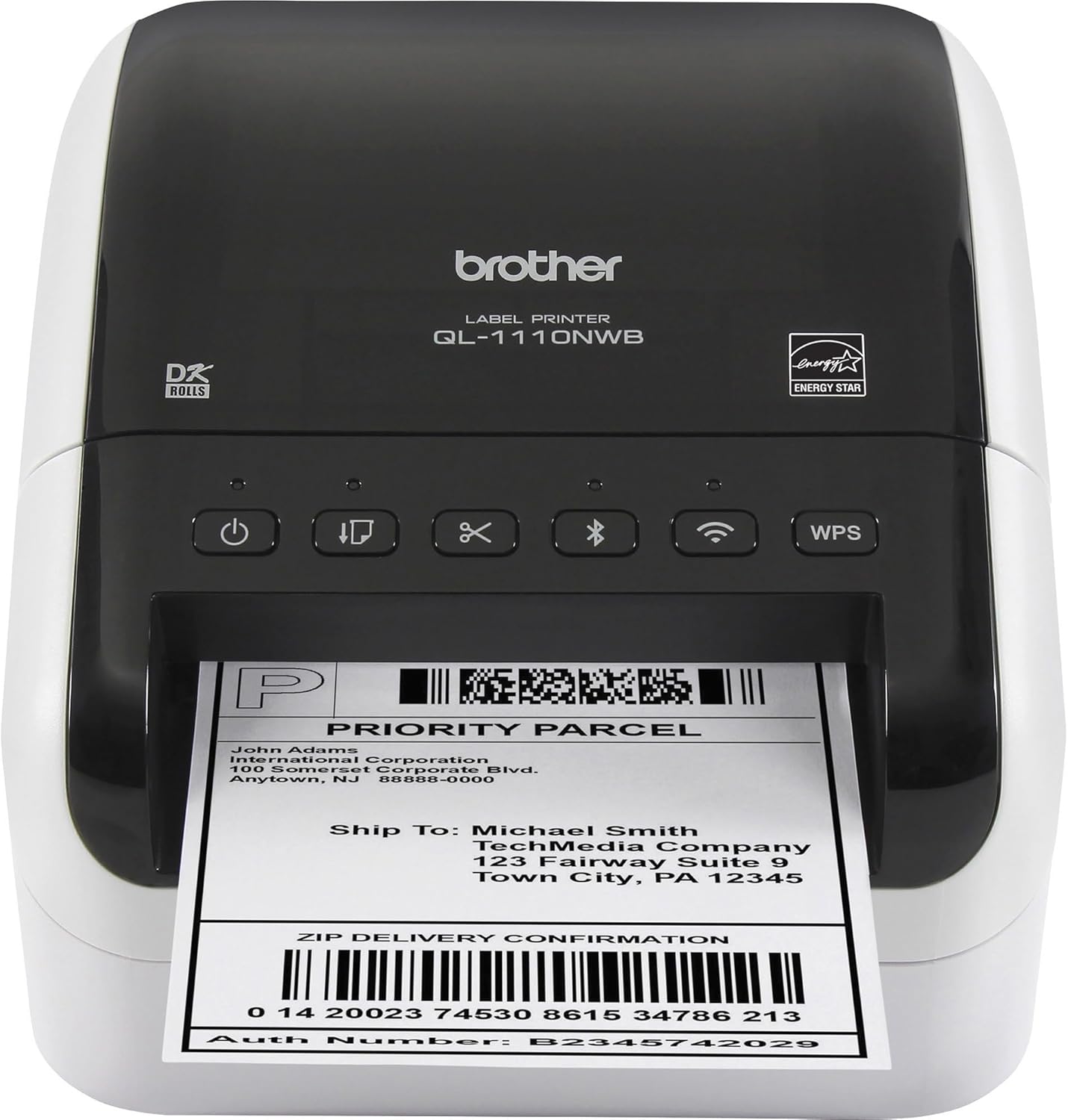
Brother’s QL-1110NWB is the network-oriented option in this shortlist, with USB, Ethernet, wireless networking, and Bluetooth interfaces documented by the manufacturer. It supports wide shipping labels, including Brother’s large shipping-label format.
You have a reason to consider those connections if two people need the same packing station. You have less reason to pay for or configure them if one laptop and one cable already cover all your work.
Brother lists DK-1241 as a compatible 4 × 6 roll, while the DK-1247 large shipping stock measures 4.07 × 6.4 inches. Check the actual roll dimensions and match your settings instead of assuming every large shipping roll is identical.
Brother also documents automatic cropping of barcode-label sheets, but identifies that feature as Windows-only. If you use a Mac, do not let that particular feature drive your purchase.
Choose it if a shared station solves a real problem; pass if the extra setup adds no value to your week. Confirm current software support and the exact model name on the offer rather than treating similarly named QL printers as interchangeable.
Check Price on AmazonLeave space for the labels, not just the machine
Put your planned supply, printer, and finished parcel in position before you decide the station fits. A device can fit on a shelf while its label feed or output path cannot.
The illustration below is a generic external-feed layout, not a dimensioned drawing of one shortlisted model. Internal-roll machines arrange the supply differently, so follow the exact manual when loading stock or opening a cover.

Make the first label a setup check
Download the shipping service’s 4 × 6 format when that is the stock you are using. Check the PDF page size rather than shrinking an entire Letter sheet onto one small label.
Select matching stock in the printer settings and inspect the preview. Acrobat’s Actual Size does not scale a page, but content can still be cropped if the file does not fit, so it is not a substitute for choosing the correct source format.
Print one label and check every address line and the complete barcode before starting the rest. Use your carrier’s current instructions for placement and handling; this comparison does not certify a label’s acceptance.
Keep the successful settings with a sample of the stock you used. If a new roll feeds differently or your shipping service changes its export layout, that reference helps you identify what changed.
Compare the supplies you would actually reorder
Make a small shopping list for each candidate: printer, compatible replacement labels, any supply holder, and a needed computer adapter. Compare complete setups rather than one discounted machine against another machine bundled with extra stock.
For a simple example, imagine two otherwise suitable supplies costing different amounts per label. Multiply each unit cost by your own expected monthly label count, then consider whether the difference is large enough to change your choice.
Keep that calculation separate from postage and shipping-platform fees. Buying a printer does not eliminate the cost of sending a package, and a manufacturer’s advertised postage discount is not a guaranteed saving on your shipments.
Also think about storage: a large carton of labels may be inexpensive per piece but inconvenient in a small room. You can reasonably prefer a manageable refill quantity over a bulk purchase that occupies the space you need for packing.
Match the purchase to your actual week
Choose the Rollo USB when a wired laptop station is your simplest route. Consider the Phomemo when its mobile app fits your routine, or the Brother when sharing one printer is worth the additional setup.
If none removes a meaningful hassle, keep using your document printer and revisit the decision when your routine changes. The useful upgrade is a repeatable path from the correct file to a clear, correctly placed label.