Best Word Processors With Printer Compatibility for Efficient Document Management
Choosing the right word processor that works seamlessly with printers can enhance your productivity, whether for home, school, or office use. Below is a summary table highlighting top-rated word processors and printer-compatible products available on Amazon, designed to meet diverse printing and word processing needs efficiently.
| Product Name | Brand | Key Features | Image |
|---|---|---|---|
| ALPHASMART NEO 2 Portable Word Processor | Renaissance Learning | Portable, USB cable included, uses AA batteries, Tested and Working | 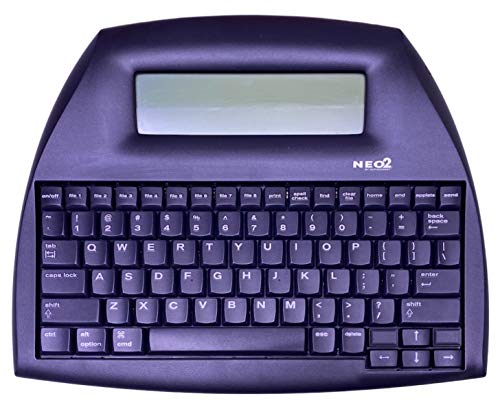 |
| Corel WordPerfect Office Home & Student 2021 | Corel | Office suite with word processing, spreadsheet, and presentation tools; supports 60 file formats; includes Oxford Concise Dictionary |  |
| Brother QL-800 High-Speed Professional Label Printer | Brother | High-speed thermal printing at 93 labels/min, dual-color black & red printing, versatile label applications |  |
| A-One PC & Word Processor Label Seal Printer (10 face, 100 sheets) | A-one | Matte paper, compatible with inkjet, laser, and dot impact printers, A4 size, multi-printer compatibility |  |
| A-One PC & Word Processor Label Seal Printer (12 face, 500 sheets) | A-one | High-quality matte paper, compatible with multiple printer types, A4 format with 12 labels per sheet |  |
ALPHASMART NEO 2 Portable Word Processor
The ALPHASMART NEO 2 is a dedicated portable word processor ideal for writing and editing documents on the go. It comes with a USB cable for file transfers and runs on three AA batteries, ensuring portability without relying on constant power.
This device is tested and confirmed working, making it a reliable tool for those who prefer distraction-free typing environments. While it does not include a printer, its USB connectivity ensures easy document transfer to a printer or computer.
Corel WordPerfect Office Home & Student 2021 Suite
This Corel WordPerfect Office Suite offers comprehensive word processing tools along with spreadsheets and presentations, making it a multi-purpose productivity software package.
With support for over 60 file formats including Microsoft Word and Excel, it ensures compatibility with many document types. Additionally, the suite includes the Oxford Concise Dictionary—a valuable resource for writers and students. This software supports printing through your existing printer setup, enabling seamless document output.
Brother QL-800 High-Speed Professional Label Printer
The Brother QL-800 is an advanced thermal label printer designed for high-volume professional labeling needs. It boasts speeds of up to 93 labels per minute with standout 300 dpi resolution.
Besides efficient black printing, it features dual-color capability, printing in black and red for enhanced label visibility. This device caters to diverse applications such as shipping labels, file folder tags, and name badges, making it ideal for business users requiring fast, clear printouts.
A-One PC & Word Processor Label Seal Printer (10 Face, 100 Sheets)

This A-One label seal printer pack includes 100 sheets of matte white paper designed for label printing with compatibility across inkjet, laser copier, heat transfer, dot impact, and handwriting printers.
Its A4 format and general-purpose design make it versatile for home or office applications, from labeling files to creating personalized seals. Users benefit from its adaptability to various printer technologies and label sealing needs.
A-One PC & Word Processor Label Seal Printer (12 Face, 500 Sheets)
The A-One 12-face label seal printer sheets come in a large pack of 500 sheets featuring high-quality matte paper with excellent thickness for a professional look.
Its format supports 12 labels per A4 sheet, compatible with multiple printer types including inkjet and laser. This product is well-suited for users who need bulk labeling capabilities with a standardized size and compatibility across printer models.
Buying Guide for Word Processors with Printer Compatibility
When selecting a word processor that matches your printing needs, consider the following factors to ensure optimal performance and ease of use:
1. Device Type and Portability
Choose between standalone word processors like the ALPHASMART NEO 2 or software suites such as Corel WordPerfect for your PC. Portable devices allow for distraction-free typing, while software suites offer extensive editing and formatting capabilities.
2. Printer Compatibility and Connectivity
Verify that your chosen word processor or software supports seamless connection to your printer. USB connectivity, wireless options, and support for various print drivers contribute to efficient printing workflows.
3. Printing Needs and Labeling
Consider if you require basic document printing or specialized label printing. Devices like the Brother QL-800 provide rapid label printing with professional quality, while A-One offers label sheets compatible with many printer types for manual label printing.
4. Software Features
Look for software that supports multiple file formats, includes dictionaries or editing tools, and offers spreadsheet or presentation capabilities if you need a comprehensive office solution.
5. Volume and Frequency of Use
Evaluate how often and in what volume you’ll print. High-speed label printers are better for frequent, large batches, while portable word processors suit users needing uninterrupted writing on the move.
6. Print Quality and Speed
Check specifications for print resolution (dpi) and speed, especially for label printing if clarity and time efficiency are priorities in your workflow.