Best USB to Serial Printer Cables for Reliable Connection
For those needing to connect legacy serial printers or devices to modern USB ports, USB to serial printer cables provide an essential bridge between technologies. These cables are compatible with various printers, barcode scanners, cash registers, and more, offering stable data transfer over RS232 or parallel interfaces. Below is a summary of top-rated USB to serial printer cables available on Amazon, each with unique features to meet different needs.
| Product | Brand | Connector Type | Length | Chipset |
|---|---|---|---|---|
| Mendouconert USB to DB25 Male Printer RS232 Cable | Mendouconert | USB to DB25 Male | 1.8M, 5M | PL2303 |
| OIKWAN USB to RS232 Male DB9 Serial Cable | OIKWAN | USB to DB9 Male | 6 ft | FTDI |
| Legrand C2G USB to DB25 Serial Adapter Cable | C2G | USB to DB25 | 6 ft | Not specified |
| SABRENT USB 2.0 to Serial DB9 RS232 Cable | SABRENT | USB to DB9 Female | 2.5 ft | Prolific |
| SABRENT USB to Parallel IEEE 1284 Printer Cable | SABRENT | USB to Parallel IEEE 1284 | Not specified | Not specified |
Mendouconert USB to DB25 Male Printer RS232 Cable

The Mendouconert USB to DB25 Male Printer RS232 Cable is designed primarily for Epson printers such as TM-T88VI and TM-T88V. It comes in two length options: 1.8 meters and 5 meters, allowing flexibility based on user setup. The cable incorporates the PL2303 chipset to ensure compatibility with many devices using RS232 protocols. Its support extends to Sharp X68K printers as well, making it highly versatile for serial printing and connection. This cable is favored for connecting devices requiring a DB25 male RS232 interface, delivering a reliable USB-to-serial bridge for stable printer communication.
OIKWAN USB to RS232 Male DB9 Serial Adapter
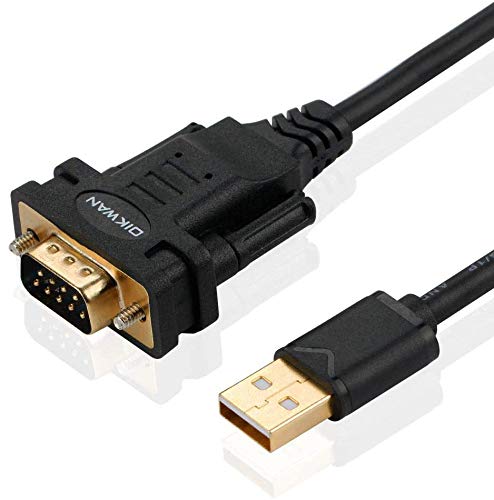
The OIKWAN USB to RS232 Male DB9 Serial Adapter features an FTDI chipset, renowned for stable and high-speed serial communications supporting up to 1 Mbps data rates. This reliable USB 2.0 adapter supports Windows, Mac OS, Linux, and even older platform versions, offering wide compatibility. The adapter is ideal for connecting serial devices such as modems, barcode scanners, printers, CNC machines, and POS equipment. Its 9-pin male DB9 connector fits a broad array of serial peripherals, ensuring excellent device support. Users should verify pin configuration and gender before ordering for compatibility assurance.
Legrand C2G USB to DB25 Serial Adapter Cable

The Legrand C2G USB to DB25 Serial Adapter Cable is designed to convert DB25 serial devices to USB connectivity with ease. Sold with a 6-foot length, this cable supports high-speed serial data transfer up to 115.2 Kbps without requiring IRQs, minimizing setup interference on your computer. Its gray cord offers durability and ease of use in office or home environments, connecting older printers, terminals, and other serial devices to modern computers. This cable is a practical solution for those needing to maintain legacy serial hardware without additional adapters or converters.
SABRENT USB 2.0 to Serial DB9 RS232 Converter Cable

The SABRENT USB 2.0 to Serial DB9 RS232 Converter Cable features a Prolific chipset for robust compatibility with a wide range of Windows versions, Mac OS X 10.6 and later, and many Linux distributions. Its plug-and-play design allows for effortless setup with no complex driver installations for most systems. At 2.5 feet long, this compact cable connects USB ports to traditional RS232 serial ports, supporting connection to serial printers, modems, barcode scanners, and other legacy devices. It balances portability with dependable serial communications.
SABRENT USB to Parallel IEEE 1284 Printer Cable Adapter

The SABRENT USB to Parallel IEEE 1284 Printer Cable Adapter supports parallel interface printing with a data transfer rate of up to 12 Mbps. This cable is an excellent choice for printers using IEEE 1284 standards, bridging modern USB ports to traditional parallel printer connections. It supports multiple operating systems and is suitable for legacy desktop printers not compatible with standard USB. While it differs from RS232 serial cables, its parallel interface support is vital for those needing to maintain older parallel printer functionality.
Buying Guide for USB to Serial Printer Cables
When selecting the best USB to serial printer cable, several factors influence compatibility and performance:
Connector Type and Gender
Confirm the serial port connector type on your printer or device—most commonly DB9 (9-pin) or DB25 (25-pin). Also, check if the connector is male or female to ensure proper fit without requiring adapters.
Chipset Quality
The chipset inside the adapter influences stability and driver support. Popular chipsets include FTDI, Prolific PL2303, and CP2102. FTDI chipsets often offer the broadest OS compatibility and reliable transfer rates.
Supported Operating Systems
Verify your computer’s OS compatibility. Some adapters support Windows 7 through 11, various Linux distros, and Mac OS versions. Check manufacturer websites for driver availability.
Cable Length and Flexibility
Choose a cable length suitable for your setup to avoid tension or clutter. Longer cables offer more flexibility but may introduce signal degradation if excessive.
Parallel vs Serial Interface
Note whether your printer uses RS232 serial or IEEE 1284 parallel interfaces. USB to serial cables handle RS232; parallel cables are needed for IEEE 1284 devices.
Transfer Speed and Data Rates
Most serial cables support speeds from 115.2 kbps up to 1 Mbps. Higher data rates are preferable for efficient printing and communication with high-volume devices.
Driver Installation and Plug & Play
Some adapters require manual driver installations, while others are plug-and-play. If possible, select adapters with automatic OS detection to simplify setup.
Durability and Shielding
Look for quality cables with tinned copper conductors and shielding to reduce interference, especially in industrial or high-EMI environments.
Considering these aspects will help ensure you select a USB to serial printer cable that effectively connects your legacy devices to modern computers, maintaining reliable operations.