Best USB to Printer Port Cables for Reliable High-Speed Connections
Finding the right USB to printer port cable is essential for ensuring smooth communication between your computer and printer or other USB B devices. Whether you need compatibility with legacy printers, high-speed data transfer, or connections to modern USB C devices, a suitable cable can improve your workflow. Below is a summary table of five top options that offer durability, wide compatibility, and efficient performance.
| Product | Brand | Length | Key Features |
|---|---|---|---|
| UGREEN USB A to USB B Printer Cable 5ft | UGREEN | 5 Feet | High-speed 480 Mbps, wide compatibility with many printer brands |
| SABRENT USB to Parallel IEEE 1284 Printer Cable Adapter | SABRENT | Not specified | Supports parallel port printers with up to 12Mbps data rate |
| CableCreation USB B to USB C Printer Cable 6.6FT | CableCreation | 6.6 Feet (2 Meters) | USB C to USB B, high-speed USB 2.0 data transfer, supports MIDI devices |
| HP 6ft Square USB A to USB B Printer Cable | Bordsek | 6 Feet | Gold-plated connectors, universal compatibility, stable USB 2.0 |
| UGREEN 10FT USB to Parallel Port Printer Cable | UGREEN | 10 Feet | USB to Parallel adapter, compatible with Windows/Mac/Linux, fast transmission |
UGREEN USB A to USB B Printer Cable 5ft – High-Speed for Multiple Printers
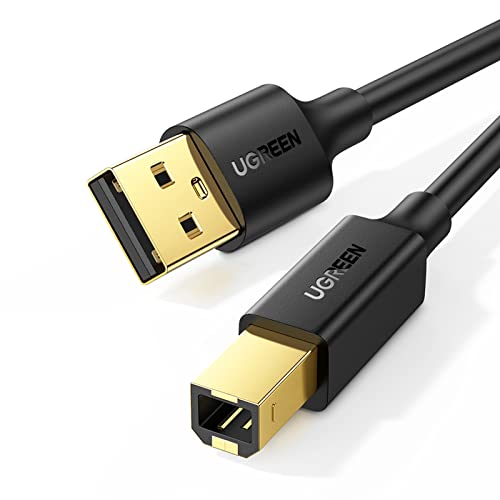
The UGREEN USB 2.0 printer cable supports fast data transfer speeds up to 480 Mbps, ideal for connecting scanners, printers, servers, and other USB B devices to computers or laptops. It offers a more stable and efficient connection compared to Wi-Fi. Designed for wide compatibility, it works with many popular printer brands such as HP, Canon, Epson, Brother, Dell, Lexmark, Xerox, and Samsung. This cable also supports peripheral devices like digital pianos and DACs, making it versatile for various uses.
SABRENT USB to Parallel IEEE 1284 Printer Cable Adapter

This adapter supports the traditional IEEE 1284 bi-directional parallel interface, allowing modern USB ports to connect with older parallel port printers. It supports data transfer speeds up to 12 Mbps and is compatible with multiple operating systems, enhancing backward compatibility for legacy printers. This choice is ideal if your printer requires a parallel port connection rather than USB B.
CableCreation USB B to USB C Printer Cable 6.6FT for USB-C Devices
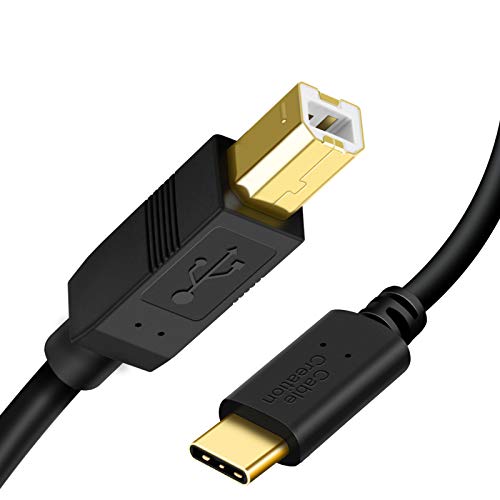
This cable enables connection between USB-C enabled laptops and tablets (like MacBook Pro and iPad) and legacy USB B devices such as printers, scanners, and MIDI controllers. It supports USB 2.0 high-speed data transfer up to 480 Mbps, offering faster and more secure syncing than Wi-Fi networks. Make sure your printer has a USB 2.0 Type-B female port for compatibility with this cable.
HP Printer Cable 6ft, USB A to USB B with Gold-Plated Connectors

Designed with gold-plated connectors for improved durability and stable transmission, this USB 2.0 printer cable by Bordsek suits a wide range of USB B printers, scanners, and external hard drives. It is plug-and-play and provides a consistent connection ideal for office environments. Available in 6 and 10-foot lengths, it offers flexibility depending on your workstation layout.
UGREEN 10FT USB to Parallel Port Printer Cable for Older Printers

This 10-foot cable converts USB signals to parallel port protocols, supporting fast data transfer up to 12 Mbps. It is compatible with Windows, Mac, and Linux operating systems, making it useful for connecting older printers that use a Centronics parallel interface. Its length and compatibility make it a convenient choice for maintaining older printing equipment.
Buying Guide: How to Choose the Best USB to Printer Port Cable
When selecting a USB to printer port cable, consider these important factors to get the right fit for your needs:
- Connection Type: Identify your printer’s port type—USB B, USB C, or Parallel (IEEE 1284). Not all printers use the same interface, so choose a cable that matches your printer and computer ports.
- Data Transfer Speed: For high-quality printing and scanner tasks, cables supporting USB 2.0 high-speed transfer (up to 480 Mbps) are preferable for stable performance and efficient data flow.
- Compatibility: Ensure the cable supports your printer brand and model. Many USB B cables are compatible with HP, Canon, Epson, Brother, and more. For legacy printers, parallel port adapters are required.
- Cable Length: Choose an appropriate length to reach your devices without excessive slack. Common lengths range from 5 to 10 feet, balancing convenience and signal quality.
- Build Quality: Gold-plated connectors improve corrosion resistance and signal integrity. Multi-shielded cables can reduce electromagnetic interference for cleaner data transfer.
- Operating System Support: Confirm the cable works seamlessly with your computer’s OS, whether Windows, Mac, or Linux.
- Future-proofing: If you plan to upgrade devices, consider cables that cater to both USB B and USB C ports to maintain compatibility.
By evaluating these factors, you can select a USB to printer port cable that ensures reliable connections, faster data transfer, and compatibility with your current and future printing devices.