Best USB Switch Boxes for Sharing Printers Between Computers
Sharing a printer among multiple computers can be hassle-free with the right USB switch box. These devices allow easy switching of USB peripherals like printers, scanners, keyboards, and mice between two or more computers without repeatedly unplugging cables. To help you find the most efficient and compatible USB switch box for your printer sharing needs, we’ve reviewed the top five options from Amazon. Below is a summary table highlighting key features of each model for quick comparison.
| Product | Ports (In/Out) | USB Version | Compatibility | Switching Method |
|---|---|---|---|---|
| UGREEN USB Switch Selector | 2 in / 4 out | USB 2.0 | Windows, Mac OS, Linux, Chrome OS | One-button physical switch |
| RIIEYOCA USB Printer Sharing KVM Switch | 2 in / 1 out | USB 2.0 | Plug & play, driver-free | Panel button & desktop controller |
| iDsonix USB 3.0 Switch | 1 in / 2 out (Bi-directional) | USB 3.0 | Windows, Mac, Linux | One-click switch |
| BENFEI USB 3.0 Switch | 2 in / 4 out | USB 3.0 | Windows, Mac OS, Linux, Chrome OS | Button switch with LED indicator |
| IOGEAR 2 Port USB 2.0 Switch | 2 in / 1 out | USB 2.0 | Windows | Auto/manual switching with software |
UGREEN USB Switch Selector 2 Computers Sharing 4 USB Devices

The UGREEN USB Switch Selector features a 2 in 4 out design, allowing two computers to share up to four USB 2.0 devices such as printers, scanners, mouse, and keyboards seamlessly. The device operates using a simple one-button swapping mechanism, avoiding complicated network setups or continual cable swapping. Though it is not a KVM switch and does not support video output, it integrates smoothly with Windows, Mac OS, Linux, and Chrome OS without drivers, providing straightforward plug-and-play usability. Users are advised to power the switch externally when connecting multiple devices to prevent disconnection issues. It is an ideal choice for users who require sharing multiple peripherals between two computers efficiently.
RIIEYOCA USB Printer Sharing KVM Switch with Automatic Switching

The RIIEYOCA USB Printer Sharing KVM Switch supports automatic and manual switching modes. It can be controlled remotely using the included desktop controller cable (1.5 meters), or by pressing a panel button on the device. This switch enables two computers to share printers, scanners, keyboards, and other peripherals without needing drivers, making it plug-and-play. Equipped with a high-quality signal switching chip, it ensures stable signal transmission and supports USB input cable lengths from 1 to 5 meters. The compact design fits comfortably on a desk without occupying much space. This device is suited to environments seeking versatile switching controls and strong signal stability.
iDsonix USB 3.0 Switch 1 in 2 Out Bi-Directional Sharing Device

The iDsonix USB 3.0 Switch offers fast data transfer speeds up to 5Gbps compliant with USB 3.0 standards. Its bi-directional design supports sharing one USB device between two computers or multiple devices via a USB hub. Switching is done with a simple click, enabling quick toggling between devices. Recommended primarily for printers, scanners, keyboards, and mice rather than heavy storage devices, it includes two 3.3 ft USB A-to-A cables. The switch supports Windows, Mac, and Linux, ensuring compatibility across platforms while helping to minimize desktop clutter by consolidating device connections.
BENFEI USB 3.0 Switch for Sharing 4 USB Devices Between 2 Computers

The BENFEI USB 3.0 Switch supports sharing four USB 3.0 devices such as printers, scanners, and keyboards between two computers. It boasts a plug-and-play design with no driver installation required and is compatible with a wide range of operating systems including Windows, Mac OS, Linux, and Chrome OS. This switch enables fast data transfers up to 5Gbps and features an intuitive button with LED indicators for easy switching and status monitoring. It requires BENFEI USB A to A cables for operation, providing a clean, organized, and efficient peripheral sharing solution in both home and office setups.
IOGEAR 2 Port USB 2.0 Switch with Auto and Manual Switching
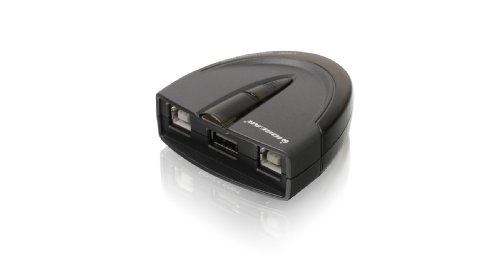
The IOGEAR 2 Port USB 2.0 Switch enables two workstations to share one USB printer easily. It supports USB 2.0 devices with data transfer rates up to 480Mbps and offers backward compatibility with USB 1.1. The unique feature is its automatic switching software which detects which computer is sending a print job and switches to that computer automatically, though manual switching via a button is also available. The switch requires no complicated setup and is ideal for users who prioritize seamless printer sharing without manual intervention—especially in office environments requiring efficient device management.
Buying Guide for USB Switch Boxes for Printer Sharing
When selecting the best USB switch box to share your printer between computers, consider the following key factors to ensure compatibility, reliability, and ease of use.
Number of Ports and Devices Supported
- Input vs Output Ports: Check how many computers (input) and USB devices (output) the switch supports. Some models share one device between two computers, others can share multiple devices.
- Device Compatibility: Confirm if the switch supports your printer and other intended USB peripherals like scanners or keyboards.
USB Version and Data Transfer Speed
- USB 2.0 vs USB 3.0: USB 3.0 offers up to 5Gbps transfer speed, beneficial if transferring large files via USB drives. For printers, USB 2.0 is usually sufficient.
- Cable Requirements: Some USB switches require special USB A-to-A cables or adapters for certain USB-C ports, so verify included cables and compatibility with your devices.
Switching Method and Control Features
- Manual Button: Most devices have a physical button for switching between connected computers, offering direct and intuitive control.
- Automatic Switching: Some models detect print jobs or active devices and switch automatically, which can improve workflow efficiency.
- Remote Control: Options with desktop controllers or panel buttons allow flexibility in device placement and switching control.
Operating System Compatibility
Ensure the USB switch is compatible with all your computers’ operating systems, including Windows versions, Mac OS, Linux, or Chrome OS. Driver-free, plug-and-play switches offer the broadest compatibility and ease of use.
Power Supply and Build Quality
- Power Requirements: Verify if the USB switch requires external power especially when sharing multiple USB hubs or high-power devices to prevent disconnections.
- Durability: Metal casing models may offer longer durability compared to plastic ones if used frequently in high-traffic environments.
Additional Features
- LED Indicators: Helpful to identify which computer or device is currently active.
- Compatibility with Other USB Devices: If planning to share more than just printers, confirm support for scanners, card readers, flash drives, and other peripherals.