Best USB Hubs for Printer Compatibility and Fast Data Transfer
Connecting a printer and multiple devices seamlessly often requires a reliable USB hub that supports high-speed data transfer and multiple ports. Below is a summary of the top USB hubs designed for printer compatibility along with other peripherals like keyboards, flash drives, and external hard drives.
| Product Name | Brand | Number of Ports | Key Features |
|---|---|---|---|
| VIENON 4-Port USB Hub | VIENON | 4 USB 3.0 ports | 5 Gbps data transfer, supports simultaneous use of 4 ports, plug and play |
| UGREEN USB 3.0 Hub 4 Ports | UGREEN | 4 USB 3.0 ports | 5 Gbps speed, wide device compatibility, plug and play |
| ANYPLUS 4-Port USB Hub Splitter | ANYPLUS | 4 USB 3.0 ports | Plug and play, compatible with multiple OS, not for charging |
| SmartQ H302S USB 3.0 Hub | SmartQ | Multiple USB 3.0 ports | 2-foot cable, fast data transfer, plug and play |
| ONFINIO 7-Port USB Hub with Switches | Onfinio | 7 USB 3.0 ports | Individual on/off switches, 5 Gbps speed, LED indicators |
VIENON 4-Port USB 3.0 Hub USB Splitter

The VIENON 4-Port USB Hub expands a single USB port into four USB 3.0 ports, each capable of simultaneous use without overheating. The device offers a SuperSpeed data transfer rate of up to 5 Gbps, making it ideal for connecting printers, flash drives, external hard drives, and other peripherals.
It requires no driver installation, supporting plug-and-play functionality across multiple devices including laptops, Xbox, PS4, and more. While it does not support charging, its data transfer capabilities ensure efficient printing and peripheral management. The hub maintains a moderate temperature even with multiple devices connected, providing reliability during extended use.
UGREEN USB 3.0 Hub 4 Ports Ultra-Slim Expander

The UGREEN 4 Ports USB 3.0 Hub transforms one USB A port into four, providing expanded connectivity for printers, keyboards, mice, flash drives, and other USB peripherals. It supports a maximum data transfer speed of 5 Gbps, capable of transferring large files quickly, such as a 10 GB file in under 17 seconds.
Designed with broad compatibility, this hub works with Windows, macOS, Linux, and Chrome OS without needing drivers. Its 2-foot cable adds convenience for various workspace setups. UGREEN’s ultra-slim design is portable while ensuring outstanding performance for printer attachments and data syncing.
ANYPLUS 4 Port USB 3.0 Hub Splitter

The ANYPLUS USB 3.0 4-Port Hub offers convenient multi-device support, expanding one USB port into four ports capable of simultaneous connections. Its compatibility spans Windows, Mac OS, Linux, and Chrome OS, facilitating easy connection to printers, gaming consoles, cameras, and hard drives.
It supports plug and play for hassle-free setup but is not recommended for charging due to its maximum output current of 900 mA, which limits charging speed. The hub is optimized for data transfer and management of USB peripherals. Its performance remains stable, making it suitable for users needing to connect multiple printer devices along with other accessories.
SmartQ H302S USB 3.0 Hub with 2ft Cable
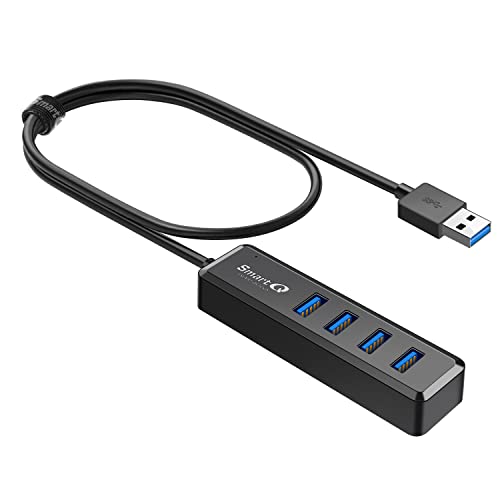
The SmartQ H302S USB 3.0 Hub is designed to provide multiple USB ports and fast transfer speeds ideal for printers and external drives. Its 2-foot long cable adds flexibility to device placement, allowing users to organize their workspace without restrictions.
Equipped with USB 3.0 technology, it supports fast data transfers suitable for high-demand peripherals. The hub offers plug-and-play functionality compatible with Windows and Mac environments, simplifying setup while maintaining high-speed data sync important for printing and scanning tasks.
ONFINIO 7-Port USB 3.0 Hub with On/Off Switches

The ONFINIO 7-Port USB Hub offers extensive connectivity, expanding a single USB port into seven, all supporting up to 5 Gbps data transfer speed. It caters to a variety of devices including printers, external hard disks, cameras, and keyboards.
What sets this hub apart is its individual on/off switches for each port, allowing users to control power without unplugging devices. Each switch features an LED status indicator for easy monitoring. This design saves energy and adds convenience when managing multiple peripherals simultaneously.
Buying Guide for Choosing the Best USB Hub for Printers
Number of Ports
Choosing a hub with sufficient USB ports is essential depending on the number of devices you plan to connect. For printer users, a 4-port hub is usually adequate, but if you have multiple peripherals, consider hubs offering 7 or more ports.
Data Transfer Speed
Look for USB hubs that support USB 3.0 or higher with speeds up to 5 Gbps to ensure efficient data transfer between your computer and printer. Faster speeds reduce wait times during large print jobs or data synchronization.
Power Supply and Charging Ability
Some USB hubs provide powered ports that supply additional energy for charging devices. However, most hubs designed primarily for data transfer, like the reviewed products, do not support fast charging. If charging multiple devices alongside printing tasks, consider a powered USB hub.
Compatibility
Ensure the hub supports your operating system such as Windows, macOS, Linux, or Chrome OS. Broad compatibility ensures a plug-and-play experience without complicated driver installations.
Additional Features
- Individual port switches with LED indicators can offer convenience by allowing selective power control.
- Long cables improve flexibility in device setup.
- Compact and portable designs are beneficial for users who travel with their peripherals.
Build Quality and Heat Management
Stable hubs maintain safe operating temperatures even while connecting multiple high-power devices. Look for products tested for durability and heat control to prevent device malfunction or data loss.