Best USB Flash Drives and Hubs for Printing and Data Storage
Choosing the best USB flash drive printer accessories means combining reliable flash drives with efficient USB hubs for seamless data transfer and device connectivity. Below is a summary table of selected USB flash drives and USB hubs ideal for storing files and connecting printers or other peripherals effortlessly.
| Product | Brand | Capacity/Ports | Key Feature | Link |
|---|---|---|---|---|
| EASTFUN USB Flash Drive 5 Pack | EASTFUN | 8GB each | Plug and play, multi-OS compatible | View on Amazon |
| MECHEER 10 Pack 8GB USB Flash Drives | MECHEER | 8GB each | Swivel design, bulk pack | View on Amazon |
| KOOTION 128GB USB 3.0 Flash Drive | KOOTION | 128GB | Ultra high speed USB 3.0 | View on Amazon |
| VIENON 4-Port USB 3.0 Hub | VIENON | 4 USB ports | High-speed data transfer, multi-device support | View on Amazon |
| UGREEN USB 3.0 Hub 4 Ports | UGREEN | 4 USB ports | Plug-and-play, ultra-slim design | View on Amazon |
EASTFUN 5Pcs 8GB USB Flash Drive Set
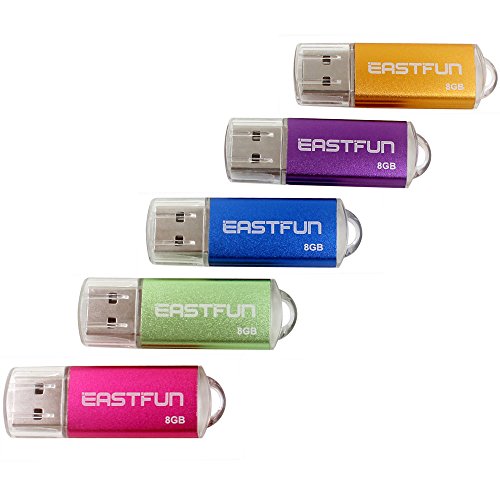
This set includes 5 mixed color 8GB USB 2.0 flash drives, ideal for everyday data storage and sharing. They require no software installation — just plug in and use across multiple operating systems including Windows, Linux, and Mac OS. Suitable for storing music, photos, movies, official documents, and more, they provide a great value for users needing easy-to-use, portable memory sticks for school, work, or family use.
MECHEER 10 Pack 8GB USB Flash Drives

A bulk pack of 10 USB 2.0 flash drives with a practical swivel design, protecting the connector and making port access convenient. These drives include a lanyard hole for easy carrying or attachment to keychains. Perfect for students, offices, or organizations requiring multiple USB drives for data backup, music, video storage, and more. The compact and portable design fits various use cases without compromising protection or ease of use.
KOOTION 128GB USB 3.0 Flash Drive with Retractable Design

Featuring USB 3.0 technology for ultra-fast read speeds up to 110MB/s and write speeds up to 40MB/s, this 128GB flash drive offers large capacity and rapid file transfers. Its retractable slide design protects the connector from damage while allowing easy use. Compatible with keychains and backpacks via the integrated lanyard hole, it’s ideal for users who need rugged, high-speed storage for large files, important documents, and multimedia content.
VIENON 4-Port USB 3.0 Hub for Multi-Device Connectivity

Expand a single USB port into four with this USB 3.0 hub, supporting simultaneous high-speed connections without performance throttling. Compatible with a broad range of devices including laptops, PCs, Xbox, printers, and cameras. The plug-and-play functionality requires no driver installation, providing quick and reliable data transfer at up to 5Gbps — fast enough for large multimedia files and essential when connecting multiple peripherals like printers or flash drives.
UGREEN Ultra-Slim 4-Port USB 3.0 Hub

This ultra-slim USB 3.0 hub quickly converts one USB port into four, ideal for connecting multiple devices such as flash drives, keyboards, and printers simultaneously. Offering a maximum data transfer speed of 5Gbps, it enables rapid file transfers and efficient multitasking. Compatible across Windows, macOS, Linux, and Chrome OS, its plug-and-play design removes the hassle of software installation, making it a practical hub for everyday use.
Buying Guide for USB Flash Drives and Printer Connectivity
Selecting the right USB flash drive and hub for printer compatibility and data storage involves understanding several important factors:
USB Flash Drive Considerations
- Capacity: Depending on your use, choose a capacity that matches your data needs. For general files and documents, 8GB or 16GB may suffice; for multimedia or large file transfers, 64GB or more is recommended.
- USB Version: USB 3.0 or higher provides faster data transfer speeds compared to USB 2.0, which is crucial for large files or frequent transfers.
- Design and Durability: Features like retractable connectors, swivel covers, or rugged casings protect the drive from physical damage and dirt.
- Compatibility: Ensure the drive supports your computer’s operating system and devices such as printers or media players.
- Additional Features: Some drives include LED indicators, lanyard holes, or encryption for security and convenience.
USB Hub Considerations
- Number of Ports: Consider how many USB devices you need to connect simultaneously. A 4-port hub is common, but larger hubs are available for extensive setups.
- Data Transfer Speeds: USB 3.0 hubs offer significantly higher speeds essential for transferring large files and printing jobs quickly.
- Power Supply: Some hubs are bus-powered (drawing power from the computer), while others require an external power source, important for powering multiple or high-demand devices.
- Device Compatibility: Ensure the hub works with your laptop, desktop, printers, and other peripherals you intend to use.
- Build Quality: Look for hubs with durable connectors and good heat dissipation to maintain performance and longevity.
Combining Flash Drives and Hubs for Printing
When using USB flash drives for printing tasks, especially for printers that support direct USB input, a reliable USB hub can expand connectivity and help you manage multiple devices simultaneously. Selecting flash drives with USB 3.0 speeds ensures the fastest transfer of print files. Meanwhile, hubs with multiple ports and stable data transmission help prevent interruptions, making them ideal for both home and office environments.