Best USB Connectors and Cables for Printers
Choosing the right USB connector for your printer is crucial for stable data transfer and device compatibility. Below is a table summarizing five top USB printer cables on Amazon, highlighting key features such as compatibility, transfer speed, connector durability, and cable length to help you make an informed choice.
| Product | Brand | Key Features | Length |
|---|---|---|---|
| Amazon Basics USB-A to USB-B 2.0 Cable | Amazon Basics | Gold-plated connectors, durable, connects speed-critical devices including printers | 16 feet |
| UGREEN USB A to USB B Printer Cable | UGREEN | High-speed transfer up to 480 Mbps, wide printer compatibility | 5 feet |
| HP Printer Cable USB 2.0 Type B | Bordsek | Gold-plated connectors, wide device compatibility, stable plug and play | 6 feet |
| HenryAv USB-A to USB-B 2.0 Cable | HenryAv | 480 Mbps speed, multi-shielded cable, durable gold-plated connectors | 6 feet |
| sweguard Printer Cable USB-A to USB-B | sweguard | Nylon braided for durability, gold-plated connectors, high-speed data transfer | 10 feet |
Amazon Basics USB-A to USB-B 2.0 Cable for Printer or External Hard Drive

This Amazon Basics cable features corrosion-resistant, gold-plated connectors that ensure optimal signal transfer, reducing any interference during printing jobs. It supports connecting speed-critical devices like printers, external hard drives, and cameras to computers, providing reliable performance. The cable is 16 feet long which offers flexibility for setups requiring distance between your printer and computer. This cable supports smooth data transfer for printers and peripherals with USB-B ports.
UGREEN USB A to USB B Printer Cable 5ft – High-Speed
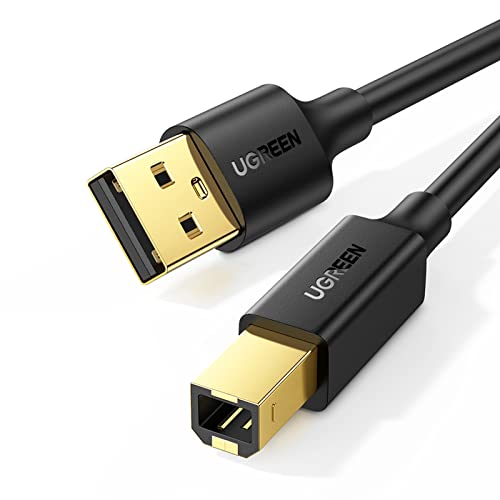
The UGREEN printer cable supports high-speed data transfer up to 480 Mbps and is backward compatible with USB 1.1 and 1.0. It is ideal for connecting various USB-B devices such as scanners, printers, external hard drives, and even MIDI instruments, making it a versatile choice. The 5-foot length suits close-range setups, and the cable is widely compatible with popular brands like HP, Canon, Brother, Samsung, and Lexmark, ensuring dependable connectivity.
HP Printer Cable USB 2.0 Type B – 6ft Durable Cord

This USB-A to USB-B 2.0 cable by Bordsek features gold-plated connectors for reliable and corrosion-resistant connections. It is designed for universal compatibility, working with printers, scanners, hard drives, and other peripherals. The 6-foot length offers moderate flexibility. With its plug-and-play design, the cable provides more stable connectivity than Wi-Fi connections when printing or scanning.
HenryAv USB-A to USB-B 2.0 Cable with 480 Mbps Transfer Speed

The HenryAv printer cable supports full USB 2.0 speed up to 480 Mbps and is built with a multi-shielded design to minimize interference. It features gold-plated connectors enhancing durability and signal integrity. The 6-foot length is usually sufficient for typical office or home printing setups. It is compatible with printers, external hard drives, cameras, and other USB-B devices.
sweguard Printer Cable USB-A to USB-B, Nylon Braided 10ft

The sweguard cable is nylon braided for improved durability and tangle resistance. It supports the standard 480 Mbps USB 2.0 high-speed transfer rate and is backwards compatible with earlier USB standards. Gold-plated connectors reduce corrosion for a stable connection. At 10 feet, this cable provides versatile length suitable for both home and office setups. It supports wide printer compatibility, including HP, Canon, Epson, Brother, Dell, Lexmark, and Samsung devices.
Buying Guide: Choosing the Right USB Connector for Your Printer
When selecting a USB connector cable for your printer, several key factors should guide your decision:
1. Compatibility
Ensure the USB cable matches your printer’s port type, typically USB-B for printers. Check the cable supports your printer brand to avoid connection issues.
2. Data Transfer Speed
USB 2.0 cables with transfer rates up to 480 Mbps are common and sufficient for most printing tasks. Avoid lower-speed cables (USB 1.1 or below) to ensure smooth data flow, especially for high-volume printing.
3. Cable Length
Choose a length that comfortably reaches between your computer and printer without causing clutter. Longer cables (10+ feet) offer flexibility but excessive length may reduce signal quality unless shielded well.
4. Connector Quality
Gold-plated connectors resist corrosion over time and maintain stable signal transfer. Multi-shielded cables reduce electrical interference, increasing reliability.
5. Durability and Build
Nylon braided exteriors and flexible materials enhance cable lifespan and reduce tangling. This is especially important in high-use environments.
6. Stability and Connectivity
USB wired connections provide more stable and consistent data transfer than wireless options like Wi-Fi. This is crucial for avoiding print errors and ensuring timely printing jobs.
7. Additional Features
Avoid cables without standard USB certification, as certified cables ensure compliance with USB specifications for safety and performance.
By evaluating these aspects, you can select the best USB connector cable for your printer that guarantees reliable connectivity, optimal speed, and long-lasting performance.