Best Thermal ID Card Printers for Professional Quality Printing
Choosing the best thermal ID card printer can dramatically improve how you create and manage identification badges, membership cards, and employee IDs. Below is a summary table highlighting top thermal ID card printers that offer various features such as single or dual-sided printing, included supplies, and compatible software packages, making them ideal for businesses and schools.
| Product | Brand | Printing Type | Included Supplies | Compatibility |
|---|---|---|---|---|
| Bodno Seaory S25 Single Sided Printer | Bodno | Single-sided | Ribbon, software, cards | Windows, Linux (Mac soon) |
| Bodno Seaory S28 Dual Sided Printer | Bodno | Dual-sided | Ribbon, software, camera | Windows, Linux (Mac soon) |
| Bodno Magicard 400X Dual Sided Printer | Bodno | Dual-sided | Ribbon, software | Windows, Mac |
| Cardholdir ID Easy Badges Solid 210 | Cardholdir ID | Single-sided | Ribbon, software, cards | PC, Mac |
| Bodno Magicard Pronto Printer Package | Bodno | Single-sided | Ribbon, software, cards | Windows, Mac |
Bodno Seaory S25 Single Sided ID Card Printer

The Bodno Seaory S25 is an excellent all-in-one package designed for low-volume ID card printing. It features a manual feed system that allows precise control by printing one card at a time, ideal for small-scale offices or events. This printer comes with the Seaory 11011 color ribbon, supporting up to 100 prints, and includes user-friendly software with pre-made templates and drag-and-drop functionality. The lifetime license of the software enhances value by allowing continued use without extra fees. Compatible with Windows and Linux, Mac compatibility is expected soon, broadening its usability.
Bodno Seaory S28 Dual Sided ID Card Printer

For those needing to print on both sides of ID cards, the Bodno Seaory S28 offers dual-sided printing in a single pass, creating vibrant, high-resolution cards up to 300 x 1200 dpi. It comes with a comprehensive package including a Seaory 17031 color ribbon for 300 prints and a camera to capture photos directly. This feature-packed printer increases productivity by eliminating double passes and is compatible with Windows and Linux operating systems. Mac support will be added next year, making it a future-proof investment.
Bodno Magicard 400X Dual Sided ID Card Printer

The Magicard 400X features dual-sided printing capable of producing full-color, professional-grade cards. This package includes a 300-print YMCKO ribbon providing vivid color and high quality for badges or membership cards. It supports both Windows and Mac platforms, making it a versatile choice for various business environments. The Magicard 400X is suitable for anyone seeking robust ID card printing with comprehensive software and supplies included, making it ready for immediate use.
Cardholdir ID Easy Badges Solid 210 Printer

The Cardholdir ID Easy Badges Solid 210 offers simplicity with a hand-fed, single-sided design ideal for employee or student ID badges. It includes beginner-friendly software and supplies for 200 prints, such as a full-color ribbon and PVC cards. The printer prints at 300 dpi, suitable for most organizational needs, ensuring clear and legible ID cards. Compatibility with both PC and Mac allows ease of use across platforms. This printer is great for users wanting a straightforward solution without complex features.
Bodno Magicard Pronto ID Card Printer Package
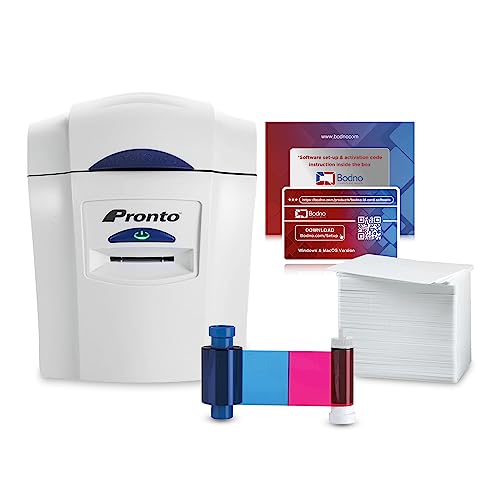
The Magicard Pronto package is designed for users who need an easy-to-use, professional-grade ID card printer. It includes everything out of the box: the printer, a MA100YMCKO color ribbon, software, and 100 durable PVC cards. Its intuitive features ensure you can start printing photo or membership cards in minutes. The compact and efficient design is geared toward low to medium volume printing, making it a popular choice for small businesses and organizations.
Buying Guide for Thermal ID Card Printers
Printing Type: Single vs. Dual-Sided
Consider whether you need single-sided or dual-sided printing. Single-sided printers are often more affordable and suitable for simple ID badges, whereas dual-sided printers enable you to print additional information or graphics on the back, useful for complex cards, security features, or compliance requirements.
Included Supplies and Software
Check for what supplies come included—ribbons, PVC cards, and software. Having an all-inclusive package means you can start printing immediately without sourcing extra materials. Software usability is also critical; drag-and-drop templates and beginner-friendly interfaces can save time and money on graphic design.
Print Quality and Resolution
Print resolution determines the sharpness of images and text. Look for printers that support at least 300 x 1200 dpi for crisp photographs and clear text. High resolution enhances the professional look and security features of ID cards.
Compatibility and Operating Systems
Verify that the printer supports your computer’s operating system. Most printers work with Windows, but if you use Mac or Linux, confirm compatibility or pending support to avoid operational issues.
Volume and Speed
Consider your printing volume. Manual feed systems are better for low-volume or occasional use. For frequent or bulk printing, choose printers with larger input hoppers and faster printing speeds to maximize efficiency.
Additional Features
Cameras for instant photo capture, security options like watermarking, and lifetime software licenses add value depending on your needs. Decide which extras align with your use case to get the best return on your investment.