Best Thermal Barcode Label Printers for Small Business and Shipping
Finding a reliable and efficient thermal barcode label printer can significantly boost productivity for small businesses, offices, and shipping needs. This article covers the best thermal label printers available on Amazon, highlighting key features such as portability, connectivity, printing speed, and label compatibility. Below is a quick comparison table summarizing the essential specs of the top five printers selected for versatility and value.
| Printer Model | Print Width | Connectivity | Label Types Supported | Portability |
|---|---|---|---|---|
| Phomemo M110 Label Maker | Up to 48mm (1.89″) | Bluetooth | Barcode, Address, Clothing, Price Labels | Yes, Portable |
| CLABEL Desk Bluetooth Printer 221D | Up to 58mm (2.28″) | Bluetooth, PC | UPC Barcodes, Address, Jewelry Labels | Compact, lightweight |
| Phomemo M120 Label Maker | 20-50mm (up to 2″) | Bluetooth, USB | Barcode, QR Code, Address, Logo | Lightweight, Portable |
| Rollo USB Shipping Label Printer | 4×6 inches (wide format) | USB | Shipping, Warehouse, Barcode Labels | No, Desktop use |
| DYMO LabelWriter 450 Twin Turbo | Varies (dual roll support) | USB | Filing, Shipping, Barcodes, Mailing Labels | No, Desktop printer |
Phomemo M110 Portable Bluetooth Label Printer

The Phomemo M110 is a compact, Bluetooth-enabled thermal label printer ideal for small business and personal use. It supports label widths ranging from 20mm to 50mm, with a maximum printable width of 48mm. This model excels in printing name, price, barcode, cable, jewelry, and folder labels using an intuitive mobile app that offers numerous templates and customization options.
Its inkless direct thermal technology offers smooth and fast printing without the need for ribbons or ink cartridges. The adjustable paper holder ensures precise feeding and reduces waste. However, it should be noted that this printer is not designed for large shipping labels. Overall, the M110 is portable and user-friendly, making it perfect for on-the-go labeling tasks.
CLABEL Desk Bluetooth Barcode Label Printer 221D

The CLABEL 221D barcode label maker offers a compact, lightweight design featuring Bluetooth connectivity for wireless printing. It supports labels up to 2.28 inches wide, ideal for UPC barcodes, address labels, and jewelry tags. The printer comes bundled with one roll of address labels, facilitating quick setup.
The “clabel trade” app greatly enhances productivity with its rich label customization options including 11 font types, 58 templates, and over 300 icons. It also supports barcode and QR code generation, Excel printing, and image embedding. The printer setup is straightforward, allowing users to begin printing in under five minutes. This model is well-suited to office and business environments where mobility and customization are priorities.
Phomemo M120 2-Inch Portable Barcode Label Printer

The Phomemo M120 is a lightweight thermal printer with broad label compatibility, supporting widths from 20mm to 50mm. It weighs just 200 grams and features a long battery life capable of printing up to 3,000 labels per charge. An auto-sleep mode conserves power during inactivity.
Its smart “Print Master” app provides advanced customization, including voice and image recognition, OCR technology for text scanning and editing, and a vast library of symbols, fonts, and templates. This printer is suitable for barcode, QR code, name, address, and logo labels, making it a versatile option for small business and home office users requiring high customization with mobile convenience.
Rollo USB Commercial Grade 4×6 Thermal Label Printer

The Rollo USB Thermal Printer is designed for high-volume and commercial-grade printing tasks. It supports large 4×6 inch labels commonly used in shipping and warehousing. This printer connects via USB and is compatible with Windows and Mac operating systems.
It employs advanced direct thermal technology that eliminates the need for ink or toner, printing labels at a rapid 150mm per second with 203 DPI resolution. The Rollo app streamlines shipping label creation by integrating with popular e-commerce platforms and providing access to discounted shipping rates. This desktop printer is powerful, suited for businesses with heavy shipping needs but less portable compared to smaller models.
DYMO LabelWriter 450 Twin Turbo Thermal Printer
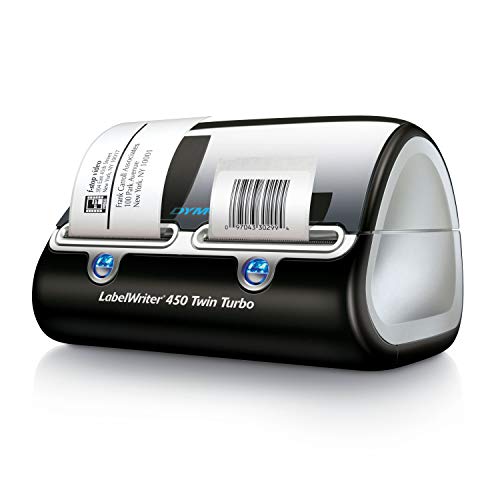
The DYMO LabelWriter 450 Twin Turbo is a versatile desktop thermal printer capable of printing from two different label rolls without swapping. This feature enhances labeling efficiency, especially in busy office settings.
It uses direct thermal printing technology, which requires no ink or toner, reducing operation costs. This model is tailored for printing a wide array of labels including filing, shipping, mailing, and barcode stickers. With precise quantity printing, it minimizes label waste and is well-regarded for reliability in home and office environments.
Buying Guide for Thermal Barcode Label Printers
When selecting a thermal barcode label printer, consider the following key factors to ensure the printer meets your specific needs:
Label Size and Compatibility
Make sure the printer supports the label widths required for your intended use. Portable options often print labels up to 2 inches wide, suitable for price tags, barcodes, and small address labels. Shipping labels typically require wider formats such as 4×6 inches.
Printing Technology
Most thermal barcode printers use direct thermal printing which requires no ink or toner, saving cost and maintenance. Thermal transfer printers use ribbons, suitable for longer-lasting labels but add complexity and cost.
Connectivity
Bluetooth and wireless connectivity allow mobile and flexible label printing. USB connections are common in desktop models offering stable, high-speed printing but with less mobility.
Portability
If you need to print labels on the go, look for lightweight, battery-powered models like the Phomemo M110 or M120. For fixed workstations, robust desktop printers like Rollo or DYMO offer higher volume printing capabilities.
Software and Customization
A good companion app or software which supports label design, batch printing, barcode and QR code generation, and image insertion enhances productivity. Consider printers with regularly updated software for improved features and ease of use.
Speed and Volume
High-speed printers are critical in busy business environments to reduce wait times. If printing large label volumes, choose commercial-grade models with fast print speeds and big roll capacity.
Operating System Compatibility
Ensure the printer supports your computer or mobile device’s operating system. Some printers support Windows, Mac, and Linux, while others may have restrictions, especially with newer OS versions.