Best Smallest All-in-One Printers for Compact Spaces and Efficient Printing
Finding a compact all-in-one printer that fits small spaces while offering robust printing, scanning, copying, and faxing features can greatly enhance your home or office setup. This article reviews some of the best smallest all-in-one printers available, highlighting their key features to help you choose the perfect printer for your needs.
| Printer | Brand | Key Features |
|---|---|---|
| Brother MFC-J1010DW | Brother | Wireless, Duplex, Mobile & Cloud Print, Compact Design |
| HP OfficeJet Pro 8125e | HP | Wireless, ADF, Duplex, Fast Print Speeds |
| Canon PIXMA TR4720 | Canon | Wireless 4-in-1, Auto Document Feeder, Fax |
| HP OfficeJet 250 Portable | HP | Portable, Wireless, Mobile Printing, Battery Included |
| Canon PIXMA TS3720 | Canon | Wireless, Fast Simple Setup, Print/Copy/Scan |
Brother MFC-J1010DW Wireless Color Inkjet Printer

The Brother MFC-J1010DW packs full functionality into a compact size. It offers printing, copying, scanning, and faxing in a budget-friendly design, perfect for limited spaces. The printer supports fast duplex printing with speeds of up to 17 ppm in black and 9.5 ppm in color, enhancing productivity while saving paper and time. With wireless capabilities, it supports mobile and cloud printing through the Brother Mobile Connect App, along with seamless integration with Alexa for hands-free control.
HP OfficeJet Pro 8125e Wireless All-in-One Printer

This HP OfficeJet Pro 8125e combines professional-quality color printing, scanning, copying, and an auto document feeder in a small footprint. It features duplex printing and a large 225-sheet input tray, suited for home offices needing reliable throughput. Offering print speeds up to 20 ppm black and 10 ppm color, it balances speed and quality. Its wireless connectivity is enhanced with dual-band Wi-Fi that detects and resolves connection issues automatically for uninterrupted workflow.
Canon PIXMA TR4720 Wireless All-in-One Printer

The Canon PIXMA TR4720 is a wireless 4-in-1 printer ideal for home use. It efficiently handles printing, copying, scanning, and faxing while maintaining low power consumption (7W active, 0.8W standby). With print speeds around 8.8 ppm black and 4.4 ppm color, it’s suitable for moderate print tasks. The easy-to-install ink cartridges simplify maintenance, making it user-friendly for beginners and casual users.
HP OfficeJet 250 Portable All-in-One Printer
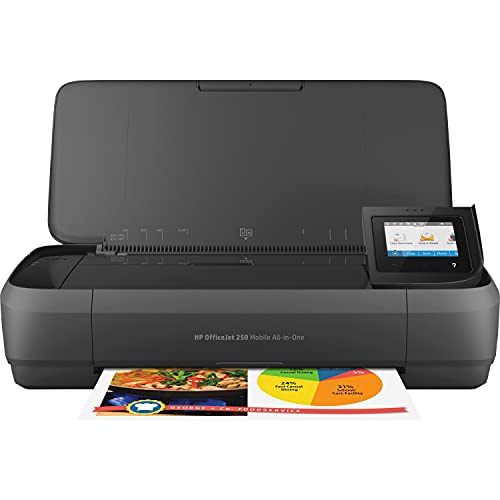
The HP OfficeJet 250 is designed for maximum portability without sacrificing essential features like printing, scanning, and copying. It supports wireless and mobile printing from various devices, making it ideal for on-the-go business professionals. Its compact size allows it to fit in backpacks or briefcases, and the included battery provides flexibility for printing anywhere. Integration with the HP app enhances ease of use via smartphones.
Canon PIXMA TS3720 Wireless All-in-One Printer

The Canon PIXMA TS3720 is an easy-to-set-up wireless all-in-one printer focused on simplicity and efficiency. It covers print, copy, and scan functions but supports single-sided printing only. Operating at approximately 7.7 ppm for black and 4 ppm for color, it suits light document and photo printing tasks. Its streamlined setup process reduces installation time, making it accessible to users with minimal technical expertise.
Buying Guide for Smallest All-in-One Printers
When choosing the best smallest all-in-one printer for your needs, it’s important to consider several factors to ensure it fits your workspace and workflow efficiently.
Compactness and Design
- Look for printers with small footprints and compact designs that fit your available space without sacrificing functionality.
- Consider portable models if you need printing capabilities on the go or in multiple locations.
Functionality
- Ensure the printer offers all needed functions: print, scan, copy, and fax if required.
- Check whether the printer supports duplex (two-sided) printing to save paper and improve professionalism.
- Auto document feeders (ADF) can expedite scanning and copying multiple pages.
Print Speed and Quality
- Evaluate the pages per minute (ppm) rate, balancing speed and quality based on your typical usage.
- Inkjet printers generally provide superior photo quality, while laser printers are better for text-heavy documents.
Connectivity Options
- Prefer wireless and mobile printing for easy access from multiple devices without complex cabling.
- Cloud printing and app support enhance remote printing and scanning capabilities.
- Dual-band Wi-Fi improves reliability in crowded wireless environments.
Ease of Use and Maintenance
- Touchscreen controls simplify operation and navigation of printer functions.
- Consider printers with easy ink cartridge replacement and maintenance to reduce downtime.
- Look for energy-efficient models to save on running costs.
By taking into account these considerations—compact design, multifunction capabilities, print performance, connectivity, and user experience—you can select a smallest all-in-one printer that meets your practical and spatial requirements effectively.