Best QR Code Label Printers for Home and Small Business
Choosing the best QR code label printer is essential for efficient organization, business branding, and inventory management. The following table summarizes five top-rated portable thermal and printable label makers, featuring Bluetooth connectivity, app customization, and multi-size label compatibility. These devices cater to a variety of uses, from home storage and office labeling to retail barcodes and QR code printing.
| Product | Brand | Main Feature | Use Case |
|---|---|---|---|
| Phomemo M120 Label Maker | Phomemo | Portable thermal label printer, multi-size labels, voice/image recognition | Small business, home, office |
| NIIMBOT Label Maker Machine D11 | NIIMBOT | Wireless, rechargeable, voice/picture recognition | Office, home organization |
| 1″ X 1″ Square Printable Labels | SPARTAN INDUSTRIAL | Inkjet and laser printable labels, 6300 matte white sheets | Custom QR code printing with existing printers |
| Phomemo M110 Label Maker Bluetooth | Phomemo | Bluetooth, thermal printing, 300+ templates, inkless | Home, retail, school, office |
| Ponek M100 Bluetooth Label Printer | Ponek | Bluetooth connectivity, versatile app, multiple tape sizes | Small business, office, home, school |
Phomemo M120 Portable Thermal Label Printer

The Phomemo M120 is a lightweight, portable thermal label maker weighing only 200 grams. It supports label sizes from 20mm to 50mm with precise calibration via its adjustable paper slot. The printer can produce up to 3,000 labels on a single charge and features an auto-sleep mode after 5 minutes of inactivity to conserve battery life.
Equipped with the “Print Master” app, this model offers powerful customization including voice and image recognition, OCR text scanning, plus 1,500+ symbols, 200 templates, 110 fonts, and support for 20 languages. It prints barcodes, QR codes, addresses, names, logos, and various label types, ideal for small businesses, offices, or home use.
NIIMBOT Label Maker Machine D11 Wireless Printer

The NIIMBOT D11 combines label-making with smart device functionality, offering a compact and lightweight design. It supports printing a variety of texts, numbers, symbols, graphics, logos, barcodes, and QR codes, with intelligent voice and image recognition capabilities.
This rechargeable model can operate for up to two months on a single charge, making it eco-friendly and cost-efficient. Its wireless connection enhances portability, suitable for users who need a reliable label maker for home, office, or business organizing tasks.
1″ X 1″ Square Printable Labels by SPARTAN INDUSTRIAL

This pack of 6300 white matte square labels is compatible with inkjet and laser printers, providing an excellent option for users who prefer printing QR codes using their existing printing devices. Each label measures 1″ x 1″ and is peel-and-stick, suitable for various surfaces such as paper, plastic packaging, glass, and metal.
The labels create smudge-free, fade-resistant prints that resist yellowing over time, offering a flexible labeling solution for organizing files, bins, price tags, and barcodes at home or office without the need for a dedicated label printer.
Phomemo M110 Bluetooth Thermal Sticker Printer

The Phomemo M110 connects easily to iOS, Android, and Windows devices via Bluetooth, using the Print Master app for creating labels. It supports widths from 20mm to 50mm and is ideal for labeling clothing, storage jars, retail price tags, and QR codes in home or commercial settings.
This thermal and inkless label maker prints up to 4,200 labels per charge with speeds of 30mm per second. It offers 300+ templates, 30 fonts, 500 emoticons, and 40 borders for extensive customization. The app also supports batch printing and saving label designs.
Ponek M100 Bluetooth Label Printer with 3 Tapes
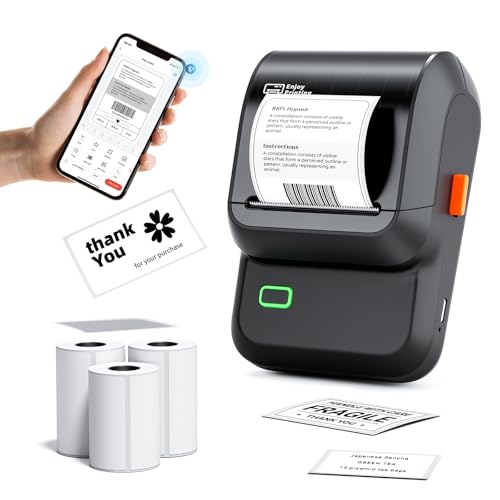
The Ponek M100 Bluetooth label printer offers seamless compatibility with Android and iOS devices. It comes with three tapes of varying widths (1.57″ x 1.18″, 1.96″ x 1.18″, and 1.96″ x 3.14″) and supports printing labels from 0.78″ to 2″ wide.
This versatile label maker connects via Bluetooth for mobile devices using the Print Master app and via USB for PC users with the Labelife app. It is ideal for small businesses, offices, schools, and home use, printing oil-resistant bread price tags, barcodes, name tags, and spice labels efficiently without manual errors.
Buying Guide for QR Code Label Printers
When selecting a QR code label printer, consider several key factors to ensure it meets your specific needs:
1. Printing Technology
Thermal printing is popular for QR code labels due to its inkless process, fast printing speeds, and durability. Thermal printers use heat-sensitive labels, saving costs on ink or toner. Alternatively, inkjet or laser printable label sheets allow custom printing with existing printers but may require additional setup.
2. Connectivity and Device Compatibility
Look for Bluetooth or wireless connection options for easy printing directly from smartphones, tablets, or PCs. Ensure the printer’s app is compatible with your operating system (iOS, Android, Windows) and offers intuitive label design tools.
3. Label Size and Customization Options
Choose a label maker that supports multiple label sizes if you need versatility in labeling various items. Check the availability of customizable fonts, symbols, templates, and the ability to add logos or images. Some apps also provide advanced features such as OCR and batch printing for efficiency.
4. Portability and Power Source
For mobile use, pick a lightweight, portable label printer with rechargeable batteries. Consider battery life — some models can print thousands of labels per charge, which is useful for on-the-go labeling. Auto-sleep modes help conserve power during inactivity.
5. Durability and Label Adhesion
Select labels that adhere well to different surfaces (plastic, glass, metal) and withstand environmental factors without fading or smudging. Some printers offer specialized label materials such as waterproof or tear-resistant options if needed.
6. Print Quality and Speed
High-resolution printing ensures QR codes and barcodes scan accurately. Fast print speeds improve productivity, especially for business environments requiring quick labeling.
7. Price and Consumables
Consider the cost of label rolls or sheets and the availability of replacements. Inkless thermal printers generally reduce long-term expenses as they don’t require ink or toner cartridges.
By assessing these criteria, you can select a reliable QR code label printer that fits your organizational, business, or personal labeling demands effectively.