Best Printers With USB Flash Drive Ports and USB Hub Accessories
Finding a printer with a USB flash drive port can streamline your workflow by allowing direct printing from flash drives. Additionally, pairing your printer with a USB hub provides expansion options for connecting multiple USB devices including keyboards, mice, and external drives. Below is a summary table of the top USB hub products that support printers and flash drives efficiently, perfect for enhancing your printing and connectivity experience.
| Product | Brand | Key Features | Amazon Link |
|---|---|---|---|
| USB 3.0 Hub, VIENON 4-Port USB Hub | vienon | 4 ports, USB 3.0, plug & play, multi-device support | View on Amazon |
| UGREEN USB 3.0 Hub, 4 Ports USB A Splitter | UGREEN | 4 ports, fast 5Gbps transfer, wide compatibility | View on Amazon |
| BYEASY USB Hub, Multiple USB 3.0 Hub | BYEASY | 4-port USB 3.0 expansion, 5Gbps speed, no drivers needed | View on Amazon |
| USB Hub 3.0, PANPEO 4-Port USB 3.0 Hub | PANPEO | Multiple USB ports, backward compatible, 5Gbps data speed | View on Amazon |
| USB Hub, USB Splitter 4-Port USB 3.0 Hub, Hididi | Hididi | 4 ports, wide compatibility, super speed transfer | View on Amazon |
VIENON USB 3.0 Hub 4-Port USB Expander

The VIENON USB 3.0 Hub expands one USB port into four high-speed ports, enabling simultaneous connections without sacrificing performance. It supports a wide device range including printers and flash drives. The USB 3.0 interface ensures a fast data transfer rate of up to 5 Gbps, suitable for transferring large files quickly. With plug-and-play functionality, you won’t need additional drivers, making it an easy and effective choice for users seeking to connect multiple devices to their printer.
UGREEN USB 3.0 Hub 4-Port USB A Splitter

This UGREEN USB hub provides four USB A ports, transforming one port into four to support multiple peripherals like printers, flash drives, and keyboards simultaneously. It boasts a rapid file transfer speed of 5 Gbps and supports major operating systems such as Windows, macOS, and Linux. With no driver installation needed, it’s a straightforward solution to improve connectivity with your printer and other devices.
BYEASY USB Hub 3.0 with Type C Power Port
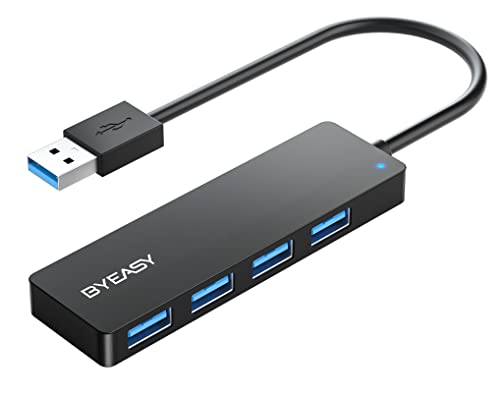
The BYEASY USB Hub enhances your setup with four USB 3.0 ports offering strong data transfer speeds up to 5 Gbps. It’s designed for stability and better heat dissipation using advanced chip technology. This plug-and-play device supports connecting printers, flash drives, and multiple peripherals simultaneously without driver requirements, ideal for expanding USB connectivity on laptops and desktops.
PANPEO USB 3.0 4-Port Hub for Wide Device Compatibility

Designed for compatibility with numerous devices, the PANPEO 4-Port USB Hub supports USB 3.0 and is backward compatible with USB 2.0 and 1.0 devices. It enables the connection of printers, flash drives, keyboards, mice, and more with a fast 5 Gbps data transfer rate. This hub doesn’t support charging but excels at offering seamless simultaneous USB connections.
Hididi USB 3.0 4-Port Hub Multiport Adapter

The Hididi USB Hub features four USB 3.0 ports that enable fast and stable connections to devices such as printers, flash drives, and cameras. It supports data transfer speeds up to 5 Gbps and is compatible across various devices and platforms. The hub is designed for plug-and-play use without requiring drivers, enhancing USB connectivity conveniently.
Buying Guide for Printers with USB Flash Drive Ports and USB Hub Accessories
When choosing a printer with a USB flash drive port or an accompanying USB hub for enhanced connectivity, consider the following factors to ensure optimal performance and convenience:
1. USB Port Availability and Compatibility
Look for printers that include a direct USB flash drive port for simple plug-and-print functionality. Additionally, if you need to connect multiple USB devices, consider a USB 3.0 hub with multiple ports compatible with your operating system and peripherals like printers, keyboards, and external drives.
2. Data Transfer Speeds
USB 3.0 hubs offer high-speed data transfer rates of up to 5 Gbps, allowing faster printing and file sharing. This speed is crucial for transferring large files such as high-resolution images or documents, which can be processed more efficiently than with USB 2.0 or older standards.
3. Number of USB Ports
Evaluate how many USB devices you plan to connect. Hubs with at least four ports provide flexibility to connect your printer alongside other peripherals without needing frequent unplugging or port swapping.
4. Plug and Play Functionality
Choose USB hubs and printers that support plug-and-play to avoid driver installation hassles. Compatibility with major operating systems like Windows, macOS, and Linux ensures smoother integration into your workspace.
5. Build Quality and Heat Management
Reliable performance with good heat dissipation is essential when multiple devices run simultaneously. USB hubs with built-in advanced chips and temperature control enhance longevity and stable performance when connected to printers and other peripherals.
6. Additional Features
Some USB hubs offer Type-C power ports for charging and power delivery, though not all hubs support charging. Confirm the features that match your needs, especially if your workflow requires portable or multi-device connectivity solutions.
Choosing the right combination of a printer with a USB flash drive port and an efficient USB hub can significantly improve your productivity by simplifying device connectivity and ensuring swift file transfer capabilities.