Best Printers and Check Paper for Secure and Efficient Check Printing
Finding the best printer to print checks requires considering security, compatibility with banking standards, and ease of use. This guide presents top printers and check papers designed for bank-compliant MICR check printing, compatible with popular accounting software like QuickBooks and Quicken. Below is a summary table of selected products to help you choose the right solution.
| Product | Brand | Type | Key Feature |
|---|---|---|---|
| DocuGard Blue/Red Premier Check Paper | DocuGard | Check Paper | 13 Security Features, ANSI Compliant |
| VersaCheck HP Officejet 200 MXE Portable | VersaCheck | Portable Printer | Wireless, MICR Ink Included, Mobile Use |
| VersaCheck HP Laserjet M234 MXE MICR Printer | VersaCheck | Laser Printer | Auto Duplex, Wireless, Dual Toner Included |
| VersaCheck M22 MXE MICR Check Printer | VersaCheck | Laser Printer | High Volume Printing, MICR Toner Included |
| CheckOMatic Computer Business Check Paper | Check O Matic | Check Paper | 100 Pack, Advanced Security Features |
DocuGard Blue/Red Premier High Security Check Paper

The DocuGard Blue/Red Premier Check Paper features 13 comprehensive security elements recommended by the National Check Fraud Center, ensuring high protection against counterfeit checks. It is ANSI compliant and compatible with laser and inkjet printers. The checks are located at the top of the sheet (3.5″ tall by 8.5″ wide), with two horizontal perforations for easy separation. This paper is designed to work flawlessly with popular accounting software like Quicken, QuickBooks, and VersaCheck, making printing professional and secure checks simple.
VersaCheck HP Officejet 200 MXE Portable Wireless MICR Printer

This portable printer bundle includes the VersaCheck X9 Platinum 5-user check printing software and blank check paper. Its wireless connectivity and battery power option enable printing bank-compliant checks anywhere, anytime. The package includes VersaInk magnetic (MICR) black ink cartridge which meets banking standards, making it ideal for businesses that require mobility and reliability. It supports Windows 10 and 11 versions, improving compatibility with common operating systems.
VersaCheck HP Laserjet M234 MXE MICR Check Printer Bundle

The VersaCheck HP Laserjet M234 offers high performance with automatic duplex printing, wireless (Wi-Fi 802.11b/g/n), Ethernet, and USB connectivity. It includes two print cartridges: a VersaToner 134A MICR black toner cartridge for fully bank-compliant check printing and an HP 134A black cartridge for regular printing. With print speeds up to 30 pages per minute, it suits high-volume need environments, supporting printing, copying, and scanning functions in one device.
VersaCheck M22 MXE MICR Check Printer with Software Bundle

This laser MICR check printer bundle includes two cartridges: one VersaToner 071 magnetic toner for secure check printing and a Canon 071 starter cartridge. The printer supports wireless WiFi, USB, automatic duplex printing, and a 150-sheet input tray. It prints up to 30 pages per minute and yields up to 3,600 checks per MICR cartridge, making it efficient for medium to high volume check printing with bank compliance.
CheckOMatic Business and Personal Check Paper 100 Pack
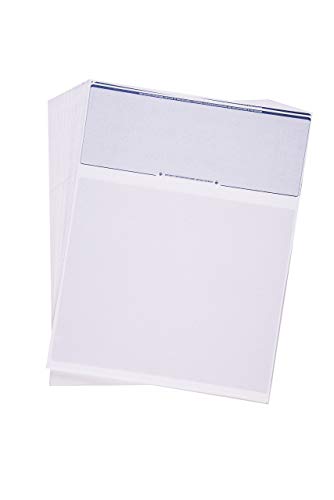
The CheckOMatic 100 Pack of blank business checks includes pay stubs and is compatible with laser printers and popular accounting software such as QuickBooks, Quicken, and Versacheck. It offers advanced security features like a blue diamond background, micro-printed borders, watermarks, and signature lines to protect against fraud. Ideal for diverse business banking and payroll applications, this pack focuses on clarity, security, and versatility.
Buying Guide: Choosing the Best Printer and Paper for Check Printing
Selecting the right check printer and paper depends on several factors to ensure secure, compliant, and efficient check production.
Security Features
- MICR Compatibility: Printers must use MICR toner or ink to print the magnetic ink character recognition line essential for bank processing.
- Security Paper: Using check paper with embedded security features like watermarks, micro-printing, and prismatic backgrounds reduces fraud risk.
Printer Type
- Laser vs. Inkjet: Laser printers with MICR toner are generally preferred for check printing due to sharper prints and higher durability.
- Portability: For mobile businesses, portable wireless printers with MICR cartridge options offer flexibility.
- Volume Capability: Consider printers that support duplex and high-speed printing for frequent or batch check printing.
Software Compatibility
- Verify compatibility with your accounting software like QuickBooks, Quicken, or VersaCheck for seamless check formatting and printing.
- Many printers come bundled with check printing software licenses to simplify setup.
Cost Efficiency
- Check the toner/ink cartridge page yield to understand long-term costs.
- Bulk purchase options for check paper help save money and maintain consistent quality.
Ease of Use and Connectivity
- Look for wireless, Ethernet, or USB connectivity options to fit your workflow.
- User-friendly printer drivers and software integration reduce setup time and printing errors.