Best Printers With Negative Scanning for Quality Photo Digitizing
Finding the right printer that can also scan negatives demands a blend of high-quality imaging and versatile scanning capabilities. This guide reviews top devices suitable for scanning negatives and printing, focusing on clarity, ease of use, and additional features. Below is a summary table highlighting key options for efficient negative scanning and printing functions.
| Product Name | Brand | Key Feature |
|---|---|---|
| ClearClick QuickConvert 2.0 Photo, Slide, and Negative Scanner | ClearClick | Dedicated negative scanner with 22 MP, no computer needed |
| HP OfficeJet Pro 8125e Wireless All-in-One | HP | Wireless all-in-one with duplex printing and scanning |
| HP Envy 6155e Wireless All-in-One Printer | HP | Color printing, scanning with auto 2-sided printing |
| Epson EcoTank ET-2800 Wireless All-in-One Printer | Epson | Cartridge-free printing with reliable scanning |
| HP ENVY Inspire 7955e Wireless Color Inkjet Printer | HP | Borderless photo printing, scanning, and copying |
ClearClick QuickConvert 2.0: Dedicated Photo & Negative Scanner
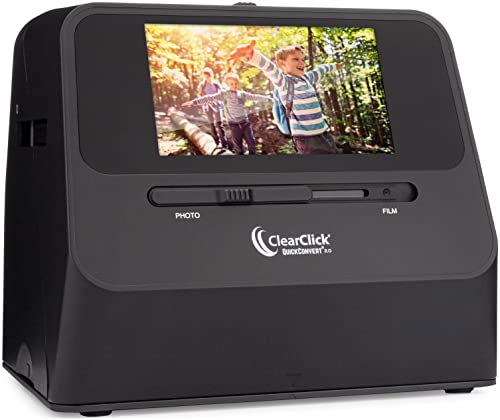
The ClearClick QuickConvert 2.0 is specialized for scanning photos, slides, and negatives directly to digital format without requiring a computer. Its capability includes 35mm, 110, and 126 films, producing 22 megapixel interpolated images suitable for detailed archival. The 5″ LCD screen facilitates instant previewing. Scanning speed is impressive, taking only 2-3 seconds per image, which makes digitizing old negatives efficient. This scanner is battery-powered for portability and saves images as JPEGs on SD cards. Although it handles one item at a time with no auto feeder, it remains highly effective for quality negative scanning tasks.
HP OfficeJet Pro 8125e Wireless All-in-One Printer and Scanner

The HP OfficeJet Pro 8125e delivers multifunctional wireless printing and scanning including high-quality color prints suitable for business and personal needs. Equipped with an auto document feeder and duplex printing, it supports quick black and color printing speeds of up to 20 ppm and 10 ppm respectively. The wireless connectivity ensures reliable performance for home or office. While it is a versatile all-in-one printer, it supports scanning documents well but does not have a dedicated negative scanning feature—making it more ideal for users wanting general scanning with occasional photo digitizing.
HP Envy 6155e Wireless Color Inkjet Printer All-In-One

The HP Envy 6155e is designed for home users seeking convenient all-in-one printing, scanning, and copying. Features include a 2.4″ color touchscreen for easy navigation, auto 2-sided printing, and a 35-sheet document feeder. Print speeds range up to 7 ppm in color and 10 ppm in black. It handles borderless photo printing well but lacks specific negative scanning capabilities, making it suitable for users primarily digitizing flat photos or documents alongside everyday printing.
Epson EcoTank ET-2800 Wireless All-in-One Cartridge-Free Printer

The Epson EcoTank ET-2800 enhances efficiency with its cartridge-free design, offering significant savings on ink replacement. It prints quickly with Micro Piezo Heat-Free Technology producing vivid prints and sharp documents. Wireless connectivity allows seamless printing and scanning from various devices. Though excellent for reliable home printing and scanning, it is not optimized for scanning negatives directly, so supplementary equipment might be required for dedicated negative digitizing.
HP ENVY Inspire 7955e Wireless All-In-One Printer with Mobile Printing

The HP ENVY Inspire 7955e meets home printing demands for documents and borderless photos in multiple sizes, with wireless and mobile printing enabled. Print speeds reach 10 ppm color and 15 ppm black, accompanied by scanning and copying conveniences. It supports HP+ smart features such as automatic updates and security enhancements. While it excels in photo and document scanning, it does not provide integrated negative scanning capability, so it serves best for users who occasionally digitize photos with inkjet printing needs.
Buying Guide For Printers That Scan Negatives
When choosing a printer capable of scanning negatives, consider factors beyond basic printing features, as negative scanning requires dedicated or highly specialized sensors and software.
- Dedicated Negative Scanner vs. All-in-One Printers: Devices like the ClearClick QuickConvert are built specifically for negatives and slides, delivering excellent detail and color accuracy. In contrast, all-in-one printers provide general scanning but may lack the resolution or holder designs for negatives.
- Resolution and Image Quality: Higher megapixel or DPI ratings improve the clarity of scanned negatives. Look for scanners or printers advertising 3000+ DPI or above 14 megapixels for detailed digitizing.
- Ease of Use and Workflow: Features such as direct SD card saving, LCD previews, and standalone operation (without computer connection) streamline the digitizing process, especially for exclusive negative scanning.
- Printing and Scanning Speeds: If the device will also serve regular printing needs, consider print speeds and duplex features to handle business documents efficiently.
- Connectivity Options: Wireless capabilities and mobile app support facilitate remote printing and scanning but have minimal impact on negative scanning quality.
- Ink Efficiency and Running Costs: Cartridge-free systems like Epson EcoTank considerably reduce ongoing costs if heavy printing accompanies scanning tasks.
Balancing scanning quality for negatives with printing and scanning versatility is key. Dedicated scanners like ClearClick deliver specialized performance, while multifunction printers provide broader utility with moderate negative scanning support.