Best Printers That Don’t Require WiFi for Reliable Printing
If you’re searching for a printer that doesn’t need WiFi, you’ve come to the right place. Whether you want to avoid network hassles or need a dependable printer for on-the-go use, various options offer wireless alternatives like direct Bluetooth, WiFi hotspot, or USB connectivity. Below is a summary table showcasing top choices designed for easy, cable-free printing without relying on home WiFi networks.
| Product | Brand | Connection Type | Key Features |
|---|---|---|---|
| Liene 4×6″ Photo Printer | Liene | Built-in WiFi Hotspot | Thermal dye sublimation, instant 4×6 photos, waterproof and fade-resistant prints |
| Rongta Portable Thermal Inkless Printer | Rongta | Bluetooth & WiFi, USB | Inkless thermal printing, compatible with Android/iOS, quiet operation |
| Rongta Portable Wireless Thermal Printer | Rongta | Bluetooth & WiFi, USB | Inkless, supports multiple print sizes, fast wireless setup |
| HP DeskJet 2755 All-in-One Printer | HP | WiFi, USB | Print, scan, copy, mobile printing, supports various media |
| HP LaserJet M209dw Wireless Laser Printer | HP | Wireless (WiFi), USB | Fast black & white printing, duplex printing, mobile compatibility |
Liene 4×6″ Photo Printer With Built-In WiFi Hotspot

The Liene 4×6″ Photo Printer offers instantly vibrant photo printing without relying on external WiFi. Thanks to its built-in WiFi hotspot, you can connect up to 5 devices directly for seamless photo printing from smartphones. Using thermal dye sublimation, the prints are rich in color and come with a protective layer to resist water, scratches, and fading, ideal for preserving memories.
The device is user-friendly with an app providing step-by-step guidance and error notifications, reducing paper jams and connection issues. It comes with 20 sheets and one cartridge, making it perfect for casual home photo printing without complex network setups.
Rongta Portable Thermal Inkless Printer for Mobile Use

This compact Rongta portable thermal printer supports both Bluetooth and direct WiFi connections, allowing printing from smartphones, tablets, and laptops. It uses a thermal inkless mechanism, so there is no need to buy ink ribbons or cartridges, significantly lowering the operating cost.
With a 203DPI resolution and the ability to print documents like forms, letters, and travel tickets quietly, it is excellent for work or study environments where noise should be minimal. The device supports various paper sizes including up to US Letter, making it versatile for multiple print needs.
Rongta Wireless Thermal Printer With Bluetooth & WiFi

The Rongta F81 wireless thermal printer is designed for fast and easy printing from phones, tablets, or PCs without traditional WiFi. You connect directly via Bluetooth or WiFi through a dedicated app, enabling efficient printing of PDFs, Word documents, images, and spreadsheets.
Inkless thermal printing means low maintenance, while supporting print sizes up to 8.5 inches wide, including legal and letter documents. It prints at a speed of 15mm per second, suitable for office or home applications requiring quick, wire-free document output.
HP DeskJet 2755 All-in-One Wireless Printer for Home
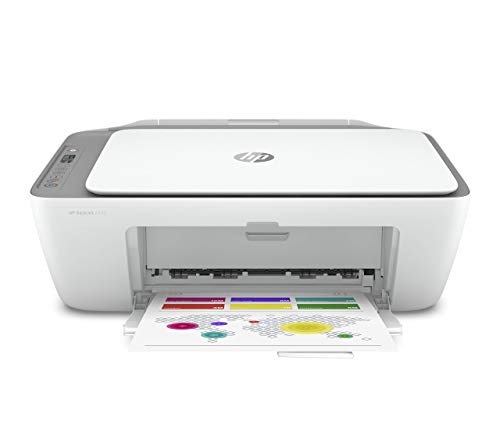
The HP DeskJet 2755 is a compact multi-function printer that handles printing, scanning, and copying with intuitive controls and wireless options. Although it supports WiFi printing, it also allows direct printing via USB for network-free setups.
Ideal for home use, it supports mobile printing through Apple AirPrint and HP Smart apps, working well with multiple operating systems. Its small footprint fits tight spaces, offering reliable color inkjet printing for documents and photos.
HP LaserJet M209dw Wireless Black & White Laser Printer

The HP LaserJet M209dw delivers fast black & white printing optimized for home office users. It offers wireless connectivity allowing mobile printing from smartphones and tablets, but also supports USB direct connection for those preferring wired use without WiFi.
It prints up to 30 pages per minute and supports double-sided printing to save paper. Its compact design fits small workspaces, making it practical for efficient, no-fuss document printing with or without network access.
Buying Guide: Key Considerations When Choosing Printers That Don’t Need WiFi
Choosing a printer that doesn’t require a traditional WiFi connection involves understanding your specific needs and how each device connects and operates. Here are important factors to consider:
Connection Types
- Built-in WiFi Hotspot: Some printers create their own WiFi network you connect to directly, avoiding reliance on routers. Good for multiple device connections without internet.
- Bluetooth: Ideal for close-range printing from phones or tablets without any network dependency, though slightly slower and fewer device connections.
- USB: Most reliable wired option for direct connection to computers, useful when wireless isn’t an option or desired.
Printing Technology and Media Support
- Thermal Dye Sublimation: Often used in photo printers, offers high-quality, long-lasting prints that resist water and fading.
- Inkjet: Versatile for photos and documents, with color printing capabilities. Requires ink cartridges.
- Laser: Best for fast, high-volume black & white printing with toner cartridges.
- Thermal Inkless: No ink required, ideal for receipts, labels, or simple documents, with low operating costs.
Portability and Size
- Portable models like Rongta printers are lightweight and compact for travel and mobile use.
- Home and office printers tend to be larger but offer more features and paper handling.
Mobile App and Software Support
- Apps simplify connecting devices directly to the printer and managing print jobs.
- Check compatibility with your smartphone OS (iOS, Android) and computer OS (Windows, Mac, Chrome OS).
Print Quality and Speed
- Consider your needs: high-quality photo printing demands different technology than printing text documents.
- Speed matters if printing large volumes frequently.
By assessing these factors, you can select the best printer that aligns with your preference for WiFi-free or limited network dependence while ensuring efficient, high-quality printing for your needs.