Best Printers and Label Makers for Mac Desktop Users
Choosing the right printer for your Mac desktop can enhance productivity, whether you need fast document scanning or efficient label printing. This guide features a selection of top printers and label makers well-suited for Mac systems, covering everything from high-speed document scanners to portable thermal label printers, ideal for professional and small business use.
| Product | Type | Key Features |
|---|---|---|
| Epson Workforce ES-400 II | Document Scanner | 50-sheet ADF, ScanSmart Software, TWAIN driver |
| PEDOOLO 4×6 Thermal Label Printer | Label Printer | Bluetooth, Multi-platform support, High-speed 203 DPI printing |
| Brother QL-800 Label Printer | Label Printer | 300 dpi, 93 labels/min, Dual-color printing |
| MUNBYN Bluetooth Thermal Label Printer | Label Printer | Driver-free, Up to 970,000 labels, Auto-calibration |
| Brother P-Touch PC Connectable Label Maker | Label Maker | Windows & Mac compatible, up to 1000mm labels, versatile usage |
Epson Workforce ES-400 II Color Duplex Document Scanner

The Epson Workforce ES-400 II is a high-speed document scanner designed for both PC and Mac desktops. It features a 50-sheet Auto Document Feeder (ADF) that facilitates quick batch scanning, making it ideal for office environments or remote work setups.
Its Epson ScanSmart Software allows users to easily preview scans, email files, and upload scans directly to cloud services. The automatic file naming helps streamline workflow. Additionally, the included TWAIN driver ensures seamless integration with most document management software, supporting efficient data organization and processing.
PEDOOLO 4×6 Shipping Label Thermal Printer with Bluetooth

The PEDOOLO Label Printer is a wireless 4×6 thermal printer compatible with Mac, Windows, Android, and iPhone via Bluetooth and USB connections. It supports major e-commerce platforms like Amazon, eBay, Shopify, and more, making it practical for shipping labels and product labeling.
With a high-resolution 203 DPI print head and speeds up to 150mm/s (72 labels per minute), it ensures clear, fast, and reliable printing. The device is suitable for large volumes with its capacity to print over 500,000 labels, improving efficiency in small business operations. It also supports customization with various thermal label widths.
Brother QL-800 High-Speed Professional Label Printer

The Brother QL-800 offers professional label printing with impressive speed, capable of producing 93 labels per minute at 300 dpi resolution. It supports both black and red dual-color printing, enhancing label visibility and branding.
This label printer is compatible with various operating systems, including Mac, and is ideal for shipping labels, name badges, file folders, and postage labels. Its plug-and-play functionality and included USB cable simplify setup and daily use for busy professionals.
MUNBYN Bluetooth Thermal Label Printer RW403B for Small Business

The MUNBYN RW403B is a wireless thermal label printer compatible with Mac and other platforms without requiring drivers. It supports major carriers and e-commerce platforms directly to streamline operations.
Built for durability, it can print up to 970,000 labels with a near-zero jam rate (<0.01%), thanks to its advanced DAC dynamic algorithm technology that auto-calibrates label alignment. This makes it a reliable choice for high-volume labeling tasks with military-standard precision.
Brother P-Touch PC Connectable Label Maker PT-P700
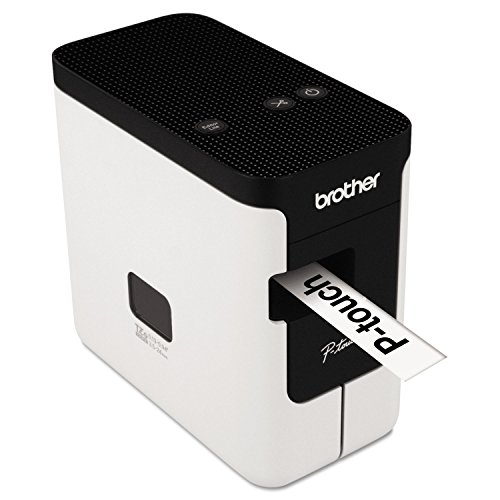
The Brother P-Touch PT-P700 is a desktop label maker compatible with Windows and Mac systems. It caters to a variety of labeling needs including IT equipment, files, storage, and signage.
This label maker offers label length customization from 25mm to 1000mm and supports easy PC connection for creating professional labels. It’s useful for detailed and precise labeling in office or technical environments.
Buying Guide: How to Choose the Best Printer for Your Mac Desktop
When selecting a printer or label maker compatible with a Mac desktop, consider the following factors to ensure it fits your work needs:
Compatibility and Connectivity
Mac OS support is critical. Check that the device supports the specific version of Mac OS you use, including M1 or later chips. Also, consider connectivity options such as USB, Bluetooth, or Wi-Fi for ease of integration with your desktop setup.
Purpose and Usage
Decide whether you need a document scanner, an all-in-one printer, or a specialized label printer. For heavy document handling, a fast scanner like the Epson Workforce ES-400 II is ideal. If you require label printing for shipping or organization, thermal label printers like the PEDOOLO or Brother QL-800 provide high-speed, high-quality printing.
Print Speed and Quality
Look for high resolution (150-300 dpi or higher) for clear text and graphics. Print speed matters if you handle large volumes — devices like the Brother QL-800 and PEDOOLO offer rapid label printing capabilities.
Software and Features
Integrated software can enhance scanning and printing workflows — features like automatic file naming, app support, and driverless printing simplify tasks. Thermal printers with extensive template libraries, such as those from KNAON, offer added versatility.
Durability and Maintenance
Consider reliability factors like jam rates and lifespan of consumables. Thermal printers require no ink but check expected label capacity to avoid frequent replacements, as seen in the MUNBYN printer’s long-lasting print head.
Label or Paper Size Support
Ensure the printer supports the sizes you need, especially for labels. Most thermal label printers support standard 4×6 inch labels but check compatibility with custom sizes or multiple label types.
Printing Volume
Choose a device suited to your volume—small home offices may require different capacities than growing businesses. High-speed models are better for large shipments or continuous scanning.