Best Instant Photo Printers for iPhone Pictures With Wireless Connectivity
Capturing memories on your iPhone is effortless, but printing high-quality photos instantly requires the right printer. This guide covers top portable and wireless printers designed specifically for iPhone picture printing, offering vibrant colors, convenience, and durability. Below is a summary of some of the best printers available on Amazon for quick and easy iPhone photo prints.
| Product | Brand | Print Size | Connectivity | Printing Technology |
|---|---|---|---|---|
| Liene M100 4×6″ Photo Printer | Liene | 4×6 inches | Wi-Fi (Hotspot) | Thermal Dye Sublimation |
| Liene 2×3” Mini Portable Instant Printer | Liene | 2×3 inches | Bluetooth 5.0 | ZINK Zero Ink Technology |
| Canon Ivy 2 Mini Photo Printer | Canon | 2×3 inches | Bluetooth | ZINK Zero Ink Technology |
| KODAK Dock Plus 4PASS Instant Printer | KODAK | 4×6 inches | Bluetooth / Docking | 4PASS Laminated Printing |
| HP Sprocket Studio Plus 4×6” Wireless Printer | HP | 4×6 inches | Wi-Fi | Dye Sublimation |
Liene M100 4×6″ Wi-Fi Photo Printer for iPhone

The Liene M100 4×6″ Photo Printer delivers vibrant, high-quality prints with advanced thermal dye sublimation technology. This printer comes with 100 sheets of photo paper and 3 color cartridges right out of the box, ensuring you have ample supplies to start printing immediately. Its minimalist design includes a magnetic cover for easy and compact storage.
This printer features a unique built-in hotspot for Wi-Fi connectivity, enabling direct connection from your iPhone without needing external networks. The laminated prints are water, scratch, fingerprint, and fade-resistant, perfect for preserving cherished memories. For best results, cleaning the print head occasionally is recommended when smudging occurs.
Liene 2×3” Mini Bluetooth Photo Printer for iPhone

Designed for extreme portability, this Liene 2×3” Mini Photo Printer is compact, weighing just 0.4 pounds, and is the size of a power bank. It supports Bluetooth 5.0, allowing quick and easy pairing with any iPhone or Android device. The sliding cover design enables effortless paper replacement, even with one hand.
The printer uses ZINK (Zero Ink) technology which eliminates cartridges by embedding dye crystals within special adhesive-backed paper. This technology results in durable, smudge-proof prints that retain vivid colors. Perfect for instant prints on the go, this bundle includes 50 sheets of ZINK adhesive paper.
Canon Ivy 2 Mini Photo Printer with Peel & Stick Prints
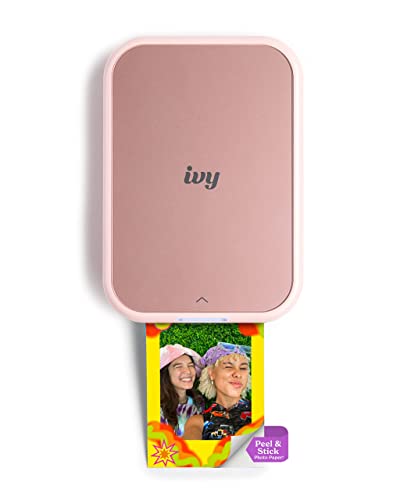
The Canon Ivy 2 Mini is a highly portable printer that produces 2×3” photos ideal for scrapbooking or decorating personal items. It uses ZINK technology to print vibrant, full-color images without ink cartridges, featuring durable photo paper with a peel-and-stick backing.
Printing is done via the Canon Mini Print app, which also allows photo customization. The peel-and-stick prints can adhere to laptops, phones, or other surfaces, making it a fun and creative printer for iPhone users seeking custom photo sharing.
KODAK Dock Plus 4PASS Instant Photo Printer

The KODAK Dock Plus combines smartphone charging and wireless photo printing in one device. Compatible with iPhone via Bluetooth, this printer supports convenient dock charging while delivering high-quality 4×6” prints.
This printer uses 4PASS technology, layering the image with multiple passes to create waterproof, fingerprint-resistant photos. It is ideal for home or small event usage, and the bundle version includes 90 sheets for extended printing sessions without needing frequent refills.
HP Sprocket Studio Plus 4×6″ Wireless Instant Photo Printer

The HP Sprocket Studio Plus stands out with its dye sublimation printing technology producing tear-resistant, smudge-proof, and waterproof 4×6” photos instantly from iPhone devices. The dedicated app supports a variety of creative options such as adding stickers, frames, and filters prior to printing.
This printer operates over Wi-Fi, making it highly convenient for wireless printing at home or on the go. Photos are dry to the touch in seconds, suitable for immediate sharing or framing.
Buying Guide for the Best iPhone Photo Printers
Choosing the right photo printer for your iPhone pictures involves several key considerations to ensure your memories are printed with the desired quality and convenience.
Print Size and Quality
- 4×6 inch prints offer a standard photo size with rich details, ideal for framing or albums.
- 2×3 inch mini prints are great for stickers or casual sharing, often adhesive-backed.
- Look for printers with dye sublimation or ZINK technology for vibrant, durable photos resistant to water and fading.
Connectivity Options
- Wi-Fi-enabled printers provide direct wireless printing without cables, sometimes via printer hotspots.
- Bluetooth printers offer quick pairing and portability, especially for mini printers designed for travel.
- Some printers combine charging docks with printing connectivity, adding convenience.
Portability and Design
- If you print on the go, consider lightweight and compact models small enough to fit in travel bags or pockets.
- Design features such as magnetic covers, easy paper loading, and durable build enhance user experience.
Print Durability and Extras
- Most modern photo printers produce waterproof, scratch-resistant prints to protect your memories.
- Check if the printer supports sticky-backed photo paper for creative decorations.
- Some models include extra features like augmented reality video printing or customizable templates through dedicated apps.
Cost and Consumables
- Consider availability and cost of photo paper and cartridges or ink. ZINK technology eliminates the need for ink but requires special paper.
- Bundles with extra paper or cartridges help save on ongoing expenses and maintain printing readiness.