Best Printer Cables With USB C for Reliable High-Speed Connections
Connecting legacy printers and devices with modern USB-C enabled laptops, tablets, and other gadgets requires the right printer cable. The best printer cables to USB C combine high-speed data transfer, robust compatibility, and durable design to keep your devices linked efficiently and securely. Below is a summary table of top-rated USB C to USB B printer cables selected for their features and versatility:
| Product | Brand | Length | Key Features |
|---|---|---|---|
| CableCreation USB B to USB C Printer Cable 6.6FT | CableCreation | 6.6 ft | Supports USB 2.0 high-speed up to 480 Mbps, connects printers, MIDI devices |
| UGREEN USB B to USB C 3 FT Printer Cable | UGREEN | 3 ft | USB 2.0 speed, plug-and-play, wide device compatibility including MIDI |
| UorMe USB C Printer Cable 6FT Type C to USB B | UorMe | 6 ft | High compatibility, supports various brands, USB 2.0 speed, stable transfers |
| JSAUX USB B to USB C Cable 10ft | JSAUX | 10 ft | Triple shielding, durable, 480 Mbps, backwards compatible with USB 1.1/1.0 |
| Bordsek Printer Cable 6ft USB C to USB B | Bordsek | 6 ft | USB 3.0 with gold-plated connectors, wide device compatibility, stable link |
CableCreation USB B to USB C Printer Cable 6.6FT
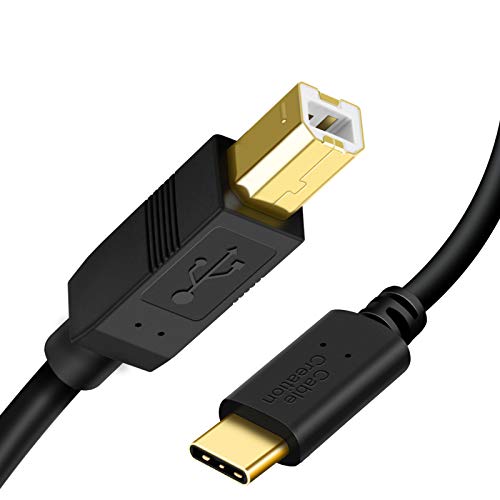
The CableCreation USB B to USB C Printer Cable is built for versatility, connecting USB-C devices like MacBook Pro and Surface Book to USB B 2.0 peripherals including printers, scanners, and MIDI instruments. With data transfer speeds up to 480 Mbps, it delivers faster, reliable connectivity compared to Wi-Fi. Ideal for legacy devices, the cable supports any USB 2.0 Type-B female port such as multifunction printers and MIDI controllers. Its 6.6-foot length provides flexibility in setup.
UGREEN USB B to USB C 3 FT Printer Cable

This UGREEN 3-foot cable is a compact solution supporting USB 2.0 high-speed transfers up to 480 Mbps, with backwards compatibility for older USB standards. It connects printers, scanners, fax machines, and audio equipment like Yamaha keyboards to USB-C or Thunderbolt 3 devices including MacBook and Samsung Galaxy phones. The cable requires no drivers for plug-and-play convenience, making it user-friendly for both office and home setups.
UorMe USB C Printer Cable 6FT Type C to USB B

The UorMe USB C to USB B cable extends 6 feet and fits a variety of USB B 2.0 devices including HP Deskjet, Lexmark, Epson, Brother printers, and MIDI instruments. It provides stable data transfer speeds of 480 Mbps and supports backward compatibility with USB 1.1 and 1.0. This cable ensures a reliable connection free from Wi-Fi dropouts and supports many popular laptop and device brands, including Samsung Galaxy and MacBook Pro.
JSAUX USB B to USB C Cable 10ft

The JSAUX 10-foot USB B to USB C cable adds extra length ideal for flexible workspace configurations. It features triple shielding with tinned copper and aluminum foil to protect against electromagnetic interference, ensuring stable and fast data transfer at speeds up to 480 Mbps. The cable supports legacy devices from HP, Canon, Lexmark, Epson, and more, making it an excellent choice for connecting printers and scanners to modern laptops.
Bordsek Printer Cable 6ft USB C to USB B

The Bordsek USB 3.0 printer cable features gold-plated connectors to prevent corrosion and ensure a clear, stable connection. This 6-foot cable supports USB 3.0 and USB 2.0 devices such as Epson, HP, Canon printers, and MIDI controllers. It promises reliable, fast data transfer and plug-and-play convenience without drivers. This cable is compatible with Thunderbolt 3 laptops, tablets, and smartphones, offering broad device support for flexible connectivity.
Buying Guide for USB C Printer Cables
Selecting the best printer cable for USB C connections involves understanding your device needs, cable specifications, and usage environment. Use the following points to guide your purchase:
1. Compatibility with Devices
- Ensure the cable supports USB B 2.0 ports if your printer or scanner is older.
- Check if your USB-C device supports USB 2.0 or USB 3.0 standards for optimal speed.
- Verify support for additional peripherals like MIDI keyboards or audio equipment if needed.
2. Data Transfer Speed
- Most printer cables support USB 2.0 speeds up to 480 Mbps, sufficient for printing tasks.
- If you need faster speeds, seek USB 3.0 compatible cables, but confirm printer port compatibility.
- Backward compatibility with USB 1.1 and 1.0 ensures support for older devices.
3. Cable Length and Build Quality
- Choose cable length based on device placement and workspace layout (typically 3 to 10 feet).
- Look for reinforced shielding, quality jackets, and strain relief to improve durability.
- Gold-plated connectors help prevent corrosion and maintain signal clarity.
4. Ease of Use
- Plug-and-play cables that require no additional drivers simplify setup.
- Reversible USB-C connectors reduce plug orientation errors.
- Additional 2-in-1 cables with USB A and USB C connectors provide extra versatility.
5. Brand Reputation and Warranty
- Choose reputable brands with positive user feedback for reliability.
- Check warranty terms to secure your investment over time.
- Customer service availability can be crucial for troubleshooting and support.
By considering device compatibility, transfer speed, cable design, ease of connection, and brand reliability, you can select the ideal USB C printer cable to keep your printing and digital music equipment connected seamlessly to your modern hardware.