Best Portable Printers and Scanners for Travel Use
For frequent travelers and remote workers, having a reliable portable printer and scanner is essential to stay productive on the go. Whether printing contracts, boarding passes, or scanning documents, compact devices that combine convenience with functionality can make a big difference. Below is a summary table of top-rated portable printers and scanners that fit travel lifestyles, followed by detailed reviews of each product.
| Product | Type | Key Features | Brand |
|---|---|---|---|
| Canon PIXMA TR160 Wireless Portable Printer | Printer | Wireless, 5-Color Hybrid Ink, Lightweight, App Connectivity | Canon |
| HP OfficeJet 250 All-in-One Portable Printer | Printer (Print/Scan/Copy) | Wireless, Battery Included, Mobile App Print/Scan | HP |
| Epson WorkForce ES-50 Portable Document Scanner | Scanner | Lightweight, Fast Single Sheet Feed, Windows & Mac Compatible | Epson |
| TATTMUSE Inkless Thermal Portable Printer | Printer | Inkless Thermal, Bluetooth, Compact, Supports US Letter & A4 | TATTMUSE |
| POLONO D810 Inkless Bluetooth Thermal Printer | Printer | Inkless Thermal, Bluetooth, Compatible with iOS/Android/PC | POLONO |
Canon PIXMA TR160 Wireless Portable Printer

The Canon PIXMA TR160 offers lightweight and highly portable printing for travelers. It fits comfortably in bags with room to spare, making it ideal for on-the-go use. Its 5-color hybrid ink system ensures high-quality prints including sharp black text and rich color photos up to 8.5” x 11”. The device supports wireless connectivity through the Canon PRINT app, Apple AirPrint, and Mopria Print Service for seamless printing from smartphones and cloud platforms.
This printer is perfect for users who want vibrant borderless photos and professional documents during travel.
HP OfficeJet 250 All-in-One Portable Printer
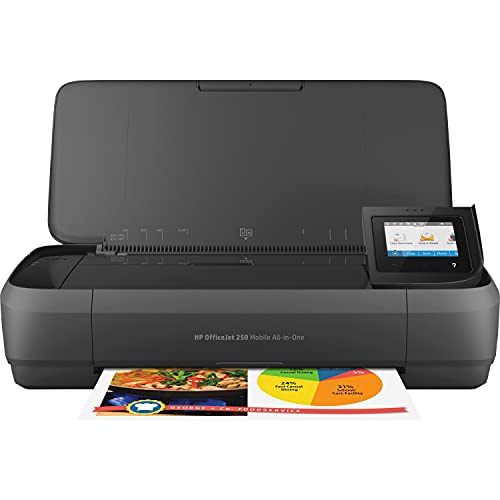
The HP OfficeJet 250 is a versatile all-in-one device that prints, scans, and copies, perfect for business travelers. It operates without a network connection and includes a rechargeable battery, enhancing portability. The compact design fits neatly into backpacks or briefcases.
Mobile printing and scanning can be managed easily via the HP app, providing compatibility across laptops, tablets, and smartphones. This device is ideal for users needing multi-functionality wherever travel takes them.
Epson WorkForce ES-50 Portable Document Scanner

The Epson WorkForce ES-50 stands out as a lightweight and fast single-sheet fed scanner designed for travel. It can scan documents as quickly as 5.5 seconds per page and handles various document sizes, including receipts, IDs, and legal papers up to 8.5″ x 72″.
Compatible with both PC and Mac, along with TWAIN driver support, this scanner is perfect for professionals needing speedy, reliable digitization on the move.
TATTMUSE Inkless Thermal Portable Printer

The TATTMUSE portable printer offers inkless thermal printing technology that requires no ink cartridges, reducing upkeep and minimizing printing costs. It is compact and lightweight (only 1.5 lb) and supports wireless Bluetooth printing from iPhone, Android, iPad, and laptops via USB-C connection.
Designed for printing documents, receipts, boarding passes, and contracts, its compatibility with US Letter and A4 thermal paper makes it a versatile option for travel and office use where inkless, monochrome printing is sufficient.
POLONO D810 Inkless Bluetooth Thermal Printer

The POLONO D810 is a highly portable thermal printer that prints in black and white, using only thermal paper for inkless operation. It supports US Letter and A4 paper sizes, ideal for travelers printing office documents, inventory lists, and business checks.
Compatible with iOS, Android, and PC (via wired USB connection), it uses the “Labelnize” app for wireless printing. Its small size and low weight (1.17 pounds) make it a practical travel companion for eco-friendly, hassle-free printing needs.
Buying Guide for Portable Printers and Scanners for Travel
Selecting the best portable printer and scanner for travel depends on various factors tailored to your specific travel and work requirements:
Portability and Size
Look for devices that are lightweight and compact enough to fit easily in a backpack, briefcase, or laptop bag. Printers like the Canon PIXMA TR160 and POLONO D810 emphasize portability without sacrificing function.
Functionality: Printer, Scanner, or All-in-One
Think about whether you need just printing, scanning, or an all-in-one device. For comprehensive tasks, HP OfficeJet 250 offers scanning, copying, and printing in one device. If scanning is your priority, compact models like the Epson ES-50 provide fast, high-quality scanning.
Connectivity Options
Wireless connectivity such as Wi-Fi, Bluetooth, and mobile app support enhances convenience when traveling. Most modern devices support mobile printing apps and wireless printing protocols like Apple AirPrint or Mopria. Also, consider if USB connectivity is supported for laptop use.
Ink vs Inkless Printing
Inkless thermal printers such as the TATTMUSE and POLONO models eliminate the need for costly ink cartridges and reduce maintenance, though they are usually limited to black and white printing. Ink printers offer color and photo printing but require more care.
Print and Scan Quality
Print resolution and scan clarity vary between models; 5-color printers provide vibrant photos, whereas thermal printers focus on text documents. Consider the types of documents you most frequently print or scan.
Battery Life and Power
For travel, battery power availability is important. Devices with built-in rechargeable batteries like the HP OfficeJet 250 provide true mobility without constant access to power outlets.
Compatibility with Devices and Operating Systems
Ensure the portable device supports your smartphone, tablet, or laptop OS (iOS, Android, Windows, Mac). Support for apps and drivers influences setup convenience and overall usability.
Paper Size and Capacity
Check supported paper sizes and input capacity. Devices supporting standard sizes like US Letter and A4 will be more versatile for various document types. Paper trays or feeders improve ease but can add to device size.