Best Portable Digital Photo Printers for Instant High-Quality Prints
Portable digital photo printers bring the convenience of printing high-quality photos anytime and anywhere. Whether for travel, events, or preserving memories on the go, these compact devices offer wireless connectivity and vibrant prints without the bulk of traditional printers. Below is a concise summary of the top portable photo printers available, followed by detailed reviews to help you choose the best fit for your needs.
| Product | Brand | Print Size | Connectivity | Special Features |
|---|---|---|---|---|
| Liene M100 4×6″ Photo Printer | Liene | 4×6 inches | Wi-Fi | Thermal Dye Sublimation, 100 Sheets & 3 Cartridges Included |
| Canon Ivy 2 Mini Photo Printer | Canon | 2×3 inches | Bluetooth | ZINK Zero Ink Technology, Peel & Stick Prints |
| Kodak Mini 2 Retro 4PASS | KODAK | 2.1×3.4 inches | Bluetooth | 4PASS Printing, Laminated & Water Resistant Photos |
| KODAK Dock Plus 4PASS Instant Printer | KODAK | 4×6 inches | Bluetooth & Docking | Phone Dock & Charge, Wireless Bluetooth Connection |
| KODAK Step Instant Smartphone Printer | KODAK | 2×3 inches | Bluetooth & NFC | ZINK Zero Ink, Full Editing Suite via App |
Liene M100 4×6″ Portable Photo Printer with 100 Sheets

The Liene M100 4×6″ Photo Printer is designed for users seeking superior image quality and portability. It uses thermal dye sublimation technology, which ensures vibrant, water-resistant, scratch-proof photos with a laminated finish. This model includes 3 color cartridges and 100 sheets of photo paper, making it a comprehensive bundle. It connects seamlessly via its own built-in Wi-Fi hotspot, allowing quick and stable smartphone printing without requiring external networks. The minimalist design and magnetic features support compact storage. It’s ideal for printing 4×6 inch photos instantly and is compatible with iPhone, Android, and PC devices.
Canon Ivy 2 Mini Photo Printer with Sticky-Back Prints
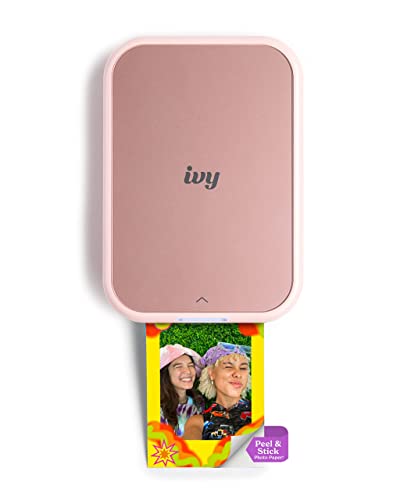
The Canon Ivy 2 Mini Photo Printer is a compact, lightweight option for instant photo printing on the go. Utilizing ZINK Zero Ink technology, it doesn’t require ink cartridges; instead, embedded dye crystals in the photo paper develop vivid prints. The printed photos measure 2×3 inches and come with a peel-and-stick backing for easy placement on various surfaces. It connects to compatible iOS and Android devices via the Canon Mini Print App over Bluetooth, making it simple to print and customize photos directly from smartphones.
Kodak Mini 2 Retro 4PASS Wireless Photo Printer

The Kodak Mini 2 Retro offers a retro aesthetic with advanced photo printing technology. Its 4PASS printing process ensures layered color application with a protective lamination, producing photos that are fingerprint-proof and water-resistant. The compact size and lightweight design (0.4 pounds) make it highly portable. Users connect their iOS or Android device via Bluetooth to quickly print 2.1×3.4 inch photos. This printer is excellent for travel, social gatherings, or field trips with easy app-based control.
KODAK Dock Plus 4PASS 4×6 Instant Photo Printer

The KODAK Dock Plus 4PASS combines instant printing with the convenience of phone docking and charging. It supports printing 4×6 inch photos via Bluetooth from Apple and Android devices and doubles as a phone charger with its docking station. Its simple interface makes printing fast and accessible in various environments such as home or school. Kodak’s proprietary 4PASS technology guarantees professional-grade photo prints with durable, laminated protection. The printer bundle offers value with additional sheets included.
KODAK Step Instant Smartphone Photo Printer

The KODAK Step Instant Printer is excellent for users looking for quick, no-ink prints sized 2×3 inches. It employs ZINK Zero Ink technology, eliminating the need for cartridges or ribbons to produce durable, moisture-resistant photos. It connects via Bluetooth or NFC, supporting most iOS and Android devices. The free Kodak app provides a full editing suite, allowing users to add filters, borders, stickers, and text before printing. Its portability and fun editing features make it ideal for creative photo sharing.
Buying Guide for Portable Digital Photo Printers
Choosing the right portable digital photo printer requires evaluating several key factors to ensure it meets your printing needs and lifestyle.
Print Quality and Technology
Thermal dye sublimation printers, like the Liene M100, produce highly detailed, vibrant, and durable 4×6 inch photos with laminated surfaces resistant to fading and smudging. ZINK (Zero Ink) technology uses embedded dye crystals within the paper for cartridge-free printing, offering smaller sticky-back prints (usually 2×3 inches) suitable for casual use and creative applications.
Print Size and Format
Consider the typical photo size you want. Larger prints (4×6 inches) provide more detail and framing options, whereas smaller prints (2×3 inches) are ultra-portable and often come with adhesive backs for easy decorating. Your choice may depend on whether you want photo-quality prints for albums or fun, shareable stickers for scrapbooking.
Connectivity Options
Most portable printers connect via Bluetooth or Wi-Fi to compatible smartphones and tablets. Wi-Fi-enabled printers sometimes create their own hotspot for direct phone connectivity without internet access, offering faster and more stable printing. NFC capability allows even quicker connections but is less common.
Portability and Battery Life
Portable printers should be lightweight and compact for easy carrying. Battery capacity matters for usage duration; some models can print dozens of photos per charge. Look for options with USB-C charging for compatibility with modern chargers and faster recharge times.
Consumables and Operating Costs
ZINK printers eliminate ink cartridges, reducing ongoing costs, but Zink paper can be pricier than standard photo paper. Dye sublimation printers require cartridges for color layers but often include generous starter packs. Assess availability and prices of refills before committing.
Additional Features
Consider print customization apps for editing features such as filters, borders, and stickers. Sticky-back photos are beneficial for easy placement. Docking features that integrate charging or multimedia functionality add convenience for some users.