Best Plastic ID Card Printers With Professional Quality and Easy Setup
Finding a reliable plastic ID card printer is essential for organizations needing efficient and professional badge creation. This article presents top products that offer excellent print quality, ease of use, and compatibility for various ID printing needs. Below is a comparison table summarizing key features of the highlighted printers and supplies.
| Product | Print Speed | Print Type | Included Software | Compatibility |
|---|---|---|---|---|
| Badgy100 Color Plastic Card Printer | 45 seconds per card | Color, edge-to-edge | Mac & Windows ID design software | Windows, Mac |
| Cardholdir ID Easy Badges Solid 210 | 300 cards/hour | Direct to Card, 300 dpi | Beginner software included | Windows, Mac |
| Bodno Badgy100 Color Printer + Supplies | 45 seconds per card | Full color, margin 1.35mm | Bodno Silver Edition software | Windows, Mac |
| Bodno Seaory S25 ID Card Printer Package | Manual feed, low volume | Single sided color | Bodno Bronze Edition software | Windows |
| Bodno Seaory S26 ID Card Printer & Camera | 300 x 1200 dpi resolution | Single sided color | Bodno software, camera included | Windows, Linux (Mac soon) |
Badgy100 Color Plastic Card Printer
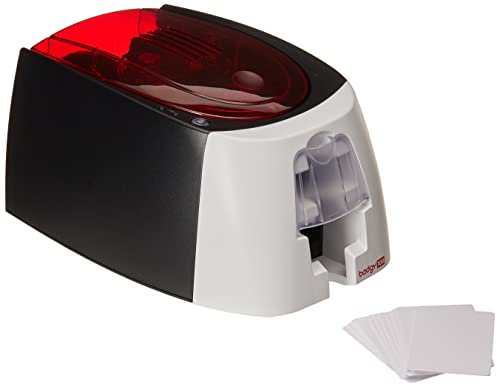
The Badgy100 Color Plastic Card Printer delivers professional-quality ID cards with quick print times of 45 seconds per card. It supports both Windows and Mac with included design software, enabling easy creation of badges. The printer offers near edge-to-edge printing with a narrow 1.35 mm margin, ensuring clean, sharp card outputs. Its setup is beginner-friendly yet customizable for advanced users, making it suitable for businesses, schools, or events requiring eye-catching photo ID badges.
Cardholdir ID Easy Badges Solid 210 ID Badge Printer

The Cardholdir ID Easy Badges Solid 210 is designed for single-sided ID badge printing with simplicity in mind. It includes everything needed to print up to 200 full-color CR80 sized badges and comes with beginner-friendly software compatible with both PC and Mac. This direct-to-card printer produces prints at 300 dpi resolution, adequate for most organizational needs. Manual feeding allows precise control, while it can print approximately 300 full-color cards per hour, ideal for small to medium printing demands.
Bodno Badgy100 Color Plastic ID Card Printer with Supplies

This all-inclusive starter package Bodno Badgy100 offers a complete solution with the printer, a 50-print ribbon, blank cards, and the Bodno Silver Edition software. It supports clean design boundaries with a 1.35 mm margin for professional-looking cards. The printer’s low-volume speed is 45 seconds per card, suited for businesses needing moderate quantities of high-quality ID badges. The included software supports versatile design and printing for efficient workflow.
Bodno Seaory S25 Single Sided ID Card Printer Package

The Bodno Seaory S25 offers a manual feed system ideal for low-volume, single-sided printing. The package includes supplies and user-friendly software with a lifetime license, featuring pre-made templates and drag-and-drop design interfaces. Precise card feeding allows detailed control over badge printing, making it suitable for offices or organizations printing ID cards on demand. This model is best for users prioritizing simplicity combined with professional output.
Bodno Seaory S26 ID Card Printer & Camera Package

The Bodno Seaory S26 enhances ID card printing with higher resolution at up to 300 x 1200 dpi for sharp and vibrant badges. This all-inclusive package comes with supplies and an integrated camera to capture photos for instant badge creation. The printer supports Windows and Linux operating systems, with Mac compatibility coming soon. Its user-friendly features and versatile software make it an excellent choice for institutions requiring detailed and colorful ID cards.
Buying Guide: Key Considerations for Plastic ID Card Printers
When selecting the best plastic ID card printer, consider these important factors to match your specific needs:
- Print Quality and Resolution: For clear, professional badges, choose printers offering at least 300 dpi; higher resolutions yield sharper images and finer color depth.
- Print Speed: Evaluate your volume requirements. Machines printing a card in under a minute suit small to medium needs, while faster printers or batch capabilities benefit higher output demands.
- Single vs. Dual-sided Printing: Determine if you need cards printed on both sides. Most budget-friendly models handle single-sided printing; dual-sided options can be pricier but offer more design flexibility.
- Software and Ease of Use: Look for included ID card design software. Beginners benefit from intuitive drag-and-drop interfaces and pre-designed templates, while advanced users may prefer customizable workflows.
- Compatibility with Operating Systems: Ensure the printer supports your environment—Windows and Mac are common, with Linux supported by fewer models.
- Included Supplies and Accessories: Starter kits with ribbons, blank PVC cards, and software simplify setup and help control costs upfront.
- Card and Ribbon Compatibility: Verify compatibility with standard card sizes (CR80) and required ribbon types to avoid supply issues. Ensure blank cards meet ISO standards for best results.
Considering these aspects will help you select an ID card printer aligned with your organizational demands, offering professional appearance, efficient operation, and long-term reliability.