Best Plastic Business Card Printers for Professional ID Badge Printing
Plastic business card printers provide a durable and professional way to create customized ID badges, membership cards, and business cards. Whether you need single-sided or dual-sided printing, fast output, or easy-to-use software, these printers offer versatile solutions for businesses of all sizes. Below is a summary table featuring top plastic business card printers and essential supplies to help you find the best option for your needs.
| Product | Brand | Key Features |
|---|---|---|
| Badgy100 Color Plastic Card Printer | Badgy | Color printing in 45 seconds, near edge printing, easy setup, Mac & Windows compatible |
| Cardholdir ID Easy Badges Solid 210 | Cardholdir ID | Single-sided printing, beginner-friendly software, prints 300 full-color cards/hour |
| Bodno Magicard 400X Dual Sided ID Card Printer | Bodno | Dual-sided printing, 300-print YMCKO ribbon included, Windows & Mac compatible |
| AlphaCard Employee ID Card Printer System | AlphaCard | Hand-fed single-sided printing, includes software and supplies, ideal for low volume use |
| Magicard 600 Dual Sided ID Card Printer & Supplies | Card Imaging | Includes color ribbon, PVC cards, design software, expert tech support |
Badgy100 Color Plastic Card Printer
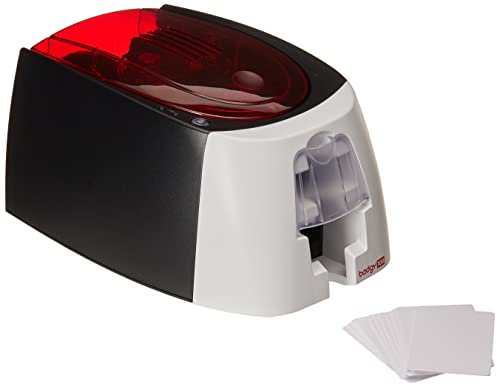
The Badgy100 Color Plastic Card Printer is designed to create professional-quality plastic ID cards quickly and conveniently. It prints full-color badges in approximately 45 seconds, with a near to edge printing margin of 1.35mm (0.05″), enabling vibrant and complete designs. The printer supports both Windows and Mac through ID design software, making it adaptable for different operating systems. It features a user-friendly setup process suitable for beginners and advanced users alike. This model is ideal for companies needing fast turnaround on durable, visually appealing plastic business cards.
Cardholdir ID Easy Badges Solid 210 Printer

The Cardholdir ID Easy Badges Solid 210 is perfect for single-sided ID badge printing with straightforward operation. It’s a direct-to-card (DTC) printer with 300 dpi resolution, suitable for 95% of organizational needs. Included are Cardholdir’s beginner-friendly software, 250 full-color print ribbon, and 200 PVC CR80-size cards, ensuring a complete start-to-finish package. It manually feeds cards and produces about 300 full-color cards per hour. Compatible with both PC and Mac, it prioritizes ease of use without compromising print quality.
Bodno Magicard 400X Dual Sided ID Card Printer

The Bodno Magicard 400X comes as an all-inclusive package with a 300-print YMCKO ribbon and ID software, allowing users to start printing professional-quality plastic cards immediately. It supports dual-sided printing, useful for more detailed card designs including photos, barcodes, or additional information. Compatible with Windows and Mac operating systems, it is a versatile option for businesses requiring robust ID printing capabilities with vibrant full-color output.
AlphaCard Employee ID Card Printer System

The AlphaCard Employee ID Card Printer System is designed for low-volume card printing with a hand-fed mechanism. It prints single-sided cards, with the option to manually flip cards for two-sided printing. This bundle includes the Magicard Pronto ID Printer, AlphaCard ID Suite Software, a 100-print color ribbon, and 100 premium blank PVC cards. Ideal for businesses that don’t require high-volume output but want quality and control over their ID card creation process.
Magicard 600 Dual Sided ID Card Printer & Supplies

The Magicard 600 offers high-quality dual-sided card printing along with a full set of supplies including color ribbon, 100 PVC cards, and Card Imaging design software. It supports customization with photos, images, text, and barcodes, making it suitable for a variety of professional ID and business card applications. Users receive free technical support, enhancing the setup and design experience for new and experienced printers alike.
Buying Guide for Plastic Business Card Printers
When selecting the right plastic business card printer, consider the following factors to ensure you make a sound investment:
Print Quality and Speed
Look for printers that offer high resolution (at least 300 dpi) to ensure sharp text and images. Print speed varies—some printers can complete a card in under a minute, which is important if you need to produce large quantities quickly.
Single vs Dual-Sided Printing
Decide whether you need single-sided or dual-sided printing. Dual-sided printers allow more information and designs per card but may be more expensive. Some single-sided printers support manual flipping for two-sided printing at lower cost.
Software and Ease of Use
Good software simplifies card design and printing. Consider if the printer includes beginner-friendly software, compatible with your computer’s OS (Windows or Mac), and whether templates or design tools are provided.
Card and Ribbon Supplies
Check if the printer package includes starter supplies such as ribbons and blank PVC cards. Compatibility with standard card sizes (CR80) and the availability of replacement supplies are essential for ongoing use.
Volume and Usage Needs
Match the printer capability with your expected card volume. High-volume printers are suitable for large businesses, while lower volume hand-fed models work well for small businesses or occasional use.
Connectivity and Compatibility
Ensure the printer supports your computer’s operating system and desired connection type (USB, network). Some printers offer Mac compatibility, others are Windows only.
Maintenance and Support
Consider the ease of maintenance and availability of technical support. A printer with good customer service and support saves time troubleshooting issues or sourcing replacement parts.