Best Photo Printers for Your Phone With Instant High-Quality Prints
Capturing memories with your phone is effortless, but printing those photos instantly requires the right device. This guide highlights the best photo printers for phones that deliver vibrant, durable prints on the go. These printers use cutting-edge printing technologies such as thermal dye sublimation and ZINK (Zero Ink) to ensure water-resistant, smudge-proof photos without hassle. Below is a summary table of top products for quick reference.
| Product | Brand | Print Size | Technology | Connectivity |
|---|---|---|---|---|
| Liene M100 4×6” Photo Printer | Liene | 4×6 inches | Thermal Dye Sublimation | Wi-Fi Hotspot |
| Kodak Mini 2 Retro Portable Photo Printer | KODAK | 2.1×3.4 inches | 4PASS Laminating | Bluetooth |
| Canon Ivy 2 Mini Photo Printer | Canon | 2×3 inches | ZINK (Zero Ink) | App Wireless |
| KODAK Dock Plus 4PASS Photo Printer | KODAK | 4×6 inches | 4PASS Laminating | Bluetooth + Dock |
| KODAK Step Instant Smartphone Printer | KODAK | 2×3 inches | ZINK (Zero Ink) | Bluetooth, NFC |
Liene M100 4×6” Photo Printer With Wi-Fi Hotspot

The Liene M100 is a portable 4×6-inch photo printer designed for iPhone and Android users. It includes 100 sheets and 3 color cartridges in the package, so you can start printing immediately. This printer uses thermal dye sublimation technology that produces vibrant photos with deep dye penetration and a laminated surface resistant to water, scratches, fingerprints, and fading.
The built-in hotspot creates a fast and stable Wi-Fi connection directly between your phone and printer, eliminating the need for external networks. Its minimalist magnetic design allows compact storage, making it ideal for travel and events. Quick print head maintenance ensures consistent high-quality output.
Kodak Mini 2 Retro Portable Photo Printer

The Kodak Mini 2 Retro is a compact, pocket-sized photo printer compatible with Android and iOS devices via Bluetooth. Weighing just 0.4 pounds, it is perfect for travel or on-the-go printing. It uses Kodak’s 4PASS technology which prints photos in multiple layers and laminates them to make prints fingerprint-proof, water-resistant, and long-lasting.
This printer supports seamless printing through the Kodak Photo Printer app. Its retro design coupled with advanced printing capabilities provides a unique blend of style and function for quick and easy physical photo sharing.
Canon Ivy 2 Mini Photo Printer With Sticky-Back Prints
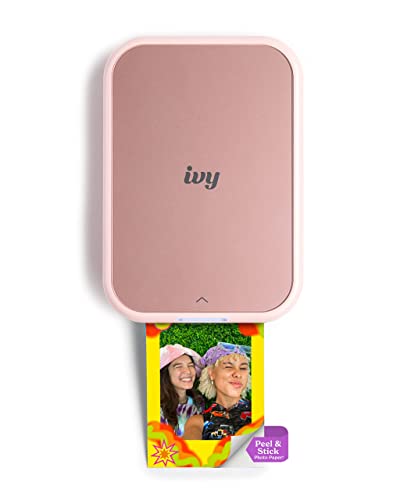
The Canon Ivy 2 Mini is a ZINK (Zero Ink) printer that produces 2×3 inch sticky-back photos from your smartphone. It uses embedded dye-based crystals inside the paper, eliminating the need for ink cartridges. This ZINK technology delivers vibrant colors and smudge-resistant prints.
Printing is done via the Canon Mini Print App, which allows photo customization before printing. The peel-and-stick backing enables easy placement of photos on surfaces, perfect for scrapbooking or decorating your space with personal mementos.
KODAK Dock Plus 4PASS Instant Photo Printer 4×6 inches

The KODAK Dock Plus enhances convenience by allowing you to dock and charge your phone while printing 4×6 inch photos instantly. Compatible with iPhone, iPad, and Android devices, it supports wireless Bluetooth connection in addition to its docking feature.
Using 4PASS printing technology, it laminates photos in layers for durable, high-quality prints that can last for years. This printer works well at home, school, or for events, with bundles containing sheets for extended printing sessions.
KODAK Step Instant Smartphone Photo Printer

The KODAK Step Instant Printer utilizes ZINK Zero Ink technology to print 2×3 inch sticky-backed photos without ink cartridges or ribbons. It connects via Bluetooth or NFC to iOS and Android smartphones and tablets, allowing instant printing of selfies or social media photos.
Included is a full editing suite through the free Kodak App for adding filters, text, stickers, and more to customize images before printing. The photos are moisture, rip, tear, and smudge resistant, combining durability with portability for printing anytime, anywhere.
Buying Guide for Photo Printers Compatible With Phones
Choosing the right photo printer for your phone involves several criteria to ensure it fits your printing needs and lifestyle.
Print Size and Quality
Photo printers offer various print sizes, commonly 2×3 inches for pocket printers and 4×6 inches for larger prints. Larger prints are better for framing and albums, while smaller sticky-back photos are ideal for scrapbooking and decorating. Print quality depends on the technology used — thermal dye sublimation and 4PASS technologies provide vibrant, multi-layer laminated images, while ZINK uses embedded color crystals to avoid ink cartridges.
Printing Technology
- Thermal Dye Sublimation: Produces rich colors with laminated surfaces that resist fading and damage.
- 4PASS Printing: Multiple layers of color with lamination for durability.
- ZINK (Zero Ink): No ink cartridges needed; colors are embedded in paper, enabling smudge-proof and water-resistant photos.
Connectivity Options
Fast and reliable connectivity is important for seamless printing. Options include Bluetooth, Wi-Fi hotspots, NFC, and dedicated printer apps. Wi-Fi hotspot printers create a private network, ensuring stable connection without external router dependency. Bluetooth is common for simplicity and mobility. Check compatibility with your device’s OS.
Portability and Design
Consider the printer’s size and weight if you plan to print outdoors or while traveling. Ultra-compact models can fit in bags or pockets and usually weigh under a pound. Magnetic or sliding covers help protect the device and photos on the go.
Paper and Cartridge Bundles
Printers often come with starter packs of photo paper and, if needed, ink cartridges. Buying bundles with extra supplies helps reduce printing costs and avoids frequent reordering. Also, check if cartridges or paper refills are easy to find.
Additional Features
- App Support: Allows advanced editing and customization before printing.
- Sticky-Back Photos: Useful for crafting and decorating.
- Docking Stations: Print and charge your phone simultaneously.