Best Photo Printers for Android Devices With Wireless and Portable Features
Finding the best photo printer for Android can transform your mobile photography experiences by allowing quick, high-quality prints right from your smartphone. This guide highlights top wireless and portable photo printers known for their compatibility, print quality, and ease of use. Below is a summary table of the featured products for easy comparison.
| Product | Brand | Print Size | Printing Technology | Connectivity |
|---|---|---|---|---|
| Liene M100 4×6” Photo Printer | Liene | 4×6 inches | Thermal Dye Sublimation | Wi-Fi Hotspot |
| Canon Ivy 2 Mini Photo Printer | Canon | 2×3 inches | ZINK Zero Ink | Bluetooth |
| KODAK Dock ERA Plus 4PASS Printer | KODAK | 4×6 inches | 4PASS Dye Sublimation | Wireless Bluetooth, Docking |
| HP Sprocket Studio Plus 4×6″ Wireless Printer | HP | 4×6 inches | Dye Sublimation | Wi-Fi |
| HPRT 4×6 Dye Sublimation Photo Printer | HPRT | 4×6 inches | Dye Sublimation | Wi-Fi, Direct Wireless Link |
Liene M100 4×6” Photo Printer for Android

The Liene M100 portable photo printer offers a user-friendly solution designed specifically for iPhone, Android, and PC users. It includes 100 sheets of 4×6 photo paper and 3 color cartridges for producing vivid prints. Utilizing thermal dye sublimation technology, the printer produces highly durable photos that resist water, scratches, fingerprints, and fading over time.
This printer boasts its own built-in Wi-Fi hotspot, ensuring a stable connection directly from your smartphone without needing external networks. Its minimalist and compact design includes a magnetic feature for easy storage, making it very portable for home or travel use. The full package includes cartridges and a photo paper supply for convenience, ideal for printing memorable moments instantly.
Canon Ivy 2 Mini Photo Printer with ZINK Technology
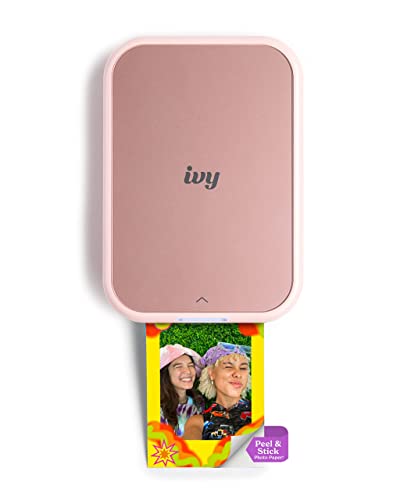
The Canon Ivy 2 Mini printer is a compact wireless printer perfect for Android devices using Bluetooth. It operates with ZINK Zero Ink technology, removing the need for ink cartridges by embedding dye crystals directly into the paper. This allows for colorful, mess-free photo prints with vibrant quality.
A notable feature is its sticky-back prints, enabling users to place photos on various surfaces like walls, laptops, or planners. The printer pairs seamlessly with the Canon Mini Print app, allowing customization and border editing before printing. Its compact design makes it a great pick for on-the-go printing with fun customization options.
KODAK Dock ERA Plus 4PASS Instant Photo Printer

The KODAK Dock ERA Plus offers versatile printing with simple wireless Bluetooth connectivity and convenient device docking to charge your phone while printing. Compatible with Android, iPhone, and iPad, it’s suited for home, school, or travel use.
Its 4PASS dye sublimation technology produces vibrant 4×6 inch photos with long-lasting quality. The printer supports easy photo printing through wireless connection and offers good value when purchased with the included 90 sheets bundle. This printer balances functionality and affordability for everyday photo printing needs.
HP Sprocket Studio Plus 4×6″ Wireless Instant Printer

The HP Sprocket Studio Plus connects with iOS and Android smartphones via Wi-Fi for fast printing of vibrant 4×6 inch photos. It uses premium dye sublimation technology, ensuring photos are tear-resistant, smudge-proof, and waterproof, perfect for preserving memories.
Users can customize photos through the HP mobile app by adding stickers, frames, and filters before printing. Designed for instant results, the printer delivers dry-to-the-touch photos quickly, enhancing the creative process of photo printing directly from smartphones.
HPRT 4×6 Dye Sublimation Wireless Photo Printer

The HPRT 4×6 photo printer delivers professional studio-grade 300dpi prints with over 1.7 million vibrant colors using advanced dye-sublimation technology. It supports easy wireless printing from Android smartphones via Wi-Fi or direct wireless connections through the HeyPhoto app.
A unique feature is the integration of Augmented Reality (AR) in printed photos. Using the HeyPhoto app, users can link video clips to their printed photos, creating interactive print experiences. Prints are sealed instantly to be waterproof, scratch-proof, and fade-resistant — ideal for preserving special moments with added digital magic.
Buying Guide for Android-Compatible Photo Printers
Choosing the best photo printer for Android devices requires considering several important factors to ensure compatibility, print quality, and usability suited to individual preferences and use cases.
Connectivity Options
- Wi-Fi Hotspot vs Bluetooth: Wi-Fi hotspot printers offer direct, interference-free connections without external networks, while Bluetooth enables easy pairing but may be sensitive to distance.
- App Support: Check if the printer has a dedicated photo app for Android that allows easy printing, customization, and editing.
Printing Technology and Quality
- Dye Sublimation: Provides vibrant, durable photos with smooth gradations and protective overlays against fading and smudging.
- ZINK Technology: Inkless printing embedded in photo paper offers convenience and mess-free usage but may have less vibrant durability compared to dye sublimation.
Print Size and Format
- Standard 4×6 inch prints are ideal for framing or traditional photo albums.
- Smaller 2×3 inch sticky-back prints are perfect for scrapbooking, decorating laptops, or notebooks with peel-and-stick functionality.
Portability and Design
- Look for lightweight, compact models with simple storage features if you plan to carry the printer regularly.
- Built-in batteries enhance portability, but require checking recharge times and battery life.
Print Speed and Paper Supply
- Fast dry-to-touch printing minimizes wait time for instant gratification.
- Consider printers bundled with sufficient photo paper and cartridges to avoid frequent replacements.
Extra Features
- Customization Tools: Apps enabling filters, stickers, borders, and text enhance creative options.
- Augmented Reality: Emerging tech links physical prints to videos or animations, adding innovative interactive layers.