Best Multifunction Printers for Business Use With Wireless and Duplex Features
Choosing the right multifunction printer for business can streamline office tasks, combining printing, scanning, copying, and faxing into one efficient device. This article reviews top options from trusted brands like Brother, Canon, and HP, focusing on features vital for business environments such as print speed, connectivity, and capacity.
| Printer | Brand | Key Features |
|---|---|---|
| Brother MFC-L8900CDW | Brother | All-in-one color laser, high volume, 63.1 lbs |
| Brother DCP-L2640DW | Brother | Compact monochrome laser, wireless, duplex, fast scanning |
| Canon imageCLASS MF751Cdw | Canon | Wireless color laser, duplex printing, 35 ppm |
| Brother MFC-L3720CDW | Brother | Color laser, auto duplex, 250-sheet capacity |
| HP Color LaserJet Pro M479fdw | HP | Wireless multifunction, auto duplex, HP Wolf Pro Security |
Brother MFC-L8900CDW Business Color Laser All-in-One Printer
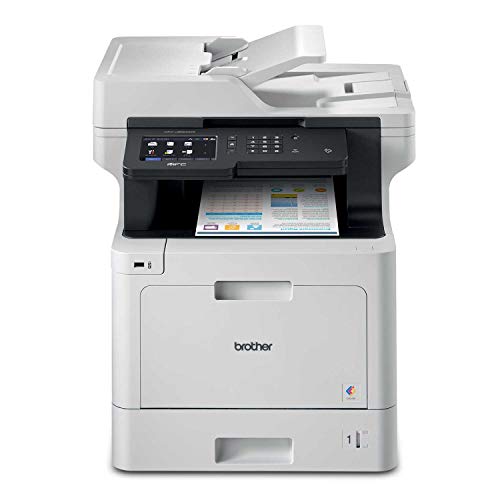
The Brother MFC-L8900CDW is designed for businesses that demand large printing, scanning, and copying volumes. This color laser all-in-one measures 19.5″ wide, 20.7″ deep, and 21.6″ high, weighing 63.1 lbs, which suits high-traffic office environments.
Its all-in-one capabilities integrate efficient workflow management, making it ideal for enterprises requiring versatility combined with robust output. It supports a broad array of business document tasks with reliable, rapid printing and copying functions.
Brother DCP-L2640DW Wireless Compact Monochrome Laser Printer

This Brother DCP-L2640DW monochrome multifunction printer is a perfect fit for small businesses that prioritize office space and efficiency. It prints black and white documents at speeds up to 36 pages per minute, accompanied by fast scanning capabilities.
Its 50-page automatic document feeder enhances productivity by handling multi-page scanning or copying jobs. Connectivity options include dual-band wireless, Ethernet, and USB, allowing flexible device connections and seamless integration into office networks.
Canon imageCLASS MF751Cdw Wireless Duplex Color Laser Printer

The Canon imageCLASS MF751Cdw stands out for wireless 3-in-1 functionality with print, scan, and copy features. Delivering up to 35 pages per minute in color or black and white, it supports duplex printing and uses high-capacity toner options to reduce interruptions.
This printer is favored for its combination of speed and color output quality, making it excellent for businesses that need dependable color documents and efficient daily operation.
Brother MFC-L3720CDW Color Laser All-in-One Printer

The Brother MFC-L3720CDW delivers professional-grade color laser printing at up to 19 pages per minute with laser-quality output. Its 250-sheet paper capacity and 50-sheet auto document feeder keep workflows smooth for small offices.
With advanced connectivity including dual-band wireless, Wi-Fi Direct, and USB 2.0, multiple users can connect easily. Automatic duplex printing enhances efficiency while reducing paper waste, tailored to busy small business needs.
HP Color LaserJet Pro Multifunction M479fdw Wireless Printer
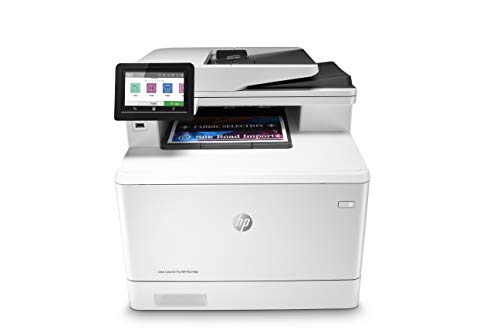
The HP Color LaserJet Pro M479fdw is built to maintain consistent performance in demanding business environments. It offers printing, scanning, copying, and faxing with high-quality output and streamlined wireless operation.
Security is enhanced through HP Wolf Pro Security, protecting company data at the printer hardware and firmware level. Its customizable touchscreen allows automation of complex workflows, saving valuable time during busy periods.
Buying Guide for Choosing a Multifunction Business Printer
Selecting a multifunction printer for business depends on several critical factors:
- Print Volume and Speed: Choose a printer that matches your office’s average print demands. High-volume printers like the Brother MFC-L8900CDW with fast output speeds suit large workloads, while compact printers fit smaller teams.
- Color or Monochrome Printing: Determine if your business needs color printing regularly. Color machines are versatile but more expensive, whereas monochrome printers like the Brother DCP-L2640DW are cost-effective for black and white documents.
- Connectivity Options: Multiple connectivity choices — including wireless (dual-band Wi-Fi), Ethernet, and USB — enable smooth integration with different devices and networks. Robust connectivity supports mobile and shared office printing.
- All-in-One Features: Combining scanning, copying, and faxing in one reduces clutter and expense. Automatic document feeders and duplex printing increase efficiency and minimize paper waste.
- Security Features: Essential for protecting sensitive business data, look for printers with embedded security protocols and firmware safeguards, like HP Wolf Pro Security on the HP M479fdw.
- Paper Capacity and Expansion: Consider printers with sizeable paper trays and options for adding more to reduce refill frequency during heavy use.
- Toner and Maintenance: High-capacity toner cartridges and easy maintenance lower operating costs and reduce downtime.