Best Micro Panel Thermal Printers for Efficient Receipt and Label Printing
Micro panel thermal printers are essential tools for compact, reliable printing needs across various industries, including retail, healthcare, and logistics. These printers offer clear, fast printing capabilities, supporting text, barcodes, and QR codes directly from connected devices. Below is a summary of five highly rated micro panel thermal printers selected for their performance, connectivity options, and ease of integration.
| Product | Brand | Power Supply | Interface | Application |
|---|---|---|---|---|
| Maikrt Micro Thermal Printer | Maikrt | 5~9V | RS232/TTL+USB | Medical & Testing Instruments |
| MicroMall Maikrt Embedded Thermal Printer | MicroMall | 12~24V | RS232/TTL+USB | Medical & Testing Instruments |
| PRIMUZ Micro Thermal Printer Module | PRIMUZ | 12~24V | RS232/TTL+USB | Arduino & ESP32 Development |
| RS232 Serial Port 58mm Thermal Printer | Generic | 12~24V | RS232/TTL+USB | Self-Service Vending & More |
| Epson TM-T20III Thermal POS Printer | Epson | USB powered | USB Only | Point of Sale Systems |
Maikrt Micro Thermal Printer 5~9V Embedded Receipt Printer
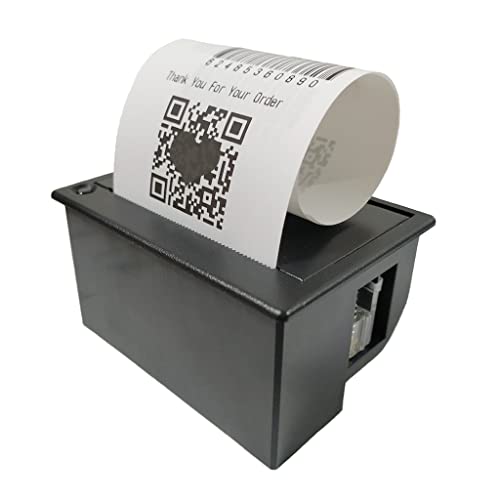
The Maikrt Micro Thermal Printer supports a 58mm paper width and operates on a 5 to 9V power supply. Designed for medical devices and testing instruments, it features clear printing quality in a compact, sturdy design. This printer connects using RS232 or TTL + USB interfaces, with the RS232 set as default. It supports a full ESC/POS printing instruction set and allows easy secondary development on various platforms including MCU, Android, Linux, and Windows. It prints text, images, barcodes, and QR codes, making it highly versatile for embedded applications.
MicroMall Maikrt Thermal Printer 12~24V with Serial Port

The MicroMall Maikrt Embedded Thermal Printer expands on the same solid design as the Maikrt model but operates at a higher voltage range of 12 to 24V. It provides RS232/TTL+USB interfaces with RS232 as the default. Its functionality extends to printing detailed text and graphics, annotated by a development kit for Android systems and ESC/POS printer command compatibility. This printer is widely applicable for instrumentation requiring embedded printing, maintaining high print clarity and fast operation in healthcare and industrial environments.
PRIMUZ Micro Thermal Printer Module with Arduino Compatibility
The PRIMUZ Micro Thermal Printer is a 58mm embedded printer module suited for microcontroller projects involving Arduino or ESP32. Its power range is 12 to 24V, with multiple physical interfaces provided including TTL, RS232, and USB—TTL being the default. This printer supports ESC/POS commands and includes secondary development resources to allow customization in printing tasks like text, barcodes, and images. Its compatibility and ease of integration make it a solid choice for embedded device developers.
RS232 Serial Port 58mm Thermal Receipt Printer with Auto Paper Cutter
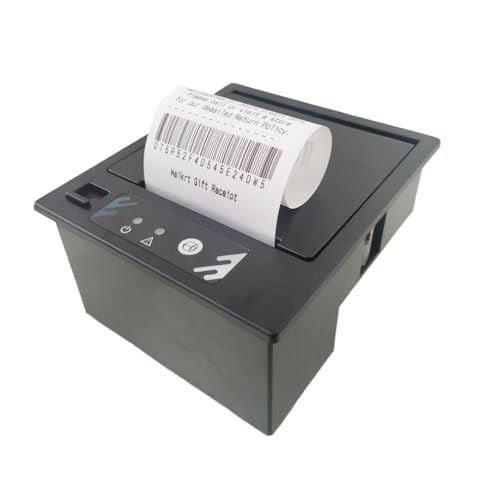
The RS232 Serial Port 58mm Thermal Printer features automatic paper cutting, boosting convenience for environments like vending machines and medical instrumentation. It runs on a 12 to 24V power supply with recommended 3A current and offers RS232, TTL, and USB interfaces. It supports rich printing options, including text, barcodes, and QR codes with ESC/POS command sets. The triple interface helps prevent connection issues when integrating with multiple hardware platforms such as Arduino, MCU, Android, and Windows systems.
Epson TM-T20III Monochrome Thermal POS Printer USB

The Epson TM-T20III is a trusted POS thermal printer ideal for retail environments. It connects exclusively via USB and is specifically compatible with Square Stand and Square Register systems. This monochrome printer delivers reliable, clear prints, though it does not support Bluetooth or Wi-Fi. Ensure your Square app is updated as required for seamless operation. It offers a straightforward solution for POS receipt printing in busy storefronts.
Buying Guide for Micro Panel Thermal Printers
Selecting the right micro panel thermal printer involves considering several key factors to match your intended application and technical requirements.
Power Supply and Voltage Compatibility
Printers typically operate on low voltage DC ranging from 5V to 24V. Ensure the printer’s power supply matches your device environment. Embedded devices often favor 5~9V models, while larger embedded systems may require 12~24V versions.
Interface Options
Check for supported communication interfaces like RS232, TTL, USB, or Bluetooth. Multiple interface options allow greater flexibility in connecting to various microcontrollers or operating systems:
- RS232/TTL: Common for embedded hardware applications.
- USB: Ideal for PC-based platforms and straightforward plug-and-play setup.
- Bluetooth: Offers wireless connectivity but less common in embedded devices.
Print Size and Quality
Most micro panel thermal printers support 58mm-wide paper rolls, which is a standard size for many applications. Assess printing resolution and clarity, especially if printing barcodes or images is required. High-quality ESC/POS command support ensures compatibility with various printing commands and data types.
Secondary Development Kit Availability
For embedded and DIY projects, having access to secondary development kits and SDKs for Android, Linux, or microcontrollers is valuable. It enables customization, troubleshooting, and integration of your printing solution.
Additional Features
Consider enhancements like:
- Automatic paper cutting for streamlined receipts or ticket output.
- Compact footprint and durability for integration into tight spaces.
- Compatibility with software platforms important for your application, e.g., Windows, Linux, Android.
Use Case Matching
Different printers serve diverse applications — from medical instrumentation, barcode labeling, to retail POS. Select a model designed for your environment to ensure smooth integration and optimal performance.