Best Multi-Function Printers for Efficient Office Printing and Scanning
Choosing the right multi-function printer (MFP) can streamline your office workflow by combining printing, scanning, copying, and faxing capabilities in a single device. Below is a comparative summary of some of the best MFPs available, each catering to different printing needs such as speed, color output, connectivity, and team size compatibility.
| Model | Type | Print Speed (PPM) | Color Capability | Connectivity | Best For |
|---|---|---|---|---|---|
| HP LaserJet Pro MFP 3101fdw | Black & White Laser | 35 | No | Wireless, Auto Duplex | Small Teams |
| HP Color LaserJet Pro MFP 3301sdw | Color Laser | 26 | Yes | Wireless | Small Teams |
| HP LaserJet Pro MFP 4101fdw | Black & White Laser | 42 | No | Wireless, Auto Duplex | Up to 10 People |
| HP Color LaserJet Pro MFP M479fdw | Color Laser | Not Specified | Yes | Wireless | Business |
| HP LaserJet MFP M235sdw | Black & White Laser | 28 | No | Dual-Band Wi-Fi | Small Offices |
HP LaserJet Pro MFP 3101fdw Wireless Black & White All-in-One

This model is an ideal multi-function printer for small teams needing reliable black and white printing, scanning, copying, and faxing. It features auto two-sided printing and an auto document feeder to speed up scanning and copying tasks. The printer handles professional-quality documents efficiently with print speeds up to 35 pages per minute. Its intelligent Wi-Fi ensures consistent connectivity, maintaining online readiness for printing jobs. Designed for teams of up to seven people, it combines performance with user-friendly features.
HP Color Laserjet Pro MFP 3301sdw Wireless All-in-One Color Laser Printer

This color laser MFP from HP is built for small teams requiring high-quality color prints, along with efficient scanning and copying. It delivers print speeds of up to 26 pages per minute in both black and color and uses next-generation TerraJet toner for vivid, professional results. The device supports Original HP 218A standard and 218X high-yield toner cartridges, ensuring consistent performance for demanding office needs.
HP LaserJet Pro MFP 4101fdw Wireless Black & White All-in-One

Perfect for larger teams of up to 10 people, this HP MFP combines fast black and white printing, scanning, copying, and faxing capabilities. It supports auto two-sided printing and an automatic document feeder for efficient workflow. Notably, it boasts blazing-fast print speeds of up to 42 pages per minute. Intelligent Wi-Fi ensures the device stays connected to the optimal network, minimizing downtime and maximizing productivity.
HP Color LaserJet Pro Multifunction M479fdw Wireless Laser Printer
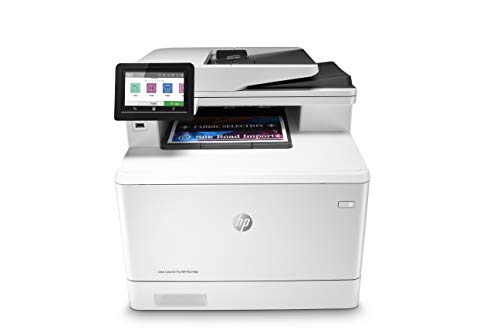
Designed to keep businesses moving forward, this wireless color MFP supports printing, scanning, copying, and faxing with consistently high-quality output. It incorporates HP Wolf Pro Security technology to safeguard sensitive data against cyberattacks at the hardware, firmware, and OS levels. The customizable touchscreen lets users automate complex workflows, simplifying repetitive tasks and boosting efficiency.
HP Laserjet MFP M235sdw All-in-One Wireless Printer

Ideal for small offices of 1-5 people, this HP MFP combines printing, scanning, and copying black and white documents swiftly. It offers the fastest two-sided print speed in its class at up to 28 pages per minute. Dual-band Wi-Fi connectivity helps automatically detect and resolve network issues to reduce interruptions. This reliable device improves office productivity with its responsive performance.
Buying Guide: How to Choose the Best Multi-Function Printer
Selecting the right multi-function printer involves considering various features to meet your specific office requirements. Here are the key factors to evaluate:
Print Type and Color Capability
Decide between black & white laser printers and color laser printers. Black & white models are sufficient for document-focused offices, while color printers are necessary if marketing materials or color presentations are a priority.
Print Speed and Volume
Consider your typical print volume and speed requirements. Faster print speeds (measured in pages per minute) help reduce wait times for larger print jobs, beneficial for bigger teams or frequent printing.
Connectivity Options
Look for printers with reliable wireless connectivity options such as dual-band Wi-Fi or intelligent wireless management that maintains connection stability. Ethernet and USB connections are also practical alternatives for some setups.
Multi-Function Features
Determine your needs for copying, scanning, and faxing. Features like automatic document feeders and duplex (two-sided) printing can save time and paper, enhancing overall productivity.
Security Features
For business environments handling sensitive data, prioritizing models with advanced security protocols, including firmware protection and encrypted communications, is crucial to prevent cyber threats.
Workflow Automation and User Interface
Ease of use through touchscreen control panels and the ability to automate complex workflows can significantly improve office efficiency by minimizing repetitive manual steps.
By balancing these considerations against your office size and printing needs, you can select an MFP that enhances your productivity and delivers reliable, professional-quality output.