Best Lightning to Printer Cable and MIDI Adapter Cables for iPhone and iPad
Finding the right cable to connect your iPhone or iPad to printers or musical instruments can be tricky, especially as not all Lightning cables support printing functionality. This guide covers the best Lightning to printer and MIDI cables and adapters that work with Apple devices. Below is a summary table featuring top products to help you quickly compare options suitable for printing and MIDI device connections.
| Product | Type | Compatibility | Length |
|---|---|---|---|
| WORLDBOYU Lightning to MIDI Cable | MIDI Cable | iPhone, iPad with Lightning | 6 FT |
| MeloAudio Lightning to MIDI Cable | MIDI Cable | iPhone, iPad Lightning devices | 5 FT |
| DCNETWORK USB C & USB-A to USB-B Printer Cable | Printer Cable | Printers, Scanners with USB-B port | 10 FT |
| UGREEN USB B to USB C Printer & MIDI Cable | Printer & MIDI Cable | MacBook, iPad, Yamaha Keyboards | 3 FT |
| HOYULLI Lightning Male to USB Female Adapter | Adapter for Lightning Devices | iPhone 11-14, iPad Lightning models (not USB-C) | Adapter |
WORLDBOYU Lightning to MIDI Cable for iPhone and iPad
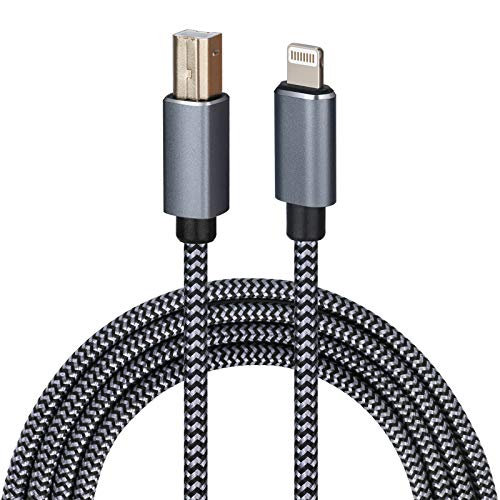
The WORLDBOYU Lightning to MIDI Cable is designed specifically for connecting iPhones and iPads to a variety of electronic musical instruments such as MIDI keyboards, electronic pianos, and audio interfaces. It supports many iOS devices up to iOS 14 without needing apps, WiFi, or personal hotspots.
- Plug and Play: Connect and play immediately with no additional setup.
- Wide Device Compatibility: Works with iPhone 5 up through iPhone 12 Pro Max and various iPad models.
- Music Device Use: Supports electronic pianos, drums, audio DACs, MIDI keyboards, and USB microphones.
This cable is ideal for musicians who want stable and fast music recording or playing connections, but it is not designed for printer connections.
MeloAudio Lightning to MIDI USB 2.0 Cable

The MeloAudio Lightning to MIDI Cable offers a high-quality, durable solution for connecting iOS devices to MIDI-compatible instruments. It uses tinned copper conductors to ensure durability and premium TPE materials to resist wear and temperature extremes.
- Easy Usage: Simply plug into iOS devices and MIDI instruments; no apps required.
- Durability: 10x longer lifespan due to quality materials and construction.
- Device Compatibility: Suitable for iPhone and iPad, works with electronic pianos, organs, drums, DACs, and USB mics.
This cable is a reliable MIDI connection option but does not support printer functionality.
DCNETWORK 10FT USB C & USB-A to USB-B Printer Cable

The DCNETWORK Printer Cable supports USB Type-A or USB-C to USB-B connections and is ideal for connecting printers, scanners, and other USB 2.0 devices. This cable is suitable for many printer brands, including HP, Canon, Epson, Brother, and Xerox.
- High Speed Transfer: Data speeds up to 480Mbps for efficient printing and scanning.
- Universal Use: Compatible with printers, scanners, and MIDI keyboards with USB-B ports.
- Durability and Stability: Gold-plated connectors and shielded PVC cable to reduce signal interference.
Note that Lightning to USB printer cable functionality is generally not supported by iPhone/iPad Lightning connectors; this cable is best used with compatible computers and USB devices.
UGREEN USB B to USB C 3 FT Printer & MIDI Cable

The UGREEN USB B to USB C Cable offers dual functionality for printers and MIDI audio devices, allowing seamless connection from USB B outputs to USB C ports on MacBooks, iPads, and other compatible devices.
- Wide Compatibility: Supports MacBook Pro/Air, iPad Pro, Yamaha keyboards, and other USB-C equipped devices.
- Plug and Play: No drivers needed, easy setup for high-speed data transfer.
- High-Speed Data Transfer: Supports USB 2.0 speeds up to 480 Mbps, with backward compatibility.
This cable is suitable for users needing connections between USB-B devices (e.g., printers, MIDI instruments) and USB-C host devices.
HOYULLI Lightning Male to USB Female Adapter OTG

This HOYULLI Lightning to USB Female Adapter supports connecting USB peripherals such as MIDI keyboards, mice, USB hubs, and storage devices directly to iPhone and iPad Lightning devices (compatible with iOS 13+). It supports OTG functions but is not compatible with printers or devices requiring high power consumption.
- Fast Data Transfer: Speeds of 25-30MB/s for quick photo and video sync.
- Plug and Play: No app needed; allows connection of USB keyboards, mice, MIDI controllers, and more.
- Compatibility Notes: Works with Lightning interface devices up to iPhone 14 models but not USB-C models such as iPhone 15/16.
This adapter is a flexible OTG connector for Lightning iOS devices supporting MIDI and other peripherals, but it does not support printer connections.
Buying Guide: Key Considerations for Lightning to Printer and MIDI Cables
Choosing the right cable depends on your intended application—whether connecting to printers, MIDI musical instruments, or other peripherals. Here are important factors to consider:
1. Device Compatibility
Most Lightning cables for iPhone and iPad do not support printing directly. Apple devices generally require AirPrint-compatible wireless printers or specialized apps. USB-B printer cables typically connect printers to computers, not iOS devices. For MIDI instruments, Lightning to USB-B MIDI cables compatible with your iOS version and device models are critical.
2. Cable Type and Function
- Printer Cables: Usually USB A or USB C to USB B connectors; used to connect printers/scanners to computers.
- MIDI Cables: Lightning to USB-B designed for music device connections; support stable and low-latency MIDI data transfer.
- Adapters: Lightning to USB female adapters enable connecting USB MIDI keyboards or hubs to iPhones/iPads, but not printers.
3. Build Quality and Durability
Look for cables with sturdy materials such as tinned copper conductors, braided nylon or TPE insulation, and gold-plated connectors for longevity and stable data transfer.
4. Length and Portability
Choose a cable length suitable for your workspace. For mobile or studio use, shorter, durable cables can reduce clutter. Longer cables enhance connectivity options but may add bulk.
5. Plug-and-Play Capability
Cables and adapters that require no drivers or extra apps reduce setup time. Verify if your device’s iOS version supports the cable functionality natively.
6. Purpose-Centered Selection
Since Lightning to printer cables are generally not supported, consider wireless AirPrint or network printer setups for iOS printing needs. For MIDI and audio recording functions, prioritize Lightning to MIDI cables specifically designed for iOS devices.