Best Laser Printer Business Checks for Secure and Professional Printing
Finding the best laser printer business checks is crucial for companies aiming to maintain security, clarity, and compatibility with popular accounting software. This article showcases top-rated options emphasizing security features, software compatibility, and professional designs. Whether printing payroll, vendor, or general business checks, these products deliver quality you can trust.
| Product | Brand | Security Features | Compatibility | Pack Size |
|---|---|---|---|---|
| DocuGard Blue/Red Premier High Security Check Paper | DocuGard | 13 ANSI Compliant Features | Quicken, QuickBooks, Versacheck | 500 Blank Checks |
| Computer Checks on Top – Custom Laser Business Checks | Bank-A-Count | Customizable | All QB Versions | 100 Checks |
| CheckOMatic High Security Check Paper – Blue Diamond | Check O Matic | Watermark, Microprint, Signature Line | QuickBooks, Intuit, Versacheck, Quicken | 100 Checks |
| Compuchecks Computer Security Business Checks | Compuchecks | Micro-print lines, Security Screens, Watermarks | QuickBooks, Quicken, MS Money | 500 Checks |
| EZ Checks High Security Check Paper with Hologram | EZ Checks | 20 Security Features including Foil Hologram | QuickBooks Compatible | 500 Sheets |
DocuGard Premier High Security Business Checks

The DocuGard Blue/Red Premier Prismatic Top Check Paper offers 13 comprehensive security features recommended by the National Check Fraud Center. These checks are ANSI compliant and suitable for use with Quicken, QuickBooks, Versacheck, and similar accounting software. Each sheet features two horizontal perforations to facilitate clean separation with dimensions of 3.5” by 8.5”. Their durable prismatic color top helps deter fraud, enhancing security while maintaining a professional appearance ideal for various business needs.
Bank-A-Count Custom Laser Business Checks

This Computer Checks on Top pack includes 100 customizable laser checks compatible with QuickBooks and other accounting software versions. After purchase, customers are contacted for printing personalization, ensuring precise alignment with their banking details. The seller supports order processing exclusively during business hours, which helps maintain communication clarity. These checks feature professional blue coloring and maintain clean printing for business contexts that require tailored check stock.
CheckOMatic High Security Blue Diamond Checks
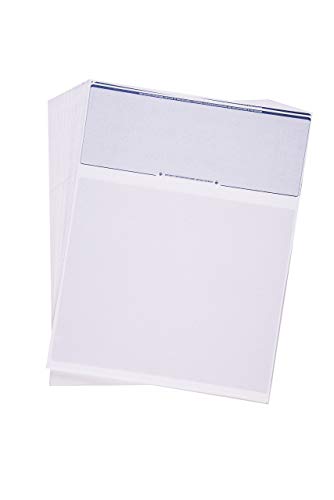
The CheckOMatic Computer Business Check Paper offers a bulk pack of 100 blanks designed with multiple security elements like a blue diamond background, micro-printed borders, watermarks, and signature lines. These checks are verified as compatible with QuickBooks, Intuit, Versacheck, and Quicken 2017. Their clear and accurate print capability is excellent for businesses requiring reliable payroll and banking check solutions with enhanced fraud protection features.
Compuchecks Security Business Checks with Pay Stubs

The Compuchecks 500 Pack provides a high quantity of computer-compatible checks and pay stubs. These 8.5” x 11” sheets feature robust security including micro-print lines, security screens, and artificial watermarks, reducing risk of fraud. Compatible with various financial software like QuickBooks and MS Money, this pack is ideal for businesses needing secure, versatile check paper stock with easy printing and separation between check and vouchers.
EZ Checks High Security Check Paper with Hologram

EZ Checks offers a pack of 500 sheets featuring 20 security features, including a foil hologram to protect against sophisticated check fraud. These 8.5” x 11” sheets place the check at the top, including double perforations for easy tear-off. Their custom blue/maroon pantograph background offers a professional polishing touch, combining visual appeal with strong anti-fraud technology suitable for QuickBooks users and other accounting software environments.
Buying Guide for Laser Printer Business Checks
Security Features to Consider
When purchasing business checks compatible with laser printers, prioritize products with multiple advanced security features such as microprint borders, watermarks, prismatic backgrounds, security screens, and holograms. This ensures your checks are fraud-resistant and compliant with banking standards like ANSI and Check 21, significantly reducing the risk of counterfeit attempts.
Compatibility with Accounting Software
Ensure your checks are fully compatible with widely-used software like QuickBooks, Quicken, Versacheck, Intuit, and MS Money. This facilitates smooth and accurate printing. Several products require you to provide account information for custom printing setup, so check for clear order processes and communication options.
Check Format and Size
Most business checks come in standard letter-sized sheets (8.5” x 11”) with the check printed at the top portion and perforations for easy separation from vouchers or pay stubs below. Confirm the check size (usually 3.5” x 8.5”) fits your printer and software settings to avoid misalignments and wasted stock.
Quantity and Cost Efficiency
Choose based on your printing volume needs— bulk packs of 500 sheets suit high volume businesses while smaller packs of 100 provide flexibility for limited use. Larger quantities often provide better cost efficiency, but ensure you maintain fresh supplies to prevent paper degradation or outdated banking information.
Customization Options
Some suppliers offer customizable checks that incorporate your company details and banking information before shipping. This added service may require order communication during specific business hours but ensures precise alignment and professionally printed checks compatible with your accounting software.
Printer Compatibility
Verify the check stock is designed for laser printers to prevent jams, smudging, or low-quality prints. These checks typically handle the heat and toner used during laser printing for crisp, clean output. Some may also work with inkjet printers, but double-check to meet your equipment’s capabilities.