Best Label Printers and Applicators for Accurate and Efficient Labeling
Finding the right label printer and applicator can streamline your packaging and organizing tasks significantly. Whether you manage a production line, a small business, or just need precise labeling at home, there are versatile options ranging from manual applicators to advanced Bluetooth-enabled label makers. The table below summarizes some of the top-rated products available, helping you make an informed decision based on features like printing speed, ease of use, portability, and compatibility.
| Product | Brand | Key Features |
|---|---|---|
| Primera AP360 Label Applicator | Primera | Fast labeling up to 1200/hr, accurate application, quick setup |
| Label Ledge Manual Label Applicator | Label Ledge | Manual precision for bottles/jars, adjustable range 0.5″-5″, no adapters needed |
| TOPOWN Precise Labeling Tool | TOPOWN | Manual, easy bottle/can adjustment, anti-slip base |
| Nelko P21 Bluetooth Label Maker | Nelko | Wireless Bluetooth, 203 DPI print, many templates/fonts, rechargeable battery |
| Phomemo D30 Portable Bluetooth Label Printer | Phomemo | Inkless thermal tech, app with 1000+ symbols, fast printing, colorful label tape options |
Primera AP360 Label Applicator For Cylindrical Containers

The Primera AP360 Label Applicator excels with its quick setup and simple operation, making it ideal for businesses labeling round containers. Its ability to apply a single label per container accurately is a big productivity booster. Operating at a speed of 5.3 inches (135mm) per second, it can handle up to 1200 containers per hour. This machine is designed for efficiency and consistency, ensuring no misalignment during application. It handles cylindrical vessels well, perfect for beverage bottles, cosmetics, and similar products.
Label Ledge Manual Label Applicator For Bottles And Jars

This manual label applicator from Label Ledge is favored for its precision on round vessels including bottles and jars. The product adjusts to accommodate labels ranging from 0.5 inches to 5 inches, catering to a range of small business needs such as wine, beer, and cosmetics. It requires no adapters and can be paired with label makers using tape or spool formats. Thanks to its user-friendly design, this applicator provides an exact, professional look and is highly suited for craft producers like candle and jelly makers.
TOPOWN Precise Manual Label Applicator Tool
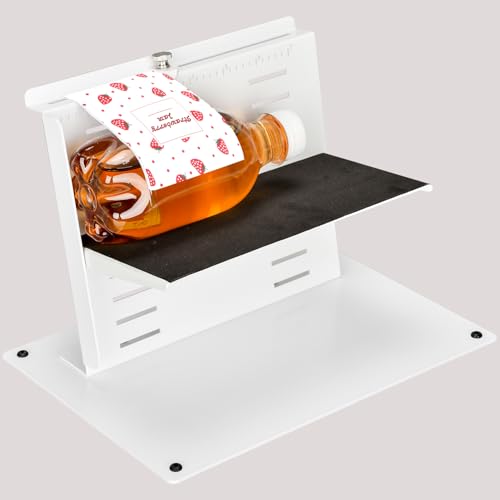
The TOPOWN labeling tool is a compact manual applicator designed to help small manufacturers apply labels neatly to cans and bottles. Its adjustable platform makes it adaptable for different container sizes, facilitating quick changes between product types. Non-slip rubber feet provide stability during application, preventing label misalignment or displacement. This tool is ideal for those seeking a straightforward solution without the need for complex or electronic equipment.
Nelko P21 Bluetooth Wireless Label Maker

The Nelko P21 is a lightweight and portable Bluetooth label maker ideal for home, school, and office use. It connects wirelessly to iOS and Android devices via the Nelko app, featuring over 90 fonts, 10 languages, and more than 450 material templates. Its high-speed chip and 203 DPI resolution provide crisp prints without ink or toner, using BPA-free direct thermal technology. The compact design and rechargeable battery make it highly convenient, though it does not support computer connection.
Phomemo D30 Portable Bluetooth Thermal Label Printer

The Phomemo D30 delivers inkless thermal printing technology with a German thermal print head, ensuring sharp, smooth prints and reduced operation costs. Its supporting app offers 1000+ symbols, 60+ frames, and various fonts for creative labeling. Users can print barcodes, QR codes, tables, and even import Excel files. It weighs less than typical label makers and supports colorful label tapes, though only black text printing is standard. This device is great for detailed, customized labels for school, home, or small businesses.
Buying Guide For Label Printers And Applicators
1. Type of Labeling Task
Consider whether you need a manual applicator for small batch precision or an automatic applicator or label printer for high-volume operations. Manual tools like Label Ledge and TOPOWN are perfect for artisan and small-scale producers, while Primera’s AP360 suits faster-paced environments.
2. Compatibility And Connectivity
For label printers, assess the connection options. Bluetooth-enabled devices like Nelko P21 and Phomemo D30 pair well with smartphones for wireless printing convenience. Check device compatibility with your phone or computer and required apps.
3. Print Quality And Speed
Print resolution (measured in DPI) affects clarity; most thermal printers offer around 203 DPI for sharp text. Consider printing speed, especially for production lines. Automatic applicators can handle over 1000 containers per hour, while manual applicators depend on user speed.
4. Label Size And Adjustability
Ensure the applicator or printer supports your label size range. Manual applicators often handle flexible dimensions (e.g., 0.5″ to 5″), while printers might support specific thermal paper widths. Check for ease of adjustment to accommodate different container sizes.
5. Portability And Power Supply
Check if the device is portable and battery-powered or if it requires a power outlet. Portable Bluetooth printers are ideal for on-the-go labeling. Rechargeable batteries with fast charging add convenience for extended use.
6. Cost Of Consumables
Inkless thermal labeling is cost-efficient, removing the need for ink or toner, but requires thermal paper or tapes. Colored labels often require special tapes. Factor in ongoing costs for paper rolls, label tapes, or adhesive labels.
7. Ease of Use
User-friendly interfaces, quick setup, and support resources (like apps with templates or included guides) streamline labeling tasks. Manual applicators benefit from ergonomic design, while printers succeed with an intuitive app interface.