Best Label Makers and Printers for Home, School, and Office Organization
Finding a reliable label maker and printer can greatly enhance your organization tasks across home, school, or office settings. These handy devices enable you to create custom, durable labels for everything from storage containers to filing systems. Below is a summary table featuring five top-rated models featuring portability, wireless connectivity, diverse templates, and inkless printing technology.
| Product | Brand | Key Features | Link |
|---|---|---|---|
| Phomemo D30 Label Maker Machine | Phomemo | Inkless thermal printing, 1000+ symbols, Bluetooth, multiple fonts & templates | View on Amazon |
| Nelko Label Maker Machine with Tape | Nelko | Compact, wireless Bluetooth, high-quality 203 DPI printing, rechargeable battery | View on Amazon |
| SUPVAN E10 Bluetooth Label Maker Machine | SUPVAN | Waterproof labels, 40 fonts, 450+ icons, rechargeable battery, free app | View on Amazon |
| NIIMBOT D110 Bluetooth Label Maker | NIIMBOT | Compact, 203 DPI direct thermal printing, batch printing, Type-C charging | View on Amazon |
| Brother P-Touch PTD210 Label Maker Bundle | Brother | Portable, multiple tape widths, laminated durable tapes, preview display | View on Amazon |
Phomemo D30 Bluetooth Portable Label Maker

The Phomemo D30 offers inkless thermal printing technology with a lightweight and portable design, ideal for quick on-the-go labeling. Utilizing advanced German thermal print heads, it delivers crisp, clear prints without needing ink or toner. The device supports both continuous and fixed-length label tapes, helping reduce waste.
This label maker app enables customization with over 1000 symbols, 60+ frames, various fonts, and icons. It can print barcodes, QR codes, images, and even import Excel spreadsheets. Users appreciate the multiple creative templates perfect for home or school organization projects. The Phomemo D30 synchronizes via Bluetooth with smartphones for easy wireless printing and offers versatile, hassle-free operation.
Nelko P21 Wireless Mini Label Maker

The Nelko P21 Bluetooth label maker is a compact and ultra-portable device designed for easy use anywhere. It features BPA-free direct thermal technology delivering high-definition 203 DPI prints without requiring ink or toner. The rechargeable battery provides long-lasting use and supports fast operation.
Compatible with IOS & Android via the “Nelko” app, this label maker offers over 90 fonts, 450+ label materials, and multi-language support. It’s ideal for homes, schools, or offices needing quick and personalized label solutions. Note, this model does not work with computers and has some app-related restrictions on certain phone versions.
SUPVAN E10 Waterproof Bluetooth Label Maker

The SUPVAN E10 specializes in versatile home, office, and school labeling. Its app requires no registration or fees and allows creation of waterproof labels that resist wear and tear. The rechargeable battery lasts up to a month per charge, making it very economical for frequent users.
User-friendly with a powerful editing app, it offers 40 font styles, 30 frames, and access to over 450 icons. This inkless labeler runs silently and supports continuous printing, making it suitable for identifying everything from kitchen spices to electronic cables and school supplies.
NIIMBOT D110 Upgraded Bluetooth Label Printer

The NIIMBOT D110 label maker is a smaller, upgraded model designed to provide sharp print clarity and smooth results. It uses BPA-free direct thermal technology with 203 DPI resolution, producing high-definition printed labels without the need for ink or toner.
This label maker supports batch printing through the “NIIMBOT” app on Android and iOS platforms, offering easy setup and quick wireless connection. The built-in rechargeable battery fully charges in 2 hours using a Type-C cable, and it’s portable for home, school, or office tasks. It does not support computer connections but excels in mobile use.
Brother P-Touch PTD210 Easy-to-Use Label Maker
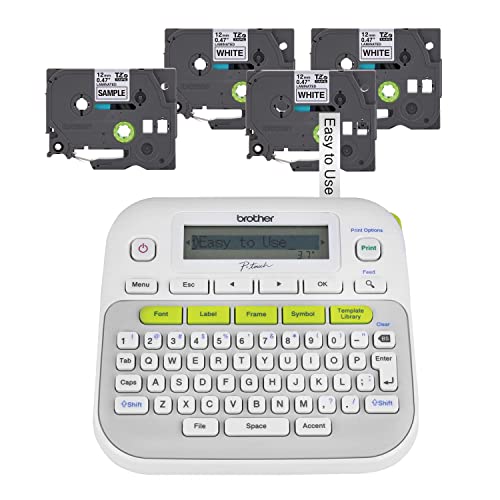
The Brother PTD210 is a trusted name in labeling, featuring a portable, handheld design with one-touch keys. It includes a display that previews labels before printing, helping ensure accuracy. It supports multiple tape widths from 3.5mm to 12mm, covering many labeling needs.
This model comes with four genuine Brother laminated tapes that are water-, fade-, and temperature-resistant, suitable for durable indoor and outdoor use. The laminated tapes are microwave and dishwasher safe, making it perfect for kitchen and office labeling. It uses six AAA batteries or optional AC power for flexibility.
Buying Guide: Key Factors When Choosing a Label Maker and Printer
When selecting the best label maker and printer for your needs, consider these important factors:
Printing Technology and Ink Requirements
Most modern label makers utilize thermal printing, eliminating the need for ink, toner, or ribbons and thus lowering maintenance costs. Check if the device supports inkless thermal printing for hassle-free operation.
Connectivity and Compatibility
Wireless options with Bluetooth connectivity to smartphones are common, allowing more flexible printing through dedicated apps. Confirm compatibility with your device’s operating system (iOS or Android) and whether the label maker supports computer connection if needed.
Label Size and Tape Options
Label makers differ in the size of tapes they use, typically between 3.5mm to 24mm widths. Choose one with tape sizes suited to your labeling tasks. Also, consider availability and variety of tape materials such as waterproof, laminated, or specialty tapes.
Design Customization Features
Look for models offering a wide range of fonts, icons, frames, and templates in their apps to create personalized and visually appealing labels. Features like barcode and QR code printing can be valuable in business or inventory settings.
Portability and Power Supply
Compact and lightweight label makers are convenient for mobile use. Consider if the model uses rechargeable batteries or replaceable ones and the battery life on a single charge, especially for frequent label printing.
Ease of Use and User Interface
A simple, intuitive app and device controls can save time. Features like label preview screens, quick template access, and app registration requirements affect usability. Free apps with frequent updates are preferable.
By evaluating these aspects, you can find the best label maker and printer to streamline your organization needs effectively and affordably.