Best Inkjet Printers and Printable Labels for High-Quality Labeling
Finding the best inkjet printer for labels involves not only the printer itself but also choosing the right printable label papers compatible with your printer. Labels need to be clear, smudge-resistant, and adhesive enough to stick securely on packages, envelopes, or products. Below is a summary table showcasing carefully selected printable labels that work well with inkjet printers to help you create professional-quality labels for shipping, organizing, or crafting.
| Product | Label Size | Sheets/Labels Per Pack | Surface | Printer Compatibility |
|---|---|---|---|---|
| Joyberg Printable Sticker Paper | 8.5″ x 11″ Full Sheet | 40 Sheets | Matte | Laser and Inkjet |
| TownStix Printable White Sticker Labels | 2″ x 4″ | 30 Sheets (10 Labels/Sheet) | Matte | Laser and Inkjet |
| FungLam Shipping Address Labels | 1″ x 2-5/8″ | 30 Sheets (900 Labels) | White | Laser and Inkjet |
| Avery Glossy Clear Address Labels | 1″ x 2-5/8″ | 300 Labels | Glossy Clear | Laser and Inkjet |
| Batrical Address Labels | 1″ x 2-5/8″ | 30 Sheets (900 Labels) | Matte White | Laser and Inkjet |
Joyberg Printable Sticker Paper for Inkjet Printers

This pack offers 40 sheets of full 8.5″ x 11″ matte sticker paper suitable for both laser and inkjet printers. The sturdy 100gsm paper supports crisp and vibrant printing without curling or jamming. The unique seamless liner and sticker paper design makes it easy to peel and cut into custom shapes and sizes with electronic cutters or hand tools.
Ink dries quickly and the matte surface reduces glare, making it friendly for handwritten notes or additional artwork using pens, markers, or pencils. These versatile sheets provide a great blank canvas for creative or professional label printing.
TownStix Printable White Sticker Labels 2″ x 4″

Ideal for smaller label needs, this pack includes 30 sheets with 10 matte labels per sheet measuring 2″ x 4″. The matte finish prevents ink smudging, ensuring hassle-free printing on inkjet or laser printers. The surface is similar to writing paper, allowing easy annotations with pens or markers.
These self-adhesive labels stick well to cardboard, plastic, paper, and other flat surfaces, making them practical for shipping or organizing tasks. Their ready-to-peel backing facilitates quick application to your packages or products.
FungLam Shipping Address Labels 1″ x 2-5/8″

This bulk pack contains 900 white labels on 30 US Letter-sized sheets, each label measuring 1″ x 2-5/8″. FungLam labels are compatible with laser and inkjet printers with excellent print clarity and no smudging or printer jams.
The labels come with an easy-to-peel design, allowing effortless removal by bending the sheet corners. These address labels are excellent for high-volume mailing and shipping applications, offering reliability and efficiency for business and home use.
Avery Glossy Clear Printable Address Labels
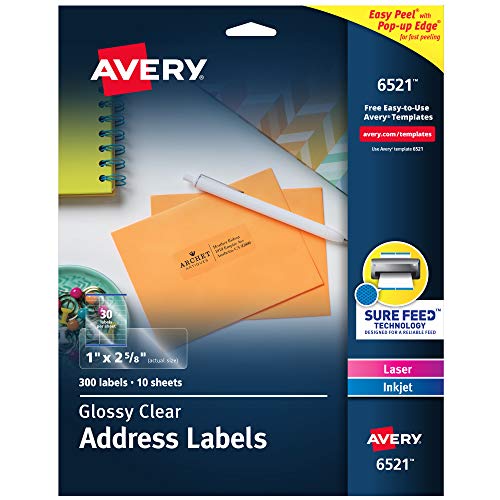
Avery offers 300 glossy clear mailing labels sized 1″ x 2-5/8″ that disappear smoothly onto surfaces like glass, plastic, and cellophane for a professional look. These transparent labels preserve the printed design’s sharpness and vibrancy.
With the Sure Feed technology, these sheets feed reliably through laser and inkjet printers, minimizing misalignment or jams. The Easy Peel with Pop-up Edge feature speeds up label application by lifting the edges for quick removal.
Batrical White Matte Address Labels 900 Count

Batrical provides 900 matte white labels on 30 sheets that measure 1″ x 2-5/8″. Compatible with laser and inkjet printers, these labels prevent ink smudging and produce crisp prints. Users can also download free print templates compatible with PDF and Microsoft Word.
They are ideal for bulk mailing, shipping, labeling boxes, classroom organization, and product stickers. The matte surface ensures your ink dries quickly and stays vibrant for long-lasting use.
Buying Guide for Inkjet Printer Labels
When selecting labels for inkjet printers, consider the following key factors to ensure the best printing results and application experience:
Label Size and Quantity
Choose a label size that fits your needs, whether for shipping, organizing, or crafting. Larger labels such as full sheets allow for custom shapes and designs. Consider how many labels you require per pack—bulk options are economical for high-volume use.
Surface Finish: Matte vs. Glossy
Matte labels offer reduced glare and are easier to write on with pens or markers, ideal for personalized or creative labeling. Glossy labels provide vivid color saturation and a professional look but may be less writable by hand.
Printer Compatibility
Ensure labels are explicitly compatible with inkjet printers to avoid issues like smudging or paper jams. Some papers work with both inkjet and laser printers, providing flexibility if you switch printers.
Adhesive Quality
Labels should have a strong, permanent adhesive to securely stick to various surfaces like paper, cardboard, plastic, or glass. Consider peelability as well to avoid tearing or residue.
Print Quality and Drying Time
Look for labels that support clear, crisp printing with quick-drying ink to prevent smudges or running. A quality label will preserve color brilliance and sharp text even after handling.
Ease of Use
Features like easy-peel backing and smooth printer feed help increase productivity, especially if printing large batches of labels.
By assessing these perspectives—size, finish, compatibility, adhesive strength, printing quality, and usability—you can choose label products that maximize your inkjet printer’s performance for professional, durable labels every time.