Best ID Card Printer Suppliers With Complete Printing Solutions
Finding the right ID card printer supplier can simplify your card printing needs, whether for business, membership, or event use. This article reviews five top-rated ID card printers available on Amazon, all from reliable suppliers offering complete packages including printers, ribbons, cards, and software. You’ll find options featuring dual-sided printing, easy-to-use software, and varying print capacities—helping you select the best solution for your volume and design requirements.
| Product | Key Features | Print Capacity | Print Type |
|---|---|---|---|
| Bodno Magicard 400X Dual Sided | All-in-one package, 300-print YMCKO ribbon, Windows & Mac compatible | 300 prints | Dual-sided |
| Bodno Seaory S25 Single Sided | Manual feed, 100-print ribbon, lifetime software license | 100 prints | Single-sided |
| Bodno Seaory S28 Dual Sided with Camera | Dual-sided one-pass printing, 300-print ribbon, Windows & Linux compatible | 300 prints | Dual-sided |
| Bodno Magicard 300 Dual Sided Silver Edition | Includes 300-print YMCKO ribbon, compatible with Mac and Windows | 300 prints | Dual-sided |
| Bodno Magicard Pronto Complete Package | Includes 100 PVC cards, easy to use, 100-print YMCKO ribbon | 100 prints | Single-sided |
Bodno Magicard 400X Dual Sided ID Card Printer

The Bodno Magicard 400X offers an all-inclusive package designed for professional dual-sided ID card printing. It comes with a 300-print YMCKO ribbon that produces vibrant, full-color cards. This printer supports dual-sided printing, enabling comprehensive card designs without manual intervention. Compatible with both Windows and Mac operating systems, it suits diverse office environments. The package includes everything necessary to start printing high-quality cards immediately, making it an excellent choice for businesses needing reliable and efficient card production.
Bodno Seaory S25 Single Sided ID Card Printer

This Bodno Seaory S25 printer features a manual feed system designed for low-volume printing needs, perfect for printing one card at a time. The included Seaory 11011 color ribbon supports 100 prints to get you started right away. The Bronze Edition package also offers ID card software with a lifetime license, featuring pre-made templates and intuitive drag-and-drop design for ease of use. It’s ideal for organizations requiring quality single-sided cards with precise user control.
Bodno Seaory S28 Dual Sided ID Card Printer with Camera

The Bodno Seaory S28 provides advanced dual-sided printing in one pass, enabling fast and vibrant image printing on both card sides at resolutions up to 300 x 1200 dpi. Its all-inclusive package features a 300-print color ribbon and includes a camera for capturing photos directly. Compatibility extends to Windows and Linux, with Mac support anticipated. This model is well-suited for businesses seeking high productivity, versatility, and integrated photo ID creation.
Bodno Magicard 300 Dual Sided ID Card Printer Silver Edition

The Bodno Magicard 300 comes as a Silver Edition package that enables immediate dual-sided printing with a reliable 300-print YMCKO ribbon included. It supports full-color, sharp card production and is compatible with both Windows and Mac platforms. The careful balance between professional-grade capabilities and ease of use makes it a flexible option for many business card printing scenarios without overwhelming complexity.
Bodno Magicard Pronto ID Card Printer Complete Package
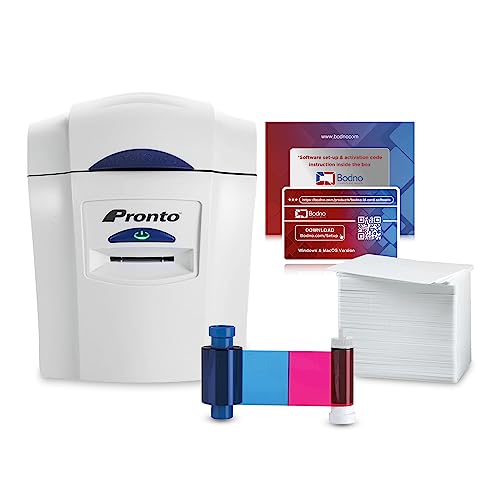
This bundle includes the Magicard Pronto printer, 100 high-quality PVC cards, and a 100-print YMCKO color ribbon. Designed for those wanting to produce professional photo or membership cards at a small scale, it offers a straightforward setup with user-friendly features. The comprehensive package ensures you have all necessary supplies for immediate card printing, making it ideal for smaller offices or clubs requiring single-sided ID cards.
Buying Guide for Choosing the Best ID Card Printer Supplier
When selecting an ID card printer supplier, consider these important factors to ensure the best fit for your needs:
Print Volume and Capacity
Determine your printing volume requirements. Printers with higher capacity ribbons (e.g., 300 prints) suit medium to large organizations, while those with smaller capacities (100 prints) are better for low-volume or occasional use.
Single-Sided vs Dual-Sided Printing
If your ID cards require information or designs on both sides, choose a dual-sided printer. Single-sided models work well for simple cards, but dual-sided capabilities save time and improve professionalism.
Compatibility and Software Features
Check if the printer supports your operating system—Windows, Mac, or Linux. Also, the included software’s ease of use, templating options, and licensing terms can significantly affect your workflow efficiency.
Printing Technology and Image Quality
Look for printers offering high dpi (dots per inch) resolutions, such as 300 x 1200 dpi, for sharp and vibrant card images. Features like YMCKO ribbons ensure full-color outputs with durable results.
Additional Equipment and Supplies
Complete packages that include ribbons, blank cards, and sometimes cameras (for photo ID capture) provide a hassle-free setup. This also saves time sourcing compatible accessories separately.
Manual vs Automatic Feed Systems
Manual card feeding suits low-volume precise printing, while automatic feeders streamline higher-volume jobs. Choose based on your use case to optimize speed and usability.
Warranty and Support
Reliable suppliers provide good customer support and warranties for hardware and software, helpful for troubleshooting issues and ensuring long-term operation.