Best ID Card Printer Software With Complete Printing Packages
Finding the best ID card printer software paired with reliable hardware and supplies is essential for producing professional-quality ID cards efficiently. Whether you need single-sided or dual-sided printing, bundled packages that include software, ribbons, and PVC cards make it easier to get started immediately. Below is a summary table of top-rated options combining advanced software with robust printers and full supplies, designed to meet a variety of printing needs.
| Product | Print Type | Included Supplies | Compatibility |
|---|---|---|---|
| Bodno Magicard 400X Dual Sided | Dual-Sided | 300 Print YMCKO Ribbon, PVC Cards | Windows, Mac |
| Bodno Magicard Pronto ID Printer | Single-Sided | 100 PVC Cards, Color Ribbon | Windows, Mac |
| Bodno Magicard 300 Dual Sided | Dual-Sided | 300 Print YMCKO Ribbon, PVC Cards | Windows, Mac |
| Bodno Seaory S28 Dual Sided with Camera | Dual-Sided | 300 Print Ribbon, Camera | Windows, Linux (Mac Soon) |
| Cardholdir ID Easy Badges Solid 210 | Single-Sided | 400 PVC Cards, Ribbons, Software | Windows, Mac |
Bodno Magicard 400X Dual Sided ID Card Printer

The Bodno Magicard 400X is an all-inclusive dual-sided ID card printer package designed to deliver high-quality, vibrant full-color cards. It features a 300-print YMCKO ribbon allowing you to start printing immediately. The printer supports dual-sided printing for creating comprehensive card designs and is compatible with both Windows and Mac platforms. This package is perfect for organizations needing efficient production of durable and professional ID cards.
Bodno Magicard Pronto ID Card Printer Package
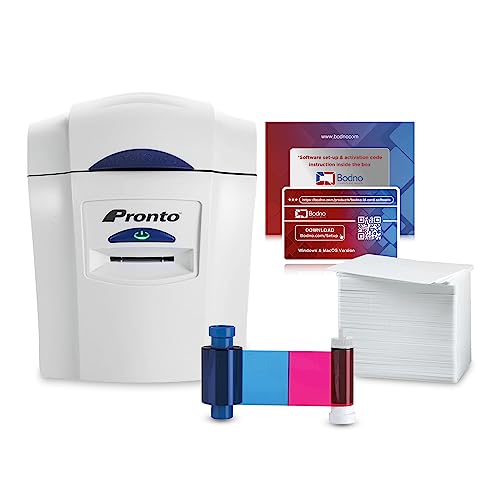
The Magicard Pronto is a user-friendly printer ideal for printing single-sided professional-grade ID and membership cards. The package includes a Magicard Pronto printer, an MA100YMCKO color ribbon, and 100 high-quality PVC cards. This bundle is designed for quick setup and ease of use, making it suitable for small to medium-sized projects and businesses that require reliable, straightforward card printing with compatible software.
Bodno Magicard 300 Dual Sided Printer & Supplies

This Magicard 300 printer package provides an all-inclusive solution for dual-sided card printing. It contains a 300-print YMCKO ribbon suitable for producing vibrant and detailed full-color cards. The printer supports dual-sided printing and is compatible with Windows and Mac operating systems. Perfect for organizations looking to create complex cards that involve printing on both sides with consistent quality and durability.
Bodno Seaory S28 Dual Sided ID Printer with Camera

The Seaory S28 features dual-sided printing in one pass, optimizing speed and quality with resolutions up to 300 x 1200 dpi. Included is a Seaory 17031 color ribbon with a 300-print capacity along with a camera, enabling efficient photo ID creation right out of the box. It is compatible with Windows and Linux, with upcoming Mac support, making it versatile for various operating environments.
Cardholdir ID Easy Badges Solid 210 Printer

The Solid 210 is a simple, manual-feed single-sided ID badge printer perfect for organizations needing straightforward printing capabilities. This package includes beginner-friendly Cardholdir ID software, full-color ribbons, and 400 PVC cards. The printer delivers 300 dpi print quality, compatible with both PC and Mac systems, and facilitates badge design using customizable templates without requiring professional graphic design skills.
Buying Guide for ID Card Printer Software and Packages
Selecting the right ID card printer software and complete package depends on several important factors. Consider the following to ensure you meet your specific needs efficiently and cost-effectively.
Printing Requirements and Card Volume
Identify whether you need single-sided or dual-sided printing, as dual-sided models such as the Magicard 400X or Seaory S28 allow more complex card designs with information on both sides. Estimate your average print volume—high-volume usage calls for printers with larger ribbon supplies and faster print speeds.
Software Compatibility and Features
Check that the bundled software supports your operating system—Windows and Mac compatibility is standard, with some options also supporting Linux. Look for features such as template customization, batch card creation using Excel or CSV files, and image capture integration for photo ID cards.
Included Supplies and Cost Efficiency
Consider what the package includes—PVC cards, ribbons, and other supplies—so you can start printing right away without additional purchases. Ribbons differ by print yield; common bundles offer 100 to 300 prints per ribbon. Bulk supplies are more cost-efficient for frequent printing.
Printing Resolution and Quality
Resolution impacts card clarity and color vibrancy. Models offering up to 300 dpi or higher are suitable for most organizational needs. Higher resolution supports sharp images and fine text, crucial for official badges and security cards.
Connectivity and Network Integration
If multiple users need access, look for printers with built-in Wi-Fi or Ethernet options to enable network printing. This enhances workflow in offices or institutions where ID card printing is a shared resource.
Ease of Use and Maintenance
Manual feed printers like the Cardholdir Solid 210 are straightforward but suited for low-volume printing. Automatic feed systems facilitate higher volumes and faster runs. Also review maintenance requirements and availability of customer support or accessories.