Best ID Card Printer Laminators for Clear and Durable Cards
Finding the right ID card printer laminator is essential for producing durable, professional-quality ID cards suitable for businesses, schools, and organizations. This guide highlights top printer laminators that combine card printing with reliable lamination features, ensuring your cards last longer and resist wear and tear. Below is a summary table of selected products to help you compare their features at a glance.
| Product | Brand | Print Type | Laminator Included | Software Bundled | Card Capacity & Features |
|---|---|---|---|---|---|
| Card Imaging Fargo DTC4500e Dual Side Printer | Card Imaging | Dual-sided dye-sublimation | No | Included design software | Dual input hopper, 100 PVC cards + ribbon |
| Brainstorm ID-Lam 45 Teslin Laminator Kit | Brainstorm ID | Inkjet Teslin card lamination | Yes | No printer software | 50 laminate pouches, Teslin sheets included |
| Bodno Magicard 400X Dual Sided Printer Bundle | Bodno | Dual-sided color printing | No | Complete ID software included | 300-print YMCKO ribbon supplied |
| Cardholdir ID Easy Badges Solid 210 Printer | Cardholdir ID | Single-sided direct-to-card (DTC) | No | Beginner ID badge software included | 200 cards, 250 color ribbon for 95% usage |
| Bodno Seaory S25 Single Sided Printer Kit | Bodno | Single-sided manual feed printing | No | Bronze edition software with lifetime license | Includes 100-card ribbon, low volume use |
Card Imaging Fargo DTC4500e Dual Side ID Card Printer
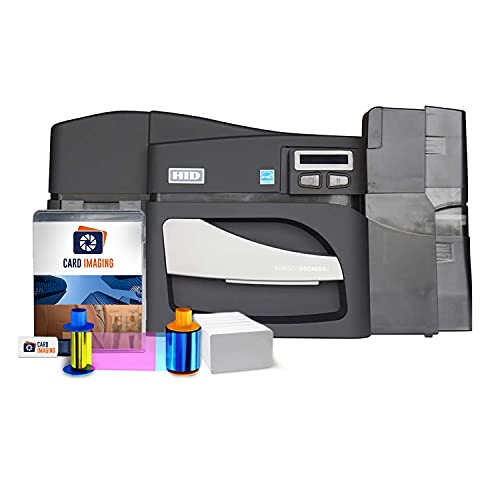
The Fargo DTC4500e offers dual-sided printing with a smart LCD screen, making it ideal for easy command access from simple to advanced print jobs. It includes a dual input hopper to hold two distinct card types simultaneously, boosting efficiency when printing mixed batches.
This bundle comes with color ribbon for 500 images, 100 PVC cards, and the brand’s design software, providing a complete solution for ID creation. The printer’s high-quality dye-sublimation process produces vibrant, long-lasting images suitable for employee badges, membership cards, and student IDs.
Brainstorm ID-Lam 45 Teslin ID Card Laminator Kit

This kit includes the Brainstorm ID-Lam 45 laminator, combining with 50 inkjet Teslin sheets and 50 glossy butterfly pouch laminates for producing PVC-like durable ID cards. It is best suited for anyone wanting to laminate existing cards or print on Teslin sheets with an inkjet printer.
The laminator is a standalone device notable for bringing a professional finish that protects cards from scratches, smudges, and moisture. However, it does not include a built-in card printer but works well for enhancing card longevity alongside compatible print setups.
Bodno Magicard 400X Dual Sided ID Card Printer Bundle

The Bodno Magicard 400X printer delivers high-quality dual-sided prints with an included 300-print YMCKO ribbon. It supports both Windows and Mac operating systems, making it versatile for various workflows.
This all-inclusive package provides software, a complete supplies kit, and professional-grade printing capability, ideal for small to medium-sized operations needing vibrant, full-color images on their ID cards. It does not include lamination but can produce durable, high-quality prints ready for optional lamination.
Cardholdir ID Easy Badges Solid 210 Single-Sided Printer

This printer is a straightforward, single-sided direct-to-card (DTC) model designed for easy operation. It includes a full bundle with 250 full-color ribbons, 200 PVC cards, and beginner-friendly badge creation software to quickly produce standard CR80 size IDs.
With a print resolution of 300 dpi, it offers sharp prints suitable for 95% of typical ID card applications. Its hand-fed system may limit throughput but grants precise control, especially for workplaces not requiring high-volume production.
Bodno Seaory S25 Single-Sided Printer with Supplies

The Bodno Seaory S25 is designed for low-volume ID card printing with a manual feed system ensuring one card prints at a time for quality control. This package includes 100 prints worth of Seaory 11011 color ribbon and user-friendly Bronze Edition software with a lifetime license.
While this printer does not include lamination, its software features pre-made templates and drag-and-drop design functions, making it suitable for small businesses or organizations seeking affordable but professional card printing.
Buying Guide: Choosing the Right ID Card Printer Laminator
When selecting an ID card printer laminator, consider these key factors to ensure the device meets your specific needs:
Printer Type and Print Quality
- Direct-to-Card (DTC) vs. Retransfer Printing: DTC printers apply ink directly to the card surface and are typically more affordable, ideal for small to medium runs. Retransfer printers offer higher print quality and edge-to-edge coverage but at higher cost.
- Print Resolution: Look for printers offering at least 300 dpi to ensure sharp text and images suitable for ID badges.
Single or Dual-Sided Printing
Dual-sided printing capability is essential if your cards require information or images on both sides, though these models tend to be pricier and more complex. Single-sided printers with manual re-feed can also handle both sides but with slower workflow.
Lamination Options
- Integrated Lamination: Some printers include built-in lamination modules, providing seamless protection for printed cards.
- Separate Laminators: Standalone laminators like the Brainstorm ID-Lam 45 allow you to laminate printed cards separately, adding flexibility and durability.
- Lamination Film Types: Verify compatibility with holographic or glossy laminates for enhanced card security and appearance.
Supplies and Software
- Included Supplies: Bundles that include ribbons, cards, and cleaning kits reduce running costs and simplify initial setup.
- Design Software: Beginner-friendly and template-based software helps streamline card creation without needing graphic design skills.
Volume and Speed Requirements
Estimate your print volume needs. High-volume operations require fast, batch printing capabilities and possibly dual input hoppers, while low-volume users may prefer lower-cost manual feed models.
Compatibility and Support
- Check operating system compatibility (Windows, Mac).
- Look for printers with readily available parts and customer support resources.
In summary, balancing print quality, lamination features, software ease, and capacity requirements will help you select the best ID card printer laminator suited to your business or personal identification needs.