Best ID Badge Printer Machines With Complete Supplies and Software
Finding the best ID badge printer machine is essential for businesses, schools, or organizations that require professional-grade ID cards. The following selection includes top-notch models from trusted brands, featuring both single-sided and dual-sided printing capabilities. These printers come bundled with supplies such as ribbons and PVC cards, alongside user-friendly software for easy design and printing. Below is a summary table to help you quickly compare the key features of these leading ID badge printers.
| Printer Model | Print Sides | Included Supplies | Software & Compatibility | Printing Resolution |
|---|---|---|---|---|
| Bodno Seaory S25 Single Sided | Single-sided | Seaory 11011 color ribbon (100 prints) | Bodno Bronze Edition with lifetime license, Windows/Mac | Standard |
| Bodno Magicard 400X Dual Sided | Dual-sided | 300-print YMCKO ribbon | Bronze Edition, Windows/Mac | Standard |
| Cardholdir ID Easy Badges Solid 210 | Single-sided | 250 print full color ribbon, 200 PVC cards | Beginner Software, Windows/Mac | 300 dpi |
| Bodno Magicard 300 Dual Sided | Dual-sided | 300-print YMCKO ribbon | Bronze Edition, Windows/Mac | Standard |
| Bodno Magicard Pronto ID Card Printer | Single-sided | MA100YMCKO color ribbon, 100 PVC cards | Bronze Edition, Windows/Mac | Standard |
Bodno Seaory S25 Single Sided ID Card Printer

The Bodno Seaory S25 Single Sided ID Card Printer offers an all-inclusive package that equips users to start producing professional-quality ID cards immediately. It includes a Seaory 11011 color ribbon capable of 100 prints.
This model features a manual feed system designed for low-volume printing needs, allowing precise one-card-at-a-time control. The included Bodno Bronze Edition software provides a lifetime license with easy drag-and-drop functionality and pre-made templates for effortless design.
Bodno Magicard 400X Dual Sided ID Card Printer

The Bodno Magicard 400X features dual-sided printing, allowing comprehensive, vivid ID card designs on both sides. It comes with a 300-print YMCKO ribbon suited for vibrant, full-color outputs.
Included in the package is user-friendly ID software compatible with both Windows and Mac systems. This printer’s all-in-one supply kit ensures you can begin printing right after unboxing, making it suitable for medium-to-high volume printing demands.
Cardholdir ID Easy Badges Solid 210 Printer

The Cardholdir ID Easy Badges Solid 210 is a simple, hand-fed badge printer designed exclusively for single-sided ID badge printing. This printer package includes the Cardholdir Beginner Software, a 250-print full-color ribbon, and 200 PVC cards, ideal for producing standard driver license-sized badges.
Its 300 dpi resolution is suitable for most organizational needs, and the manual feeding supports printing at a rate of 300 full-color cards per hour. The printer software simplifies design with ready-made templates and is compatible across PC and Mac platforms.
Bodno Magicard 300 Dual Sided ID Card Printer

The Bodno Magicard 300 dual-sided printer provides vibrant and sharp ID cards using a 300-print YMCKO ribbon included in the bundle. It supports dual-sided printing in one pass, enhancing productivity.
This printer is compatible with Windows and Mac operating systems and includes the Bronze Edition software license. The high-quality card output makes this an excellent choice for businesses requiring more detailed and durable ID cards.
Bodno Magicard Pronto ID Card Printer
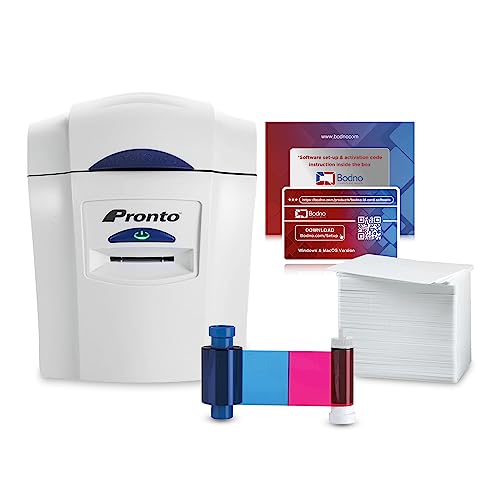
The Bodno Magicard Pronto ID card printer comes with everything needed to start printing professional-grade single-sided photo ID cards right out of the box. Included supplies are the Magicard Pronto printer, an MA100YMCKO color ribbon, and 100 durable white PVC cards.
It offers simple operation and quick setup, with user-friendly features making it ideal for those who need fast, reliable ID printing without a steep learning curve.
Buying Guide for ID Badge Printer Machines
Selecting the right ID badge printer machine depends on several essential factors. Here are key considerations to help you make an informed choice:
Printing Requirements
- Single-Sided vs. Dual-Sided Printing: Single-sided printers are ideal for basic badges, while dual-sided models enable adding more information or graphics on the reverse side.
- Volume Capacity: Determine your required printing volume—manual feed systems suit low-volume needs, whereas batch feeders or automated systems handle larger batches efficiently.
Included Supplies and Software
- Complete Packages: Opt for printers bundled with ribbons, PVC cards, and software, ensuring seamless startup without separate purchases.
- Software Usability: Look for user-friendly design software with templates and drag-and-drop features to simplify badge creation, suitable for beginners or advanced users.
- Compatibility: Verify software compatibility with your operating system — Windows, Mac, or Linux.
Print Quality and Durability
- Resolution: Higher dpi (dots per inch) values, such as 300 dpi, deliver sharper images and clearer text.
- Printing Technology: Dye sublimation (direct-to-card) printers typically offer vibrant colors and durability.
- Ribbon Types: YMCKO ribbons provide full-color printing, while simpler ribbons suit monochrome or limited color badges.
Additional Features
- Feed System: Manual feeding allows control but may slow down high-volume printing, whereas automated feeders improve efficiency.
- Card Sizes: Confirm the printer supports the standard card sizes required by your organization, often CR80 (driver’s license size).
- Connectivity: USB or network printing support varies; choose models that fit your office setup.
By evaluating these aspects, you can choose an ID badge printer machine that meets your organization’s specific needs, ensuring smooth, professional identification card production.