Best Flyer Paper for Inkjet Printers for High-Quality Prints
Choosing the best flyer paper for inkjet printers is essential to achieve vibrant colors and sharp details in your brochures, flyers, and promotional materials. Below is a summary table of top-rated flyer papers compatible with inkjet printers, featuring various weights, finishes, and functionalities to suit your specific printing needs.
| Product | Brand | Paper Weight | Finish | Sheets Per Pack |
|---|---|---|---|---|
| Uinkit 37lb Thin Flyer Paper Glossy 8.5×11 | Uinkit | 37lb (135gsm) | Glossy Single-Sided | 100 |
| PPD Double Sided Glossy Brochure and Flyer Paper | PPD | 37lb (140gsm) | Glossy Double-Sided | 100 |
| Uinkit Brochure Paper Glossy Double Sided 8.5×11 | Uinkit | 37lb (140gsm) | Glossy Double-Sided | 100 |
| Hammermill Premium Inkjet & Laser Paper 24lb | Hammermill | 24lb | Matte | 500 |
| HP HeavyWeight Project Matte Paper 8.5×11 | HP | 40lb | Matte | 250 |
Uinkit 37lb Thin Glossy Flyer Paper 8.5×11, 100 Sheets

This Uinkit 37lb flyer paper is designed exclusively for inkjet printers using dye-based inks. It features a single glossy finish on one side, providing a flat and smooth texture that prevents watermarks on the back side so you can write notes if needed. The 135gsm weight ensures the paper is thinner than typical photo paper, offering fast drying times and professional-quality prints with brilliant color reproduction and crisp details. Ideal for printing flyers, brochures, and photos where sharpness and gloss are priorities.
PPD Double Sided Inkjet Glossy Brochure & Flyer Paper 8.5×11, 100 Sheets

The PPD glossy brochure and flyer paper offers double-sided printing with a 140gsm/37lb weight that strikes a balance between durability and flexibility. Compatible with all inkjet printers, this photo-quality paper features an instant-dry, water-resistant coating that minimizes smudging while producing vivid, high-resolution images. Its lighter paper weight reduces the risk of printer jams and makes it easier to fold or shape for creative projects like chip bags or party favors. This pack of 100 sheets is perfect for marketing materials that require both sides to be printed with eye-catching content.
Uinkit Brochure Paper Glossy Double Sided 8.5×11, 100 Sheets

This double-sided glossy flyer paper by Uinkit is tailored for inkjet printers using dye inks. At 140gsm and 37lb thickness, it offers a lightweight yet sturdy feel suitable for printing flyers, calendars, and brochure materials. Both sides are printable with instant drying, no fading, and smudge-resistant properties, ensuring your flyers maintain professional vibrancy without watermark interference. With 100 sheets per pack, this paper is suitable for producing quality marketing collateral or photo prints on both sides.
Hammermill Premium Inkjet & Laser Paper 24lb, 8.5 x 11, 500 Sheets
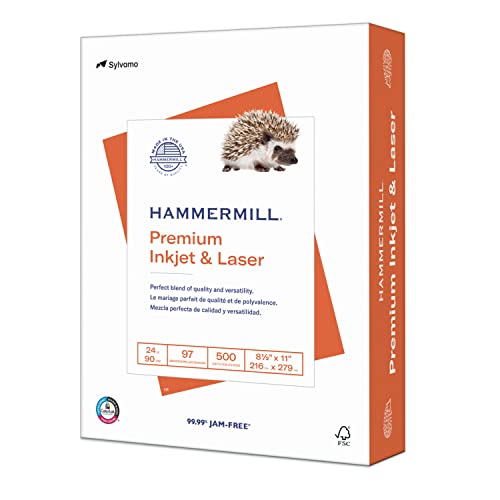
The Hammermill Premium Inkjet & Laser Paper is a versatile 24lb sheet suitable for double-sided printing on inkjet or laser printers. With a 97 brightness and blue-white shade, it ensures sharp, clear prints. The paper incorporates ColorLok Technology, for colors that are 30% brighter, blacks 60% bolder, and ink dries three times faster. Ideal for newsletters, flyers, and reports, this acid-free paper prevents yellowing over time, making it suitable for long-lasting printed materials. The larger pack of 500 sheets suits high-volume printing needs.
HP HeavyWeight Matte Project Paper, 8.5×11, 40 lb, 250 Sheets

Designed for professional prints, the HP HeavyWeight project paper weighs 40lb, offering extra thickness with a matte finish suitable for two-sided printing. It is ideal for business, school, and home projects requiring vibrant colors without gloss reflection. Paired with the HP Smart app, it can streamline printing and scanning remotely. This paper supports inkjet, PageWide, and laser printers, ensuring versatility for diverse project requirements. The 250 sheets count balances volume and convenience.
Buying Guide: How to Choose the Best Flyer Paper for Inkjet Printers
1. Paper Weight and Thickness
Flyer paper weight is measured in pounds (lb) or grams per square meter (gsm). Lightweight papers (around 20-37lb or 75-140gsm) are easier to handle, fold, and are less likely to jam in older printers. Heavier papers (above 40lb/150gsm) offer a more premium feel with increased durability but may require printer compatibility checks.
2. Finish: Glossy vs. Matte
- Glossy: Produces vibrant, sharp images with bright colors, ideal for photo-quality flyers and brochures. May show fingerprints or glare under bright lights.
- Matte: Reduces glare, easier to write on, and offers a professional look for text-heavy prints or business documents.
3. Single-Sided vs. Double-Sided Printing
Depending on your flyer design, opt for either single-sided paper with one glossy or matte finish or double-sided paper that allows printing on both sides without bleed-through or smudging. Double-sided papers typically have coatings on both sides for optimal ink absorption.
4. Ink Compatibility
Most flyer papers designed for inkjet printers work best with dye-based inks, which offer vivid colors but less water resistance. Ensure that your flyer paper specifies compatibility with your printer’s ink type (dye vs. pigment ink) for the best results.
5. Drying Time and Smudge Resistance
Instant-dry coatings on flyer paper help prevent smudging and allow quick handling after printing, increasing productivity especially in bulk printing scenarios.
6. Printer Compatibility and Paper Feed
Check your printer’s specifications for paper weight restrictions and preferred paper types to avoid jams or print quality issues. Lighter papers are generally better for older or entry-level inkjet printers.
7. Purpose and Project Requirements
Consider the flyer’s purpose—marketing materials may demand high-gloss vibrant prints, while school or business documents might benefit from matte finishes for readability. Also, volume needs influence whether a bulk pack or smaller set is optimal.