Best Ethernet Printer to WiFi Adapters for Seamless Wireless Printing
Connecting your wired Ethernet printer to a WiFi network can enhance convenience by eliminating cumbersome cables and increasing placement flexibility. Using a reliable Ethernet to WiFi adapter, you can convert your wired printer to a wireless device, allowing you to print from multiple devices across your network effortlessly. Below is a summary table showcasing some top Amazon picks catered for this purpose:
| Product | Brand | Wireless Speed | Compatibility | Link |
|---|---|---|---|---|
| BrosTrend AC1200 WiFi to Ethernet Adapter | BrosTrend | Up to 867Mbps (5GHz) | Smart TV, Printer, Xbox, PS, Blu-ray, etc. | View Product |
| IOGEAR Universal Ethernet to Wi-Fi N Adapter | IOGEAR | Up to 300Mbps (2.4GHz) | Ethernet devices (no mesh/support for hotspots) | View Product |
| BrosTrend WiFi 6 AX3000 WiFi to Ethernet Adapter | BrosTrend | Up to 3000Mbps (WiFi 6) | PC, Printer, Smart TV, Xbox, Blu-ray, DVR | View Product |
| BrosTrend AX1500 WiFi 6 WiFi to Ethernet Adapter | BrosTrend | Up to 1 Gbps (Gigabit LAN port) | TVs, Printers, Consoles, Computers, VoIP Phones | View Product |
| BrosTrend Dual Band 1200Mbps WiFi Bridge | BrosTrend | Up to 1200Mbps | Smart TV, Printer, Game Console, Raspberry Pi | View Product |
BrosTrend AC1200 WiFi to Ethernet Adapter
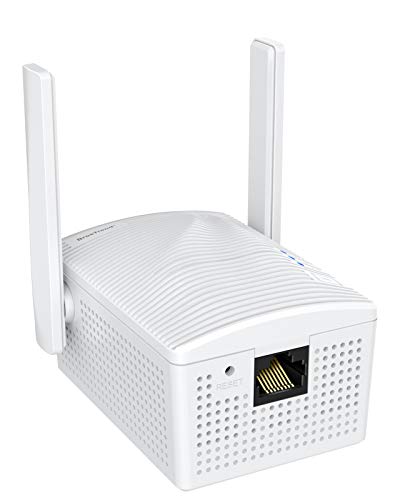
The BrosTrend AC1200 WiFi to Ethernet Adapter provides a seamless wireless bridge to connect Ethernet-only devices like printers to your WiFi network. It supports dual-band speeds of up to 867Mbps on 5GHz and 300Mbps on 2.4GHz, enhancing multimedia streaming, gaming, and data transfer performance. No driver installation is required — the adapter fully supports a range of Ethernet-enabled devices, including smart TVs, Blu-ray players, game consoles, and network printers. Its power source is a standard electrical outlet, making setup simple and flexible.
IOGEAR Universal Ethernet to Wi-Fi N Adapter

The IOGEAR GWU637 is a straightforward Ethernet to WiFi adapter designed for connecting wired devices to a 2.4GHz WiFi network at speeds up to 300Mbps. It features push-button Wi-Fi Protected Setup (WPS) for easy configuration and supports several encryption standards such as WEP, WPA, and WPA2 for secure connectivity. While it does not work with enterprise authentication or mesh networks, it is ideal for home use where you want a reliable wireless connection for your Ethernet printer or other devices.
BrosTrend WiFi 6 AX3000 WiFi to Ethernet Adapter

Designed for maximum speed and reliability, the BrosTrend WiFi 6 AX3000 Adapter connects wired devices like printers to WiFi 6 networks with dual-band throughput reaching up to 3000Mbps. It includes a Gigabit Ethernet port to fully utilize broadband speeds and features two high-power antennas and amplifiers for enhanced signal strength even at longer distances. This adapter is suitable for PCs, smart TVs, gaming consoles, and printers, delivering a stable and fast wireless experience.
BrosTrend AX1500 WiFi 6 Universal Ethernet Adapter

The BrosTrend AX1500 adapter supports WiFi 6 and provides fast and stable wireless connectivity to wired devices at speeds up to 1Gbps over its Gigabit Ethernet port. Compatible with a wide range of devices—including printers, smart TVs, network switches, and VoIP phones—it offers efficient bridging without needing new equipment. The dual-band design ensures you get the best speed on either 2.4GHz or 5GHz networks.
BrosTrend Dual Band 1200Mbps WiFi Bridge
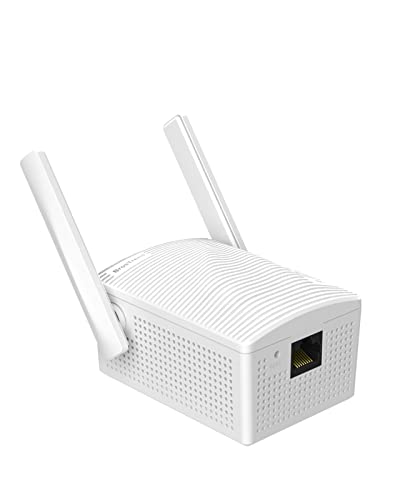
This BrosTrend Dual Band WiFi Bridge is a versatile solution for connecting Ethernet-only devices such as printers or game consoles to WiFi networks. Offering up to 1200Mbps wireless speeds and coming with two external antennas for stronger reception, it eliminates the hassle of running long Ethernet cables across your home or office. It is universally compatible with any device featuring an RJ45 port and requires easy setup, making it ideal for improving wired device connectivity.
Buying Guide: How to Choose the Best Ethernet to WiFi Adapter for Your Printer
Choosing the right Ethernet to WiFi adapter for your printer ensures smooth wireless printing and network compatibility. Consider the following factors:
- Speed Requirements: Look for adapters supporting at least AC1200 speeds (867Mbps on 5GHz) to guarantee fast data transfer and smooth operation, especially for printers handling large files or high volumes.
- WiFi Standards: Modern standards such as WiFi 6 (802.11ax) offer improved speeds, reduced latency, and better handling of multiple devices compared to older WiFi 4 or 5 models.
- Compatibility: Confirm the adapter supports your printer’s Ethernet port and your home network setup, including router compatibility, encryption standards, and frequency bands.
- Setup and Ease of Use: Choose adapters with simple installation, preferably with WPS button support or detailed guides, and that do not require driver installations.
- Signal Strength & Range: Devices with external antennas or high-gain amplifiers provide more robust connections and better range, especially in larger homes or offices with obstructions.
- Ethernet Port Type: Gigabit Ethernet ports (1 Gbps) are preferred over Fast Ethernet (100 Mbps) to fully leverage broadband and local network speeds.
- Power Source: Most adapters require an electrical outlet for power; ensure easy access to power sources where your printer is located.
- Security Features: Support for WPA2 or WPA3 encryption ensures safe communication over your wireless network.
Review your network environment, printer model, and required data rates before deciding on an adapter to make the most out of wireless printing convenience.