Best Easy-to-Use 3D Printers for Beginners and Home Use
Exploring the world of 3D printing has never been easier thanks to the latest user-friendly 3D printers designed for beginners, kids, and hobbyists. This guide highlights some of the best easy-to-use 3D printers available on Amazon, focusing on intuitive controls, quick setup, and dependable printing quality. Whether you’re seeking a printer for STEM education, creative projects, or rapid prototyping, these models offer a range of features such as Wi-Fi connectivity, auto-leveling, and high-speed printing. Below is a summary table of the selected top-rated printers to help you compare at a glance.
| Printer | Brand | Key Features |
|---|---|---|
| AOSEED 3D Printer for Kids | AOSEED | One-click app control, 0.05 mm precision, creative toy library |
| FLASHFORGE Adventurer 5M | FLASHFORGE | Auto bed leveling, Core XY structure, ultra-fast 600mm/s print speed |
| Official Creality Ender 3 | Comgrow | Resume printing after power outage, open source, DIY assembly |
| Upgraded Tina2S 3D Printer | HEPHI3D | WiFi cloud printing, ultra-quiet, fully assembled |
| 3Doodler Start+ Essentials 3D Pen | 3Doodler | Child-safe 3D pen, no hot parts, STEM educational toy |
AOSEED 3D Printer for Kids with PLA Filament Set

This AOSEED 3D printer is designed as a perfect starter 3D printer for kids and beginners, offering an effortless one-click printing experience through its smart app compatible with iOS, Android, and Windows. It supports voice commands for accessibility and includes a huge creative library with over 1,500 digital designs and 15+ themed mini design modules tailored for toy creation and STEM education.
The machine delivers professional-grade printing precision at 0.05 mm with speeds up to 200 mm/s. Its innovative quick-release nozzle simplifies nozzle changes ensuring smooth operation. This compact printer offers both educational value and fun customization options, making it ideal for home users looking to start 3D printing without complexity.
FLASHFORGE Adventurer 5M High-Speed 3D Printer

The FLASHFORGE Adventurer 5M excels in ease and speed with its one-click automatic printing and fully auto bed leveling feature, eliminating manual calibration. Its Core XY all-metal structure enables ultra-fast 600mm/s print speeds and 20000mm/s² acceleration, ideal for professionals needing rapid prototyping efficiency.
This model also boasts smart design upgrades such as quick 3-second nozzle swaps, a high-flow nozzle capacity, and a fast 35-second heat-up cycle to 200°C. The dual-sided PEI print platform aids in easy removal and adaptability for diverse filament types and project complexity, providing versatility for intermediate users stepping up their printing game.
Official Creality Ender 3 Open Source 3D Printer
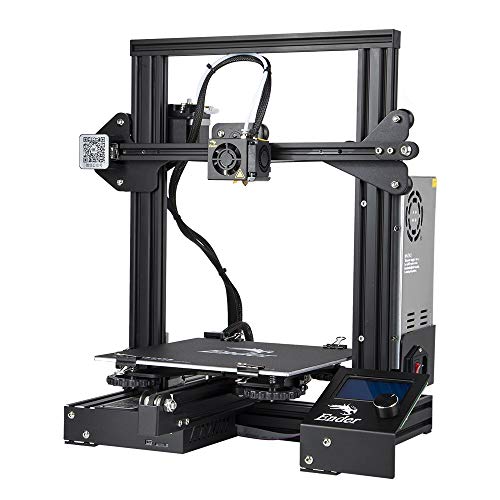
The Creality Ender 3 is a staple for beginners and students who want hands-on experience assembling and customizing their 3D printer. It features a resume printing function to continue after power outages, minimizing print failures and waste. The printer requires moderate assembly, which can take about two hours.
Advanced extruder technology reduces clogging and improves mixing for smooth prints. Its V-shape wheels ensure quiet, smooth, and durable X-Y movements. This model is fully open source, supporting extensive community upgrades and tweaks, making it suitable for learning and experimentation in 3D printing.
Upgraded Tina2S WiFi Cloud-Connected 3D Printer

The HEPHI3D Tina2S stands out for its fully assembled, out-of-the-box setup and smart wireless printing capability through the dedicated “Poloprint Cloud” app. It offers quick online slicing and WiFi cloud printing for seamless smartphone or tablet integration, making it beginner-friendly without complicated steps.
This compact, open-source printer is compatible with popular slicing software like Cura and PrusaSlicer, supporting USB transfer and software customizations. Its ultra-quiet operation (40–50dB) and print speeds up to 200mm/s create a pleasant user experience at home or classroom environments.
3Doodler Start+ Essentials Child-Safe 3D Pen Set

The 3Doodler Start+ Essentials is a unique 3D pen designed specifically for children aged 6 and up, offering a completely safe 3D printing experience with no hot parts. The pen uses special low-temperature plastic filaments, eliminating any burn risk while encouraging creativity and STEM learning through hands-on art projects.
This upgraded version includes more plastic filament, new stencils, faster charging, and a safety standby mode. It serves as a screen-free educational tool that fosters spatial thinking and fine motor skills, perfect for parents seeking an approachable introduction to 3D art for kids.
Buying Guide for Easy-to-Use 3D Printers
Choosing the best easy-to-use 3D printer depends on several key factors to ensure a smooth and enjoyable printing experience, especially for beginners:
- User-Friendly Interface: Look for printers with intuitive controls, app or touchscreen operation, and minimal manual calibration. Features like one-click printing and auto bed leveling simplify startup.
- Assembly Requirements: Fully assembled models reduce complexity and setup time, while DIY kits offer greater learning opportunities but require patience and technical skill.
- Printing Precision and Speed: High accuracy (e.g., 0.05mm resolution) matters for detailed prints, but balance speed and quality according to your application—high-speed printers suit rapid prototyping.
- Connectivity and Software: Wi-Fi, cloud printing, and compatibility with popular slicer software (Cura, PrusaSlicer) enhance convenience, allowing wireless control and easy file management.
- Material Compatibility: Consider whether the printer supports common filaments like PLA and TPU. Some models even include resin options or specialized filaments for advanced projects.
- Noise Level: Ultra-quiet operation is essential for home or classroom environments to avoid disturbance during long print jobs.
- Build Volume: Evaluate the maximum print size you require; smaller printers fit limited spaces and smaller prints, while larger volumes accommodate bigger designs.
- Support and Community: Well-supported brands and open-source platforms provide access to tutorials, troubleshooting, and upgrades vital for beginners.
By considering these factors, you can select a 3D printer that not only matches your technical expectations but also fits your lifestyle and creative goals.