Best Dual Tray Printers With Scanner for Efficient Office Use
Finding the right dual tray printer with scanning capabilities can significantly enhance your office productivity by minimizing paper refills and streamlining document processing. Below is a summary table highlighting some of the top dual tray printers equipped with scanners, tailored for business and home office environments.
| Product | Brand | Print Speed | Paper Capacity | Connectivity |
|---|---|---|---|---|
| Brother HL-L5210DWT | Brother | Up to 48 ppm | 850 sheets total (dual trays + multipurpose) | Wireless, Gigabit Ethernet |
| Brother HL-L6210DWT | Brother | Up to 48 ppm | 1,140 sheets total (dual trays + multipurpose) | Wireless, Gigabit Ethernet |
| Brother HLL8360CDWT | Brother | Up to 33 ppm (color) | 750 sheets total (dual trays + multipurpose) | Wireless, Gigabit Ethernet |
| Canon imageCLASS MF465dw | Canon | Up to 42 ppm | Standard 250-sheet tray (single tray) | Wireless |
| Brother MFC-L3720CDW | Brother | Up to 19 ppm (color) | 250-sheet tray | Dual-band Wireless, USB |
Brother HL-L5210DWT Business Monochrome Laser Printer

The Brother HL-L5210DWT stands out with its fast print speed of up to 48 pages per minute, making it ideal for busy office environments. Its dual paper trays provide a substantial total capacity of 870 sheets with a 250-sheet main tray, a 520-sheet secondary tray, and a 100-sheet multipurpose tray for specialty media or envelopes. This extends driving down refill frequency and boosting workflow efficiency. Additionally, it offers wireless and gigabit Ethernet networking, ensuring seamless connectivity across devices.
Cost-efficiency is enhanced by the availability of a super high-yield 11,000-page replacement toner cartridge, helping minimize ongoing expenses. The monochrome laser technology guarantees crisp, professional-quality text documents.
Brother HL-L6210DWT Business Monochrome Laser Printer

The Brother HL-L6210DWT is another high-capacity monochrome laser printer featuring dual 520-sheet paper trays and a 100-sheet multipurpose tray, which can upgrade to 1,660 sheets with an optional additional tray. Its print speed reaches up to 48 ppm, making it suitable for high-volume office settings.
This model supports wireless dual-band networking and gigabit Ethernet, facilitating flexible connectivity and printing from mobile devices. Utilizing Brother’s ultra high-yield toner cartridges extends efficiency with fewer replacements, reducing operating costs while maintaining professional print quality.
Brother HLL8360CDWT Business Color Laser Printer
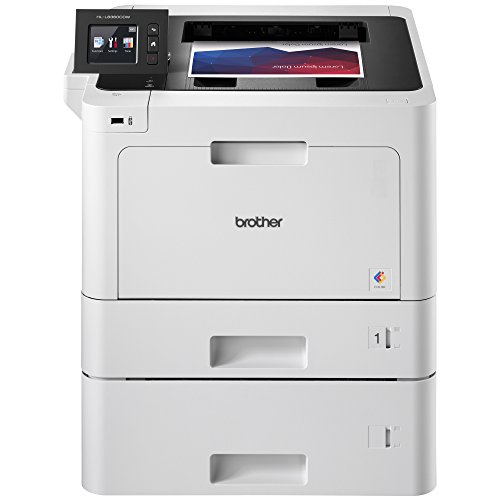
The Brother HLL8360CDWT provides high-quality color printing at speeds up to 33 pages per minute with robust dual paper trays (250-sheet and 500-sheet capacity) allowing extended print runs without interruptions. Its 750-sheet maximum input capacity meets the demands of busy workgroups.
Connectivity options include wireless and gigabit Ethernet, plus mobile device compatibility through AirPrint, Wi-Fi Direct, and NFC for easy on-the-go printing. This ensures quick, vibrant color output with minimal user effort.
Canon imageCLASS MF465dw Monochrome Wireless Laser Printer

For those seeking an all-in-one laser printer with scanning, copying, and faxing, the Canon imageCLASS MF465dw delivers efficient performance with print speeds up to 42 ppm. Its wireless connectivity and a 5-inch color touchscreen provide user-friendly operation and customizable shortcuts.
This model includes an auto document feeder simplifying multi-page scanning and copying while streamlining office tasks. Although it has a single paper tray, the reliable output speed and multi-function capability make it a prime choice for home offices or small businesses.
Brother MFC-L3720CDW Color Laser All-in-One Printer

The Brother MFC-L3720CDW is a versatile color laser all-in-one fax, scan, copy, and print solution for small offices. It features a 250-sheet adjustable paper tray and a 50-sheet automatic document feeder, providing convenience for multi-tasking and duplex printing.
Advanced connectivity includes dual-band wireless networking and USB, making sharing easy. Print speeds are competitive at up to 19 pages per minute, and laser-quality output ensures professional-looking documents consistently.
Buying Guide: Key Considerations for Dual Tray Printers with Scanners
Choosing the best dual tray printer with scanner depends on several factors to match your particular needs. Here are some important elements to consider:
1. Paper Capacity and Tray Configuration
A printer with dual trays of high capacity reduces interruptions caused by frequent paper refilling. Look for combined tray capacity numbers and whether multipurpose trays are included for specialty media.
2. Print Speed and Volume
Print speeds measured in pages per minute (ppm) directly impact office productivity. Higher ppm models suit environments with heavy daily printing requirements. Consider your average print volume to avoid overpaying for speed you don’t need.
3. Scanning Features and Auto Document Feeder (ADF)
A quality scanner with an automatic document feeder enables fast processing of multi-page documents, boosting efficiency. Features like duplex scanning and touchscreen controls enhance usability.
4. Connectivity Options
Modern offices require flexible connectivity. Wireless dual-band, Ethernet, USB, and mobile printing compatibility (AirPrint, Wi-Fi Direct, NFC) are useful to ensure seamless integration across devices and platforms.
5. Color vs. Monochrome Printing
Depending on your printing needs, choose between monochrome printers for text-heavy documents or color printers if graphic and presentation materials are regularly printed.
6. Cost Efficiency and Consumables
Check toner yield and availability of high-yield cartridges or super high-yield options to reduce ongoing costs. Cartridge technology such as super high-yield toner contributes to fewer replacements and decreased operational expense.
7. Multifunction Features
Consider all-in-one functions like fax, copier, and scanning if your workflow requires multi-purpose device use, reducing the need for multiple separate machines.
By carefully weighing these factors, you can select a dual tray printer with scanner that meets both performance and budgetary needs for your office or home workspace.