Best Commercial Wide Format Printers for Precision and Quality Prints
Finding the best commercial wide format printer is essential for businesses needing precise, large-scale printing for architectural plans, posters, maps, and professional graphics. The options range from high-quality inkjet plotters to all-in-one laser printers supporting various media sizes. Below is a summary table of top-rated wide format printers available on Amazon, highlighting key features to help you compare quickly.
| Product | Brand | Max Media Size | Warranty & Support | Ideal Use |
|---|---|---|---|---|
| HP DesignJet T650 24-inch Plotter | HP DesignJet | 24-inch roll & 13×19 sheet | 2-year onsite & remote support | Technical line drawings, posters, maps |
| HP DesignJet T210 24-inch Plotter | HP | 24-inch roll & 13×19 sheet | Manufacturer support | Technical drawings, sewing patterns, posters |
| Canon imagePROGRAF TC-21 24″ | Canon | 24-inch roll & sheet | Includes ink & warranty | Posters, vibrant graphics, color printing |
| Canon imagePROGRAF iPF770 36″ | Canon | 36-inch wide format | 1-year on-site warranty | Fast D-size prints, professional graphics |
| Brother MFC-L8900CDW Color Laser | Brother | Standard letter size, not wide format | Manufacturer Warranty | Business color laser all-in-one |
HP DesignJet T650 Large Format 24-inch Plotter Printer

The HP DesignJet T650 is engineered for professionals in architecture, engineering, and construction who need accurate technical line drawings and crisp text. This printer supports media rolls up to 24 inches wide as well as sheets up to 13 by 19 inches using the automatic sheet feeder. It delivers precise line quality and vibrant posters suitable for maps and renders.
Included is a comprehensive 2-year onsite and remote warranty with HP parts and next business day service, ensuring minimal downtime for your large format printing needs. The device caters specifically to wide or large format prints requiring high accuracy and durability.
HP DesignJet T210 Large Format 24-inch Plotter Printer

The HP DesignJet T210 features a modern, compact design fit for office environments needing wide format printing up to 24 inches. This printer excels at detailed line drawings, professional sewing patterns, maps, and posters. Media handling is flexible with options for sheet feed, roll feed, and an automatic horizontal cutter, enhancing productivity for engineering and creative professionals.
Supporting media sizes of 24-inch wide rolls and up to 13×19 sheets via the optional feeder, the T210 fits varied projects where precision and easy operation matter:
- Accurate and crisp line quality for professional use
- Automatic sheet feeder accessory available
- Versatile media handling with cutter integration
Canon imagePROGRAF TC-21 24″ Large Format Printer

The Canon imagePROGRAF TC-21 is ideal for users requiring vibrant, sharp posters and graphics on both roll and sheet media. It ships with a full set of inks, including 280 ml total, which is generous for its class and helps ensure rich color output from the start.
This desktop roll printer accommodates media up to 24 inches wide, with an automatic sheet feeder for cut sheets. It balances high-quality color printing with ease of use, making it suitable for marketing materials, professional presentations, and colorful wide format prints.
Canon imagePROGRAF iPF770 36″ Inkjet Large Format Printer

The Canon imagePROGRAF iPF770 expands print width capabilities to 36 inches, ideal for businesses needing larger formats. It achieves up to two D-size prints per minute, supporting fast turnaround for architectural and engineering applications.
This model includes a 1-year on-site warranty and is backed by authorized Canon resellers, providing confidence for professional users who demand reliability and quality in wide format printing.
Brother MFC-L8900CDW Business Color Laser All-in-One Printer
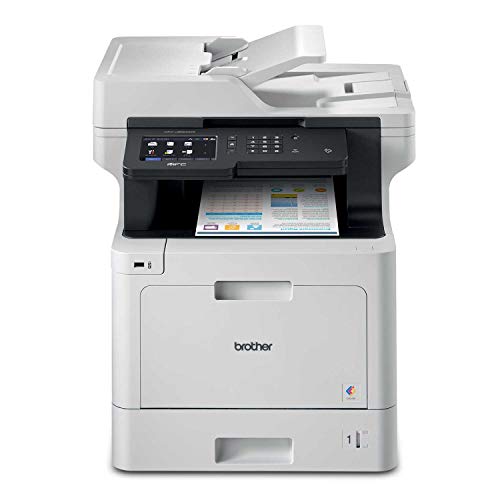
While not a traditional wide format printer, the Brother MFC-L8900CDW serves businesses with high-volume color laser printing, copying, scanning, and fax needs. Its 19.5-inch width and robust functionality make it a powerful all-in-one solution for standard document sizes.
It excels in environments requiring large print volumes with reliable color output but does not support wide format media rolls or large architectural prints like the specialized plotters above.
Buying Guide for Commercial Wide Format Printers
Choosing the right wide format printer demands careful consideration of several factors. Understanding these aspects will help you select the best device tailored to your specific printing requirements:
1. Media Size and Format Compatibility
Ensure the printer supports the maximum media width you require—commonly 24 or 36 inches for wide format. Check if the printer handles rolls, sheets, or both as different projects may require flexibility in media feeding.
2. Print Quality and Resolution
For technical drawings, precise line accuracy and crisp text are critical. For posters or marketing materials, vibrant color rendering and consistent saturation matter. Choose an inkjet model with a color gamut suited to your needs or a laser multifunction device for document-heavy tasks.
3. Speed and Efficiency
Commercial usage benefits from faster print speeds and features like automatic cutters, multi-sheet feeding, and simplified media loading. Consider the printer’s prints-per-minute rate, especially for large batch jobs.
4. Warranty and Support Services
Wide format printers are significant investments. Look for comprehensive onsite warranty options and responsive manufacturer or reseller support to minimize downtime and maintenance hassles.
5. Software Compatibility and Connectivity
Check that the printer interfaces smoothly with your design and CAD software, offering compatibility with common file formats. Network connectivity options such as Wi-Fi, Ethernet, and mobile printing capabilities also enhance usability in office environments.
6. Cost Considerations
Factor in not only the printer’s initial price but also the availability and cost of consumables like inks and media rolls. Efficient ink usage and bulk purchase options can reduce long-term expenses.
7. Footprint and Design
Consider the physical size and design of the printer in your workspace. Compact models offer ease of placement, while larger devices may require dedicated areas but often provide enhanced functionality.
By evaluating these perspectives, you can select a commercial wide format printer that aligns with your professional needs, delivering quality prints with reliability and efficiency.