Best Commercial Business Card Printer Machines for Professional Use
Choosing the right commercial business card printer machine is essential for any business looking to produce high-quality, professional cards efficiently. This article reviews the top printers available on Amazon that cater to different business needs, including dual-sided printing, software compatibility, and all-in-one packages. Below is a summary table of the selected products to help you compare key features at a glance.
| Product | Print Type | Included Supplies | Software Compatibility | Printing Speed |
|---|---|---|---|---|
| Bodno Magicard 400X | Dual-Sided Color | 300-print YMCKO Ribbon, Supplies Package | Windows, Mac | Not specified |
| Badgy100 Color Plastic Card Printer | Single-Sided Color | Not specified | Windows, Mac | 45 seconds per card |
| Cardholdir ID Easy Badges Solid 210 | Single-Sided Color | 250-print Ribbon, 200 PVC Cards | Windows, Mac | 300 full color cards/hour |
| AlphaCard Employee ID Card Printer System | Single-Sided Color | 100-print Ribbon, 100 PVC Cards | Windows | Low Volume Printing |
| Brother MFC-L8900CDW Color Laser Printer | Color Laser Printer (Multi-Function) | Not specific to business cards | Windows | High Volume |
Bodno Magicard 400X Dual Sided ID Card Printer with Supplies

The Bodno Magicard 400X is an all-inclusive printer ideal for businesses needing professional dual-sided ID and business card printing. It comes with a 300-print YMCKO ribbon and a comprehensive supplies package, so you are ready to print immediately. The printer supports vibrant full-color output, producing high-quality cards with ease. It works on both Windows and Mac operating systems, offering versatility for different users.
This printer is designed for dual-sided printing, allowing designs on both sides of the card without manual reinsertion, which increases efficiency for business card production. The package includes ID software to simplify card design and streamline the printing process.
Badgy100 Color Plastic Card Printer
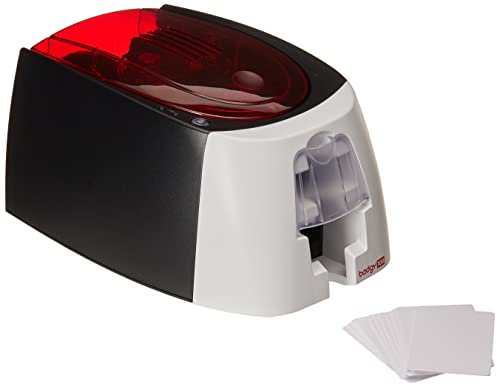
The Badgy100 is a compact and user-friendly printer that produces professional plastic cards suitable for business cards and badges. It offers near edge-to-edge printing with a minimal margin of 1.35mm, delivering sharp, vivid designs. A single card prints in approximately 45 seconds, making it a practical choice for small to medium volume needs.
This printer supports both Windows and Mac operating systems and includes ID design software, making setup and operation straightforward for both beginners and advanced users. It’s perfect for businesses that require quick, individual card prints with professional-quality results.
Cardholdir ID Easy Badges Solid 210 Printer with Software

The Cardholdir ID Easy Badges Solid 210 is a simple, hand-fed printer designed for single-sided employee and student ID cards. It comes with beginner-friendly Cardholdir ID software, a 250-print color ribbon, and 200 PVC cards, providing everything needed to print standard CR80 sized ID badges.
This machine prints at 300 dpi resolution, suitable for most organizational needs. Its manual feeding mechanism allows printing up to 300 full-color cards per hour. The provided software includes templates, eliminating the requirement for external graphic design resources, compatible with both PC and Mac.
AlphaCard Employee ID Card Printer System with Software and Supplies

The AlphaCard Employee ID Card Printer System includes the Magicard Pronto ID Printer paired with AlphaCard ID Suite software and supplies. This single-sided printer is designed for low volume use, ideal for small businesses or departments. Included are a 100-print color ribbon and 100 premium PVC cards for immediate use.
The hand-fed process requires manual reinsertion for double-sided printing, which may suit businesses with limited print runs. This system focuses on ease of use, comprehensive software for employee ID creation, and high-quality output for professional business cards and badges.
Brother MFC-L8900CDW Business Color Laser Printer
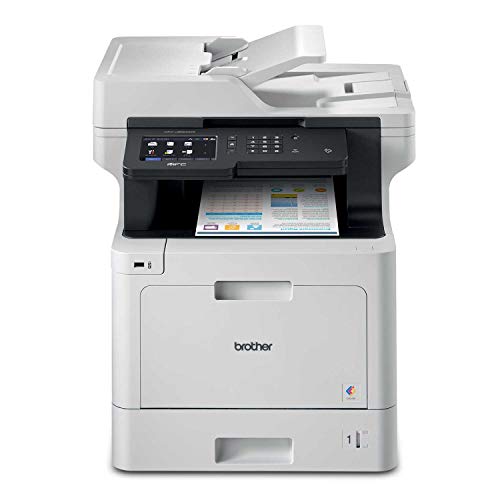
The Brother MFC-L8900CDW extends beyond traditional card printing as an all-in-one color laser printer designed for businesses requiring high volume print and copy solutions. While not specialized for printing business cards, it excels in producing color documents at a professional level.
Its multi-functionality includes scanning, copying, and faxing capabilities, making it a versatile option for businesses with broad operational printing needs. The printer offers a robust build, with dimensions suitable for an office setting and supports Amazon Dash Replenishment for automatic supply refills.
Buying Guide for Commercial Business Card Printers
When selecting a commercial business card printer machine, consider the following factors to match your business printing demands:
1. Printing Requirements
- Single vs. Dual-Sided Printing: Dual-sided printers save time and provide professional-quality cards with more design flexibility.
- Color vs. Monochrome: Full-color printers produce vibrant business cards and IDs, essential for branding.
2. Print Volume and Speed
- Evaluate your typical print volume to choose a printer designed for low to high printing capacities.
- Consider print speed, especially for high-volume scenarios, to maintain efficiency.
3. Included Software and Usability
- Software ease-of-use impacts workflow; look for solutions with templates and user-friendly interfaces that are compatible with your operating system.
- Compatibility with Windows and Mac ensures flexibility for different user environments.
4. Supplies and Maintenance
- Check if the printer package includes ribbons, cards, and other supplies needed to start printing immediately.
- Consider the cost and availability of consumables to manage long-term expenses.
5. Printer Size and Portability
- Compact printers fit better in limited workspace environments or mobile setups.
- All-in-one devices offer multifunctional use beyond card printing, which may be beneficial for some businesses.
By assessing these factors, businesses can select a business card printer that effectively balances quality, cost, and operational needs. The reviewed models offer options for various scales and functionalities, from high-quality dual-sided printing to versatile multi-purpose office printers.