Best Color Name Badge Printers for Professional and Efficient ID Printing
Finding the best color name badge printer is essential for organizations needing high-quality, durable, and customizable badges. Whether it’s for employee identification, students, events, or visitor management, choosing the right badge printer ensures efficient workflows and professional output. This guide reviews top products available on Amazon and provides a comparison table to help you decide.
| Product | Brand | Key Features |
|---|---|---|
| Cardholdir ID Easy Badges Solid 210 | Cardholdir ID | Single-sided, beginner-friendly software, 300 dpi, prints 400 cards with included supplies |
| Brother QL-800 High-Speed Label Printer | Brother | Highly versatile, prints black & red, 93 labels/min at 300 dpi, optimized for shipping & badges |
| Badgy100 Color Plastic Card Printer | Badgy | Fast 45-second color prints, near edge printing, easy for beginners & advanced users |
| ID Maker Card Edge 2-Sided Printer & Kit | ID Card Pros | Dual-sided printing, fraud protection overlays, includes software and supplies |
| Avery Flexible Printable Name Tags | Avery | Flexible removable stickers, printable on laser & inkjet printers, no curl or fall-off |
Cardholdir ID Easy Badges Solid 210 Printer

The Cardholdir ID Easy Badges Solid 210 is an all-in-one badge printer perfect for those new to ID printing. It comes with complete supplies — two 250-print full color ribbons and 400 PVC cards — so you can start producing single-sided employee or student ID badges immediately. Featuring 300 dpi print resolution with direct-to-card (DTC) technology, it covers nearly all organizational needs for quality print details.
The included Cardholdir ID Beginner Software offers ready-to-use templates, so no expensive design skills are needed. It supports both PC and Mac and allows manual feeding capable of printing up to 300 full color cards per hour, balancing accessibility and speed. This model is ideal for small to mid-size organizations focusing on straightforward, quality badge printing.
Brother QL-800 High-Speed Professional Label Printer

The Brother QL-800 stands out for its blazing speed in label production, printing up to 93 labels per minute with a sharp 300 dpi resolution. This professional thermal label printer supports dual-color printing in black and red, an excellent feature for emphasizing important information on name badges and shipping labels.
It’s designed for versatility, easily handling file folders, postage, and badges. The product includes genuine Brother DK pre-sized labels and connects via USB, simplifying setup and usage. Its fast and multi-purpose nature makes it highly suitable for businesses requiring efficient, eye-catching labels beyond basic badges.
Badgy100 Color Plastic Card Printer
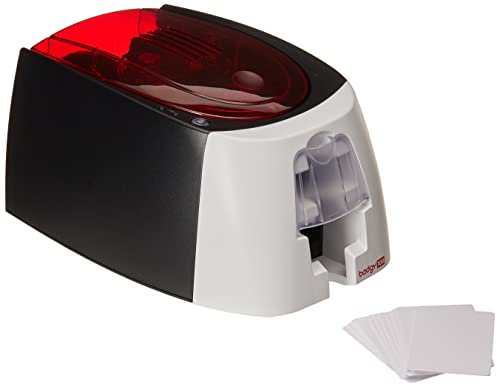
The Badgy100 offers professional-grade plastic ID printing with a user-friendly experience. Its embedded ID design software supports both Windows and Mac, enhancing design flexibility for various user levels. It produces a full-color badge in just 45 seconds thanks to fast printing technology.
Near-edge printing capability means it minimizes margins to 1.35mm, ensuring badges appear polished and complete. Its easy setup process suits both beginners and advanced professionals. Research shows it’s ideal for organizations valuing quick turnaround time with professional aesthetics.
ID Maker Card Edge 2-Sided Printer & Supply Kit

The ID Maker Card Edge printer features dual-sided printing—an advantage for organizations needing more badge information or security on both front and back. It ships with software designed with a drag-and-drop interface and includes 3 holographic overlay designs to enhance fraud protection.
This kit includes everything for quick startup: ID Maker Basic Software, 200-print full color YMCKO ribbon, and 100 blank PVC cards. However, it is not compatible with Macs, which is an important consideration. Its digital data shredding feature ensures sensitive employee information is deleted immediately after printing, emphasizing security.
Avery Flexible Printable Name Tags

The Avery Flexible Printable Name Tags provide a versatile solution when a badge printer isn’t practical. These self-adhesive, removable name badges are designed to bend with clothing—eliminating curling or detachment during wear. Ideal for conferences, classrooms, or casual events, they are compatible with both laser and inkjet printers for on-demand customization.
You can easily personalize these tags either by hand or with computer printing. They are an economical yet effective option for short-term use where laminated or plastic cards aren’t necessary. Their flexibility and adhesive strength make them a popular alternative in high-variability environments.
Buying Guide for Color Name Badge Printers
Choosing the best color name badge printer involves multiple key factors depending on your organizational needs:
Print Quality and Technology
- DPI resolution: Higher dpi (300+) ensures crisp images and clear text, especially important for detailed logos or photos.
- Printing technology: Direct to Card (DTC) printers produce vibrant, durable prints compared to sticker-based methods.
- Single vs. dual-sided printing: Dual-sided printers allow more information and security features on badges but may increase complexity and cost.
Ease of Use and Software
- Beginner-friendly software with templates can save design time and reduce the need for graphic designers.
- Compatibility with PC and Mac should match your existing hardware to avoid additional costs.
- Integrated label or card supplies included with a printer provide better value and immediate printing capability.
Speed and Volume
- Consider your printing volume to balance speed and cost efficiency — some printers provide rapid output for large batches.
- Manual feeding printers offer control but may slow down print times; automated feeders suit high-volume use.
Security Features
- Holographic overlays, data shredding, and fraud prevention protect against counterfeiting and data theft, crucial for sensitive work environments.
Budget Considerations
- Initial printer cost, ink/ribbon expenses, and card or label refill prices should be reviewed to ensure affordable maintenance.
- Flexible name tags can be cheaper alternatives when plastic cards or printers are not required.
Connectivity and Compatibility
- Check for USB, Ethernet, wireless, or Bluetooth options based on your workplace setup for hassle-free integration.
By thoroughly evaluating these aspects against your organizational demands, you can select a color name badge printer that delivers both high-quality results and operational efficiency.