Best Cheap Printers and Scanners for Home and Office Use
Finding a reliable and affordable all-in-one printer and scanner can be challenging with so many options on the market. This guide highlights some of the best inexpensive printers and scanners that offer excellent wireless connectivity, user-friendly features, and versatile printing capabilities perfect for both home and office settings.
| Product | Brand | Key Features |
|---|---|---|
| Canon PIXMA TR4720 | Canon | 4-in-1 wireless, auto document feeder, fax, easy ink replacement |
| HP OfficeJet Pro 8125e | HP | Color inkjet, duplex printing, fast print speed, large input tray |
| Canon PIXMA TS3720 | Canon | Print, copy, scan, fast setup, compact design |
| HP Envy 6155e | HP | Duplex printing, auto document feeder, touchscreen, color output |
| HP DeskJet 2755 | HP | Compact, wireless, compatible with multiple OS, mobile printing |
Canon PIXMA TR4720 All-in-One Wireless Printer

The Canon PIXMA TR4720 is a versatile 4-in-1 device offering printing, copying, scanning, and faxing capabilities designed for home use. It features wireless connectivity that enables easy printing from mobile devices. Its auto document feeder simplifies multi-page scanning and copying tasks.
This model has a power-efficient design consuming only 7W during operation, with minimal standby and off power use. Print speeds are competitive at approximately 8.8 ipm black and 4.4 ipm color. The straightforward ink cartridge replacement system complements its user-friendly nature.
HP OfficeJet Pro 8125e Wireless All-in-One Printer

The HP OfficeJet Pro 8125e excels in print quality and speed, printing up to 20 ppm black and 10 ppm color. It supports duplex printing and includes a 35-sheet auto document feeder, ideal for busy home offices or small businesses.
Its dual-band Wi-Fi is designed for reliable wireless connectivity, automatically resolving network issues. The 225-sheet input tray reduces the need for frequent paper refills, boosting efficiency. Extra features include mobile printing support and easy scanning and copying capabilities.
Canon PIXMA TS3720 Wireless All-in-One Printer

The Canon PIXMA TS3720 combines print, copy, and scan features in a compact frame suited for space-conscious users. It supports only single-sided printing but compensates with fast speeds—7.7 ipm black and 4 ipm color.
This model stands out for its easy setup process, allowing users to get started quickly. The wireless connection lets users print directly from smartphones or tablets, making it an accessible option for casual use or students.
HP Envy 6155e Wireless All-in-One Printer

The HP Envy 6155e is tailored for home users needing quality color printing, copying, and scanning with duplexing capabilities. It includes a 35-sheet auto document feeder and a 100-sheet input tray to accommodate various print jobs.
The intuitive 2.4″ color touchscreen simplifies navigation and settings adjustments. Print speeds reach up to 10 ppm black and 7 ppm color. Wireless connectivity supports printing from multiple devices, including smartphones.
HP DeskJet 2755 All-in-One Wireless Printer
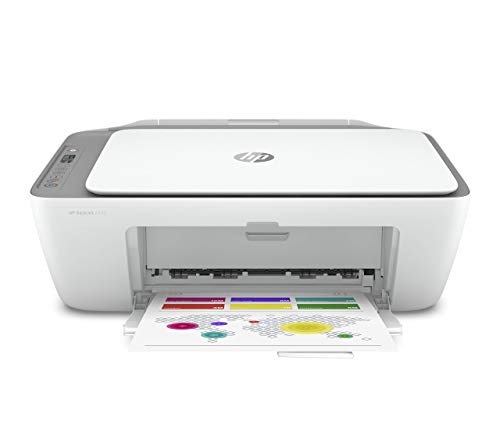
The HP DeskJet 2755 is a compact all-in-one printer suitable for light home office tasks. It supports wireless printing, scanning, and copying with a simple interface featuring an Icon LCD display and seven control buttons.
Compatible with a wide range of operating systems, it facilitates mobile printing via Apple AirPrint, HP Smart app, and other wireless protocols. Its versatility includes support for various media sizes such as letter, legal, and envelopes, making it well-rounded for everyday use.
Buying Guide for Cheap Printers and Scanners
Print Quality and Speed
Resolution and print speed depend on your typical printing needs. For documents, higher black-and-white print speeds (measured in pages per minute) improve efficiency. For photos or color documents, quality inkjet printers with precise color reproduction are preferred.
Functionality: All-in-One vs Single Function
Many affordable models offer multi-function capabilities: printing, scanning, copying, and sometimes faxing. Consider if you need duplex printing or an auto document feeder, which speeds up handling multi-page documents.
Connectivity Options
Wireless connectivity through Wi-Fi or Bluetooth enables convenient printing from smartphones, tablets, and computers. Some printers support dual-band Wi-Fi for improved stability and mobile printing protocols like Apple AirPrint or Mopria.
Ink and Operating Costs
Check if the printer uses standard ink cartridges or a subscription-based ink delivery system. Easy cartridge replacement and availability of affordable cartridges can reduce ongoing costs. Some models also support smart reorder features to prevent running out of ink.
Size and Design
A compact design is essential for small spaces, especially in home offices or student desks. Consider the physical footprint and placement flexibility when selecting your printer and scanner.
Ease of Use
A user-friendly interface with touchscreen controls or simple buttons can reduce setup and operational difficulties. Printers designed for quick out-of-the-box setup and intuitive controls offer a better user experience.
Additional Features
Look out for features like duplex printing, fax capability, or Alexa integration for voice commands, which can add value depending on your requirements.