Best Cheap ID Card Printers for Affordable Professional Badge Printing
Finding the best cheap ID card printer that balances cost, quality, and ease of use can be challenging. Whether you need employee badges, student IDs, or membership cards, an affordable printer with included supplies and user-friendly software is vital. Below is a summary of five highly rated ID card printers available on Amazon, offering great value and features tailored to beginners and small businesses alike.
| Product | Brand | Key Feature | Printing Type |
|---|---|---|---|
| Cardholdir ID Easy Badges Solid 210 | Cardholdir ID | Includes 200 PVC cards & beginner software | Single-Sided Direct to Card |
| Badgy100 Color Plastic Card Printer | Badgy | Prints color badges in 45 seconds | Single-Sided |
| Bodno Seaory S25 Single Sided ID Card Printer | Bodno | All-in-one with supplies & lifetime software license | Manual Feed Single-Sided |
| Bodno Magicard Pronto ID Card Printer | Bodno | Easy setup with 100 PVC cards included | Single-Sided |
| Bodno Magicard 400X Dual Sided ID Card Printer | Bodno | Dual-sided capable with 300 print ribbon | Dual-Sided |
Cardholdir ID Easy Badges Solid 210 Printer

This hand-fed single sided ID card printer comes with a full package including Cardholdir ID Beginner Software, 250 full color ribbon prints, and 200 standard CR80 PVC cards. It is designed for simplicity and efficiency with direct-to-card printing at 300 dpi, which meets the needs of most organizations. The manual feed system supports printing approximately 300 color cards per hour. It is compatible with both PC and Mac, making it accessible for a variety of users.
Badgy100 Color Plastic Card Printer
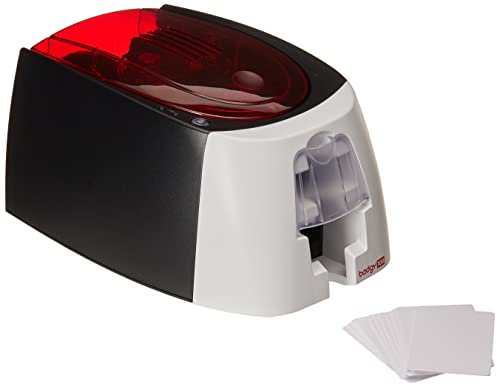
The Badgy100 offers professional-grade plastic ID printing with an easy-to-use ID design software compatible with both Windows and Mac. It produces full color badges in about 45 seconds and supports near edge printing with a 1.35mm margin, allowing for vibrant and detailed designs. This printer is ideal for users wanting quick setup and reliable output without complex technology requirements.
Bodno Seaory S25 Single Sided ID Card Printer

This all-inclusive ID card printer package is designed for low-volume, professional-grade printing. It features a manual feed system ideal for precise one-card-at-a-time printing. The package includes Seaory 11011 color ribbon for 100 prints and supplies, plus easy-to-use software with a lifetime license. The drag-and-drop design feature makes it suitable for beginners needing customized ID cards quickly and affordably.
Bodno Magicard Pronto ID Card Printer
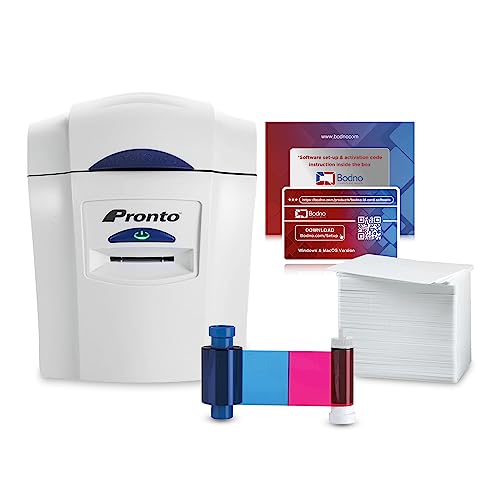
This package includes a Magicard Pronto printer with the MA100YMCKO color ribbon and 100 high-quality PVC cards. It is tailored for ease of use, giving users the ability to start printing durable photo or membership ID cards almost immediately. The included software and supplies make this an excellent choice for small businesses or organizations starting without prior experience in ID printing.
Bodno Magicard 400X Dual Sided ID Card Printer

The Magicard 400X stands out by offering dual-sided printing capability paired with a 300-print YMCKO ribbon, all included to begin producing vibrant, high-quality ID cards immediately. It supports both Windows and Mac systems, catering to users who want to create more comprehensive ID cards with front and back designs. This printer is a strong option for users who require more functionality within an affordable price range.
Buying Guide for Cheap ID Card Printers
When selecting a cheap ID card printer, several factors are essential to consider for the best balance between price and performance:
- Printing Technology: Direct to Card (DTC) printers offer clear images at 300 dpi, suitable for most identification needs. Consider whether single or dual-sided printing is required for your cards.
- Included Supplies: Look for packages that include ribbons, PVC cards, and software to avoid extra expenses and setup hassles.
- Software Compatibility and Usability: User-friendly software with ready templates can save time, especially for beginners. Compatibility with your operating system (Windows or Mac) is crucial.
- Print Speed: If printing large batches, faster printers with automatic feed are preferable. For low-volume or occasional use, manual feed printers can be cost-effective.
- Card Size and Quality: Most printers use CR80 (driver license size) cards. Ensure the cards are durable and compatible with your printer for professional results.
- Budget Considerations: While aiming for the cheapest option, balance initial cost with ongoing supply expenses and print quality.
Thoroughly evaluate your volume needs, design complexity, and budget to select the best cheap ID card printer that fits your requirements without compromising on essential features.