Best CD DVD Label Printers for Professional Media Organization
Organizing your CD and DVD collections has never been easier with the right CD DVD label printer or printable labels. Whether you are managing a media library, business files, or personal backups, selecting high-quality printable CD labels ensures a clean and professional appearance. Below is a summary table of the top products designed to meet your labeling needs with durable materials and compatibility with both inkjet and laser printers.
| Product Name | Brand | Labels Included | Printer Compatibility |
|---|---|---|---|
| Avery Printable CD Labels, Matte White, Inkjet | Avery | 40 CD & 80 Spine | Inkjet Printers |
| Avery Printable CD Labels, Permanent Adhesive, Laser Printable | Avery | 40 CD & 80 Spine | Laser Printers |
| Avery Printable Full-Face CD Labels, Matte White | Avery | 40 Disc & 80 Spine | Laser/Inkjet Compatible |
| CD/DVD Label Pack, Matte White, Inkjet & Laser | Blank Labels | 20 Disc & 40 Spine | Inkjet and Laser |
| Full-Face CD/DVD Labels & Spine Label, 200 Sets | Online Labels | 200 Disc & 200 Spine | Inkjet/Laser |
Avery Printable CD Labels, Matte White for Inkjet Printers

This pack offers 40 CD labels and 80 spine stickers with a matte white finish and permanent adhesive designed for inkjet printers. The labels provide a professional, polished appearance to your CDs, enhancing media presentation while offering large printable surfaces for customization. You can use Avery’s Design & Print Online tool for easy creation of personalized labels. Ideal for organizing music collections, data backups, or business media, these labels accurately categorize your library.
Avery Printable CD Labels, Matte White, Permanent Adhesive Laser Printable

Specifically designed for laser printers, this pack contains 40 blank CD labels and 80 blank spine stickers with a permanent adhesive and matte white finish. Perfect for organizing digital photo albums, music collections, or backups, it helps you achieve a clean and professional media presentation. Avery provides easy-to-follow instructions and templates via its online design tool, so customization and application are straightforward and result in professional-grade labels every time.
Avery Printable Full-Face CD Labels, Matte White, Laser & Inkjet Printable

Offering an extended print area, these full-face labels cover the entire disc surface for a sleek, professional look. Compatible with both laser and inkjet printers, the pack contains 40 disc and 80 spine labels with permanent adhesive and a matte finish. This product is perfect for projects that require a more prominent label presence and clean design. Avery’s online design platform includes templates and tools suitable for customizing labels efficiently.
CD/DVD Label Pack, Matte White, Compatible with Inkjet and Laser
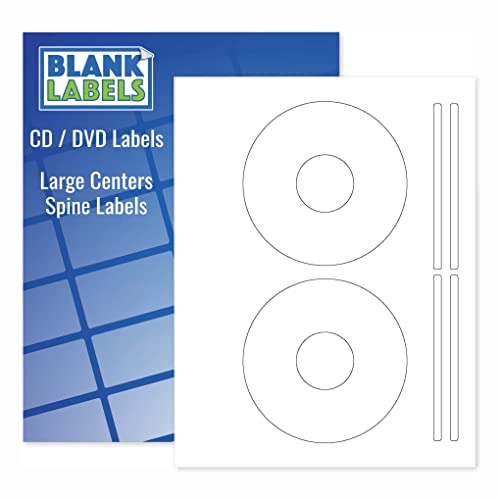
Manufactured in the USA, this set includes 20 disc and 40 spine labels with a matte white finish guaranteed not to smear or smudge. Compatible with inkjet and laser printers, these labels feature permanent adhesive designed specifically for CD and DVD surfaces. The easy-to-peel sheets offer consistent sticking power and are suitable for other substrates including paper, glass, and metal. Ideal for custom text, images, and reliable labeling of CDs and DVDs.
Full-Face CD/DVD Labels & Spine Label Pack – 200 Sets

This pack features 200 sets containing disc and spine labels, compatible with both inkjet and laser printers. The matte white labels come on 100 sheets and feature a permanent adhesive designed to withstand smudging and yellowing over time. Built with a 17mm center hole, they fit perfectly on most discs. The purchase includes online software activation for designing labels, making it easier to create professional and customized results. Labels are delivered in a protective container that doubles as storage.
Buying Guide for CD DVD Label Printers and Printable Labels
When selecting the best CD DVD label printer or printable labels, consider the following factors:
Printer Compatibility
- Inkjet vs. Laser Printer Compatibility: Verify if the labels are designed specifically for inkjet, laser, or both printer types to ensure print quality and adhesion.
Label Finish and Adhesive
- Matte vs. Glossy Finish: Matte labels reduce glare for easier readability, while glossy labels offer a shiny look but may smudge on some printers.
- Permanent Adhesive: Ensure the adhesive is strong enough to withstand handling and storage without peeling or fading.
Label Size and Coverage
- Standard vs. Full-Face Labels: Full-face labels cover the entire disc surface, providing more design space and a professional look compared to standard circle labels.
Quantity and Value
- Consider how many labels come per pack and whether they include spine labels for cases, which is helpful for organizing larger collections.
Customization Tools
- Online Design Software: Some brands offer free, easy-to-use online tools with templates that streamline label creation and personalization.
Durability and Quality
- Look for labels that resist smearing, smudging, and yellowing over time, especially if the discs will be frequently handled or stored long-term.