Best Cd and DVD Printers and Printable Labels for Professional Disc Labeling
Creating professional-quality labels for your CDs and DVDs is essential for organizing collections or making media projects stand out. Whether you prefer using a dedicated disc printer or printable adhesive labels, this guide highlights top products that simplify disc labeling. Below is a summary table of selected items covering both printing hardware and printable label options.
| Product | Brand | Type | Main Feature |
|---|---|---|---|
| Epson Discproducer PP-100III | Epson | Disc Printer | Automated CD/DVD/Blu-ray disc printing and duplication |
| Amicool External DVD Drive USB 3.0 | Amicool | External Burner Drive | Portable CD/DVD burner with USB 3.0 and Type-C support |
| Avery Printable Full-Face CD Labels (8960) | Avery | Printable Labels | Full-face matte white adhesive labels with permanent adhesive |
| Avery Printable CD Labels Matte White (8692) | Avery | Printable Labels | Matte white labels designed for inkjet printers with spine labels |
| CD/DVD Label 20 Disc & 40 Spine Labels | Blank Labels | Printable Labels | Matte white permanent adhesive labels compatible with inkjet and laser printers |
Epson Discproducer PP-100III Disc Publisher and Printer
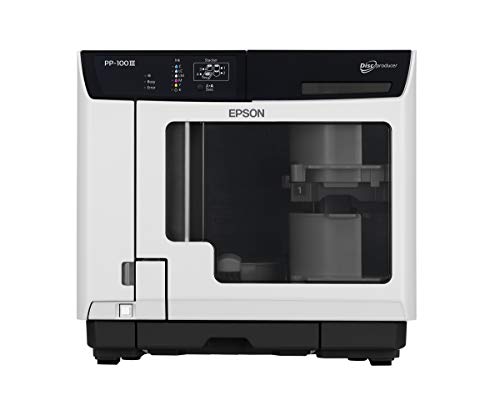
The Epson Discproducer PP-100III is a high-efficiency, unattended CD, DVD, and Blu-ray disc printer designed for volume duplication and sharp disc printing. It can hold up to 100 discs, automating the entire process of printing and replication.
Its key feature is the patented MicroPiezo technology, which delivers high-quality, detailed text and vibrant graphics. Economical and easy to maintain, it uses six high-capacity ink cartridges with low ink sensors, plus a replaceable waste tank. Epson’s reliable service support provides added confidence in its durability.
Amicool External DVD Drive USB 3.0 CD/DVD Burner
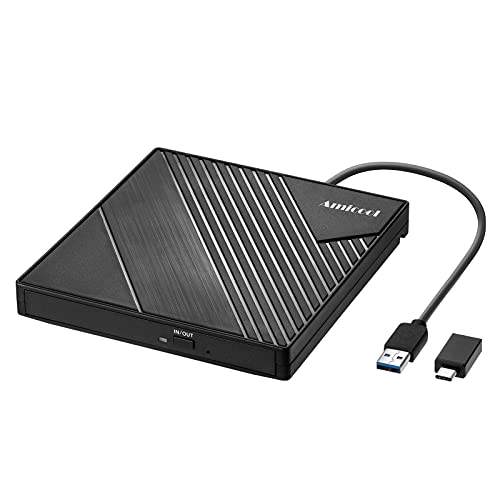
The Amicool External DVD Drive is a compact USB 3.0 and Type-C compatible optical drive that supports CD and DVD burning, rewriting, and reading. Its plug-and-play design requires no external drivers or power supply, making it ideal for laptops or desktops without built-in drives.
It offers fast read and write speeds—up to 8x for DVDs and 24x for CDs. Compatible with Windows, Mac, and Linux systems, the device plays music and videos smoothly. This versatile external burner is perfect for occasional disc burning and media playback.
Avery Printable Full-Face CD Labels, Matte White (8960)

Avery’s Full-Face CD Labels come with a matte white finish and permanent adhesive to create professional-looking full-disc labels for CDs and DVDs. The extended print area covers the entire disc face, providing a clean and polished appearance for organizing digital albums and media projects.
Users can easily customize the labels with Avery Design & Print software, which provides templates and design tools for professional results. These labels are compatible with both laser and inkjet printers, making them a convenient solution for personalized disc labeling.
Avery Printable CD Labels, Matte White, Inkjet Printer (8692)

This Avery CD label pack includes 40 full disc labels and 80 spine labels with a permanent adhesive and a matte white finish. Designed specifically for inkjet printers, these labels provide a professional look that enhances the presentation of your discs.
The package supports instant organization by enabling users to label discs clearly. Avery’s design software ensures easy customization, enabling tailored designs to match your media’s purpose or theme.
CD/DVD Label Pack – 20 Disc & 40 Spine Labels, Matte White
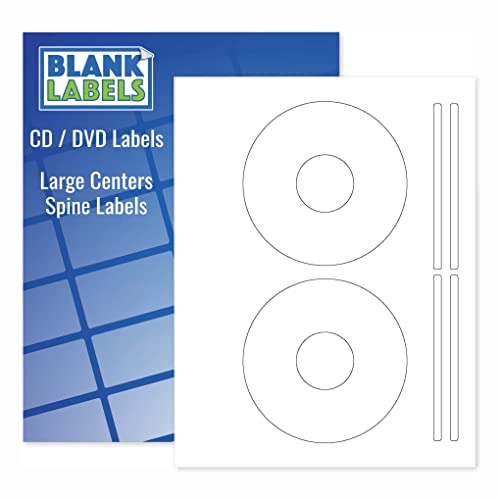
These Blank Labels are proudly made in the USA and feature a matte white finish that resists smearing and smudging. Tailored for CD and DVD labeling, each sheet includes two large disc labels plus spine labels for clear identification.
They are compatible with both inkjet and laser printers, offering flexibility. The permanent adhesive ensures that labels stick reliably, making them suitable for important media collections or business files.
Buying Guide For Cd And Dvd Printers And Printable Labels
Choosing the right CD and DVD printing solution depends on your needs, budget, and desired outcome. Here are key factors to consider:
Printer vs. Printable Labels
- Disc Printer: Ideal for high-volume, professional use with automated disc handling and high print quality. Devices like the Epson Discproducer are best for businesses or serious hobbyists requiring consistent results.
- Printable Labels: Suitable for occasional use or smaller projects. Labels from brands like Avery offer cost-effective customization with minimal equipment.
Compatibility
- Verify compatibility with your printer type (inkjet, laser) for labels.
- For disc printers or external drives, confirm operating system support including Windows, Mac, and Linux.
Print Quality and Design Options
- Look for printers with advanced technology (e.g., MicroPiezo) for sharp graphics and text.
- Design software availability such as Avery Design & Print or bundled tools enhances customization ease and quality.
Convenience and Speed
- External DVD burners should offer plug-and-play setup and fast read/write speeds for efficient disc creation.
- Disc printers with automation reduce manual handling and accelerate production.
Durability and Adhesion
- For labels, ensure permanent adhesive that resists peeling during handling or playback.
- Printed discs should have water-resistant and abrasion-resistant ink to maintain longevity.
Purpose and Volume
- Casual users or small projects may find labels sufficient.
- Professionals who manage large disc libraries or media duplications benefit from dedicated disc printers.