Best Printable Business Cards for Home and Office Printers
Creating professional business cards at home or office is easier with the right printable business card paper. Whether using an inkjet or laser printer, choosing high-quality cardstock ensures crisp prints and clean edges, enhancing your brand image. Below is a comparison table summarizing five top-rated printable business cards specially designed for printer compatibility, durability, and ease of use.
| Product | Brand | Card Size | Quantity | Special Features |
|---|---|---|---|---|
| Avery Printable Business Cards with Sure Feed Technology (Inkjet) | Avery | 2″ x 3.5″ | 100 cards | Sure Feed Technology, smooth clean edges |
| Avery Printable Business Cards with Sure Feed Technology (Laser) | Avery | 2″ x 3.5″ | 250 cards | Sure Feed Technology, multiple precise cuts |
| Thick Business Cards 500 Printable, Matte White | XXINMOH | 3.5″ x 2″ | 500 cards | 250gsm cardstock, double-sided printing |
| Blank Business Card Paper 100 Sheets (1000 Cards) | BEST PAPER GREETINGS | 3.5″ x 2″ | 1000 cards | Pre-scored perforations, multi-purpose |
| Avery Clean Edge Printable Business Cards (Inkjet) | Avery | 2″ x 3.5″ | 90 cards | Clean Edge Technology, optimized for inkjet printers |
Avery Printable Business Cards with Sure Feed Technology for Inkjet Printers

This set of Avery printable business cards is crafted from high-quality white cardstock measuring 2″ x 3.5″. Designed specifically for inkjet printers, the cards feature Sure Feed Technology which helps prevent misalignments and printer jams, ensuring every detail is sharply printed. The cards have smooth, clean edges owing to precise multiple cuts, making separation effortless while maintaining a professional look. Its thickness and texture provide a sturdy feel right out of the printer, perfect for those needing customizable, professional business cards with reliable print results.
Avery Printable Business Cards with Sure Feed Technology for Laser Printers
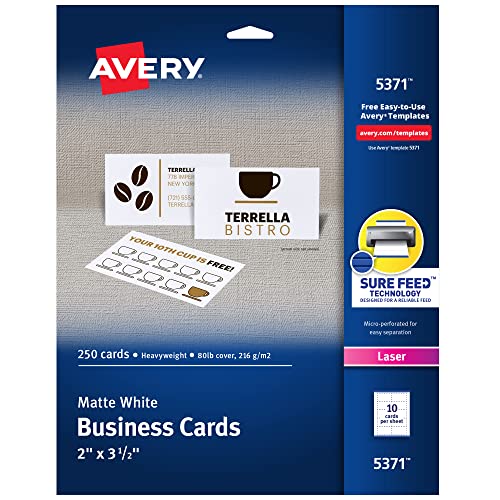
These 250 blank business cards by Avery are designed for laser printers and measure 2″ x 3.5″. Using the proprietary Sure Feed technology, this cardstock offers precise feeding through the printer to minimize jams and print misalignments. Multiple precise cuts result in smooth edges around each card, promoting a clean, professional appearance. Free templates from Avery’s website make custom designs straightforward, whether creating business cards, loyalty cards, or event RSVP cards, adding to this product’s versatility.
Thick Business Cards 500 Printable Matte White 250gsm Cardstock

This comprehensive set from XXINMOH provides 500 thick business cards in the standard size of 3.5″ x 2″. Printed on premium 250gsm matte white cardstock, these cards are compatible with both inkjet and laser printers, offering double-sided printing capability for added customization. Additionally, the package includes 50 perforated printable sheets sized 8.5″ x 11″ for easy and clean separation after printing. Perfect for professionals seeking versatile, heavyweight cards that deliver a lasting impression.
Blank Business Card Paper 100 Sheets for Inkjet and Laser Printers

Best Paper Greetings offers a large pack of 100 sheets of blank business card paper that yield 1000 cards at a 3.5″ x 2″ size. The cards are pre-scored with perforations for quick and clean separation after printing. These cards support both inkjet and laser printers, expanding usability. They are designed for various purposes including professional business cards, thank-you notes, and creative projects. The acid-free paper ensures longevity for your prints and consistent quality with vivid graphics and typography.
Avery Clean Edge Printable Business Cards for Inkjet Printers

Avery presents its Clean Edge printable business cards specifically optimized for inkjet printers. The package contains 90 cards sized 2″ x 3.5″. This premium cardstock stands out by featuring Clean Edge® technology, which allows cards to snap apart easily, leaving behind the smoothest and cleanest edges among printable business cards. The cards also support double-sided printing with guaranteed jam and smudge-free performance, making them suitable for adding crisp, professional text and vibrant images.
Buying Guide: Choosing the Best Printable Business Cards for Your Printer
Selecting the ideal printable business cards depends on multiple important factors. Below are key points to consider ensuring your printed cards look professional and meet your business needs:
- Printer Compatibility: Verify that the business card paper is compatible with your printer type—laser, inkjet, or both. Some cardstocks are optimized specifically for one type to prevent jams and guarantee clear printing.
- Cardstock Weight and Thickness: Heavier cardstock (usually 200-250gsm or more) gives a premium feel and durability. Too thin cards may feel cheap and professional contacts might discard them easily.
- Surface Finish: Matte, glossy, or uncoated surfaces affect the card’s look and printing quality. Matte cards reduce glare and tend to produce sharper images, while glossy finishes can enhance colors but may smudge with some printers.
- Sheet Size and Perforations: Standard business cards are 3.5″ x 2″. Check if sheets have pre-cut or perforated outlines to simplify separating cards after printing. Perforated sheets enable neat edges with minimal effort.
- Quantity and Cost Efficiency: Consider how many cards you need regularly. Buying larger quantity packs saves cost but ensure you will use them before paper quality degrades.
- Customization Options: Availability of templates and compatibility with design software or apps (such as Avery Design & Print) can simplify creating unique layouts, logos, and personal details.
- Edge Quality: Products using technologies like Avery’s Sure Feed or Clean Edge offer smoother, professional edges that boost presentation and handling ease.
- Double-Sided Printing: If you want to include information on both sides, ensure the paper is suitable and your printer supports two-sided printing without smearing.
Review these considerations based on your business branding goals, printing technology, and volume needs to select the best printable business cards that project professionalism and quality.